Integrating your website with a real estate CRM: Sperant and alternatives
At almost every real estate developer we work with, the lead takes the same absurd journey: it comes in through the website form, lands as an email in an inbox, someone reads it, and someone types it again by hand into the CRM the sales agents use. Between the visitor clicking "submit" and the first contact, hours go by, sometimes a whole day, and along the way data gets lost and records get duplicated.
The integration fixes that: the form creates the lead directly in the CRM, with its channel, source and project. Here's how we did it on the website for Proyecto Domus, the apartment project by real estate developer Bastión in Pueblo Libre, what it took and what you should ask for before you commission one.
What changes when the form writes to the CRM
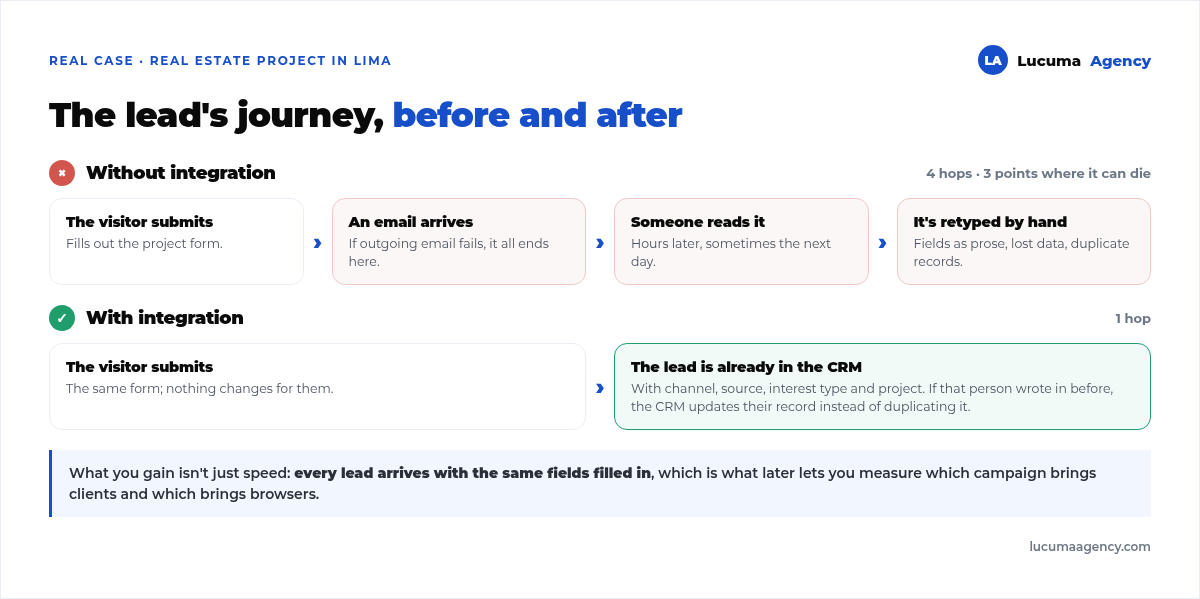
Without integration, the lead's journey has four hops and three places where it can die: the email doesn't go out, nobody reads it in time, it gets transcribed wrong. With integration, there's just one step.
What you gain isn't just speed. It's that every lead arrives with the same fields filled in: entry channel, source, type of interest, project. That's exactly what later lets you measure which campaign brings in buyers and which one brings in the merely curious, a conversation you can't have when the data arrives as prose inside an email.
And there's a third, less obvious benefit: the CRM detects duplicates. If the same person writes in again from another campaign, no new lead is created; the existing one is updated. Doing that by hand, through transcription, is impossible.
How it works under the hood
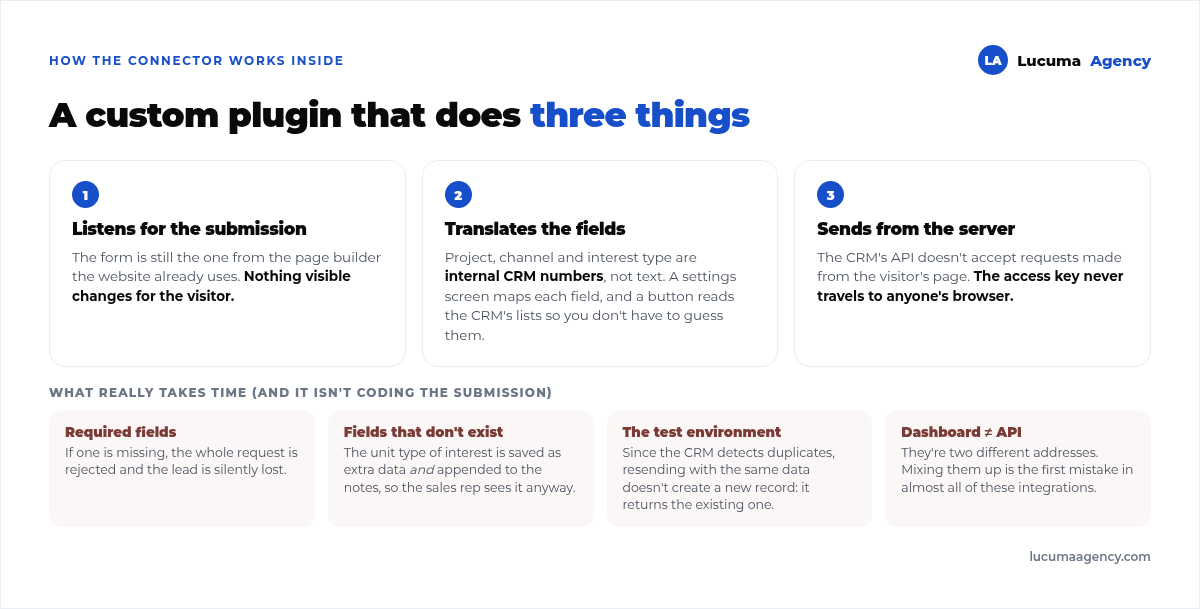
The connector is our own WordPress plugin that does three things:
1. It listens for the form submission. The form is still the one from the builder the website already uses; nothing changes for the visitor.
2. It translates the fields. This is the boring part, and the one that takes the time. The form calls something "phone" that the CRM calls something else; the project, the channel and the type of interest are internal CRM numbers, not text. The plugin has a settings screen where each field is mapped, plus a button that pulls the CRM's lists of channels, sources and units so nobody has to guess them.
3. It sends from the server, not from the browser. A technical detail with consequences: for security reasons, the CRM's API doesn't accept requests made from the visitor's page. The server has to make the call. That also means the access key never travels to anyone's browser.
What really takes time
It's not coding the submission. It's everything else:
- Required fields. If one of the fields the CRM requires is missing, the whole request is rejected and the lead is silently lost. You have to identify them and give them a default value.
- Fields the CRM doesn't have. The unit type of interest ("3 rooms, 7th floor") doesn't always exist as a field. Our solution was twofold: store it as additional data and append it to the notes text, so the sales agent sees it no matter what, even if the field isn't set up in their dashboard.
- The test environment. Working against the live account fills the client's dashboard with fake leads. And there's a detail that takes a while to learn: since the CRM detects duplicates, resending a test with the same data doesn't create a new record; it returns the existing one. To test for real, you have to change the ID number, email and phone on every attempt.
- Confusing the dashboard with the API. They're two different addresses, and the one you log into to see leads isn't the one that receives the data. It's the first mistake in almost every integration of this kind.
Sperant and the alternatives, honestly
Sperant is the most widely used CRM among the Peruvian real estate developers we work with, which is why it's the one we build the most integrations for. That's not a recommendation, just an observation. The choice of CRM belongs to the client and depends on how their sales team works.
What we do recommend is choosing it for its API as much as for its dashboard. A beautiful CRM that can't be connected condemns you to manual transcription forever, and that costs more than any license.
Three questions worth asking any vendor before you sign:
- Do you have public documentation for your API? If the answer is "we'll send it to you," the project will take three times as long.
- Can leads be created and lists (projects, channels, units) be queried from outside? Creating leads without being able to read the lists forces you to hard-code numbers that later change.
- Is there a test environment? If there isn't, every test clutters the sales team's dashboard.
We offer this integration as a service: website integration with Sperant. With other CRMs the work follows the same pattern; only the field mapping changes.
What to verify before signing off on the integration
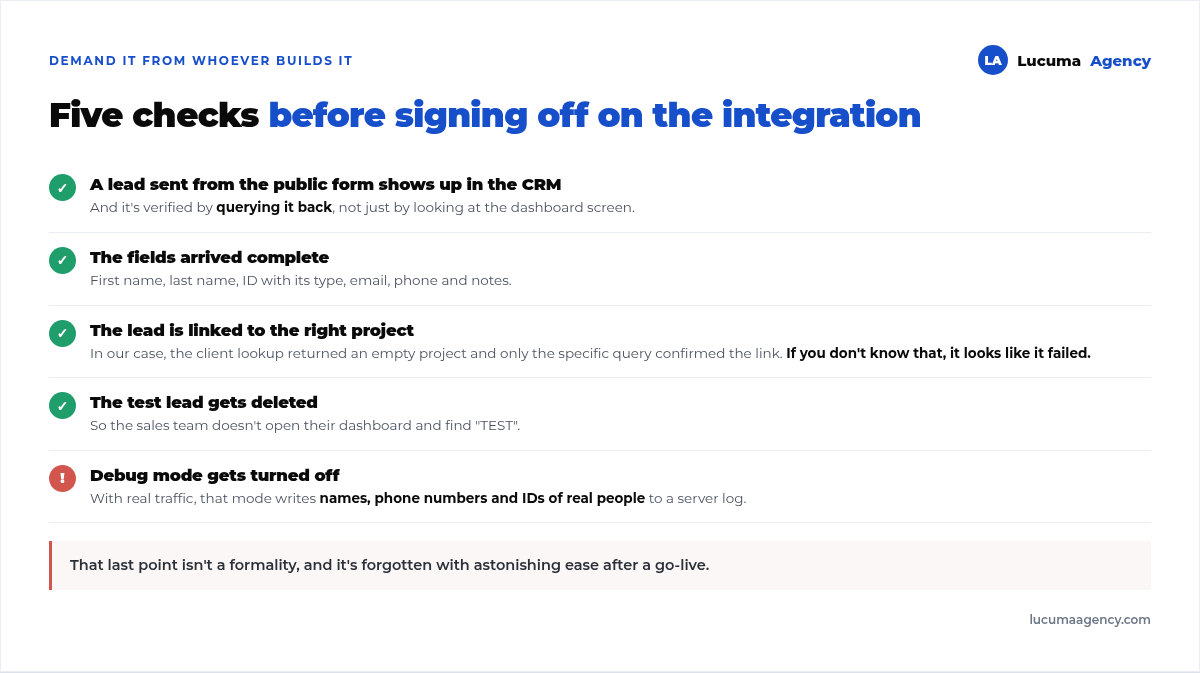
Our final check, and we recommend demanding it from whoever builds yours:
- A lead sent from the public form shows up in the CRM dashboard, and it's also confirmed by querying it back, not just by looking at the screen.
- The fields arrived complete: first name, last name, ID number with its type, email, phone, notes.
- The lead is linked to the right project. In our case, the client lookup returned an empty project, and only the project-specific query confirmed the link. If you don't know that, it looks like it failed.
- The test lead is deleted.
- Debug mode is turned off. Important: with real traffic, that mode writes visitors' personal data to a server log.
That last point isn't a formality. A log with the names, phone numbers and ID numbers of real people is exactly what you don't want to leave switched on, and it's astonishingly easy to forget after a launch.
Frequently asked questions about integrating your website with a CRM
How long does an integration like this take?
The sending part itself takes days. What sets the timeline is the other side: getting access, understanding the CRM's documentation and finding out which fields are required. With clear documentation and a test environment, a couple of weeks; without them, twice that.
Will it make my form slower?
Practically not at all: the data is sent to the CRM on the server while the visitor sees their confirmation message. What you do need to decide is what happens if the CRM doesn't respond, and the right answer is that the lead is still saved on the website and retried, never that the visitor sees an error.
What if the CRM goes down?
That's why the form should always save the submission on the website itself, in addition to sending it to the CRM. It's the same logic we explain in when your form submissions don't arrive: the external system notifies, your database keeps the record.
Does it help measure campaigns?
Yes, and it's the best reason to do it. If every lead comes in with its source and channel, you can match ad spend against truly qualified leads, not against submitted forms. It's the foundation of what we do in real estate marketing.
Do I need a CRM if I only have one project?
With one project and a few leads a month, a shared spreadsheet used with discipline works. A CRM pays off once you have several sales agents, because the problem is no longer storing the lead but assigning it and knowing who is handling it.
Conclusion
Integrating your website with your CRM removes the weakest link in real estate lead generation: the person copying by hand what came in by email. The technical part is predictable; what sets the timeline is the CRM's documentation and the discipline in mapping fields. And before you sign off on it, demand the full verification, including turning off debug mode.
In Lucuma Agency, digital marketing agency in Lima, we build the website and the connector together, so every lead reaches the sales agent complete from day one. If you have a project in presale and your leads still go through an email inbox, check out web design for real estate developers or book a free consultation and we'll review your lead flow in 30 minutes.
Other posts you might like
At almost every real estate developer we work with, the lead takes the same absurd trip: it comes in through the form...
Switching servers is scary for a sensible reason: you rarely do it, and when it goes wrong, it goes wrong in public....
The question always comes the same way: “which payment gateway do you recommend?” And the useful answer doesn't start with a name, because the...
There's a moment, in quite a few projects, when the search for the right plugin becomes the problem. You tried three,...
Almost every online complaints book we audit complies on the outside and fails on the inside. They have the notice,...
The message came in like this: “the complaints book is throwing an error.” The Proba Inmobiliaria website, a page required by law,...
“Top 50 plugins” lists don't help you decide. They help you install fifty plugins. This is ours,...
Almost every business we ask has backups. Almost none has ever restored one. Those two sentences together are...
Almost every hosting conversation starts with price and ends up in the wrong place. The useful question is...
When a business wants to sell outside its country, the conversation almost always starts off wrong: with translation. And the...
Structured data is the piece of code that explains to Google, in a language that leaves no room for interpretation,...
The question comes up in almost every meeting: “if I use AI to write, will Google penalize me?” The short answer...