Form emails not arriving: how we fixed WordPress outgoing mail
The alert came in like this: “the complaints book is throwing an error.” The Proba Inmobiliaria website, a page required by law, and a form that showed a generic error when submitted. The visitor filled everything in, hit send and got a red message with no explanation. The cause wasn't in the form, and it's the same one that breaks thousands of forms in Peru every day.
The diagnosis: the form was working
The first step was to stop looking at the form and look at what the server was returning. Submitting from the terminal, the response was clear: the submission was failing at the email action, not in validation or in the fields.
In other words, the form received the data, validated it, built the message and, when it asked WordPress to send it, WordPress said no. And since the only action configured was “send an email,” any email failure broke the entire submission.
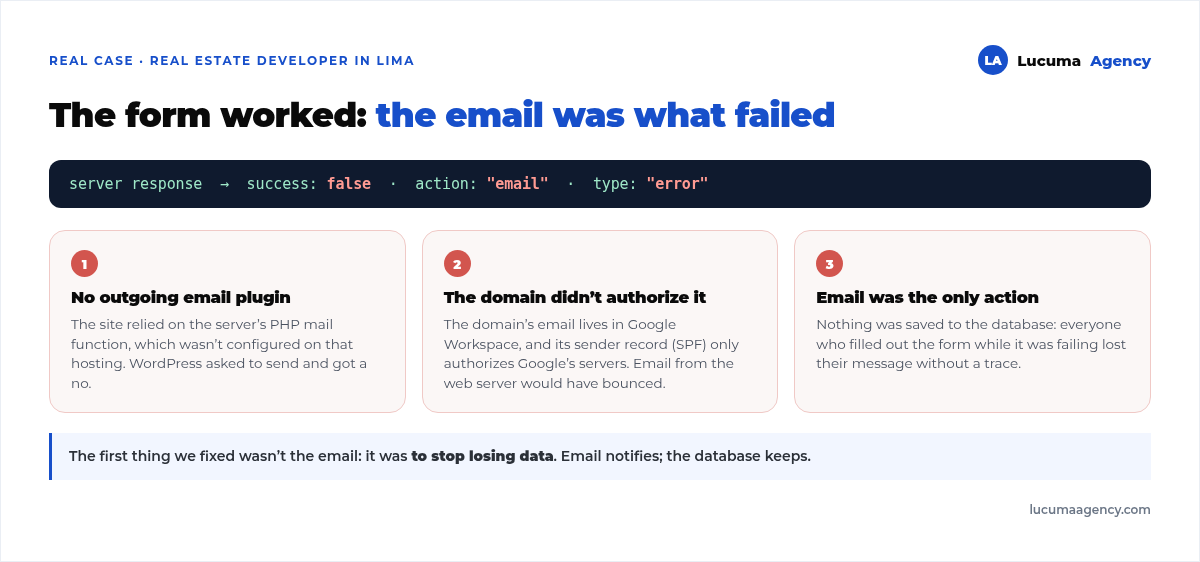
Underneath were three chained problems:
1. There was no outgoing email plugin. The site relied on the server's PHP mail function, which wasn't configured on that hosting. WordPress tried to send and got a no.
2. Even if it had sent, it would have bounced. The domain uses Google Workspace for its email. Its sender authorization record states, word for word, that only Google's servers can send email on behalf of that domain. An email sent from the web server would have gone straight to spam or been rejected.
3. The form wasn't saving anything. This is what turns a problem into a disaster: for as long as it was failing, every person who filled out the form lost their message. There wasn't a trace of it in the database.
The first thing we did wasn't fixing the email
It was to stop losing data. We turned on saving submissions to the database and added it as a form action, alongside the email one. From that moment on, every submission is recorded and can be viewed and exported from the dashboard, even if email fails.
For a complaints book that isn't a convenience, it's an obligation: the forms have to be kept. But the logic applies to any business form. Email is a notification, not a record-keeping system. What else Indecopi requires, besides keeping every form, is covered in the guide to the virtual complaints book in WordPress. If your only copy of a lead is an email in an inbox, you've already lost leads and you don't know it.
With that in place, the server's response was correct again and visitors stopped seeing the error. Then came the email.
How to fix outgoing email, in order
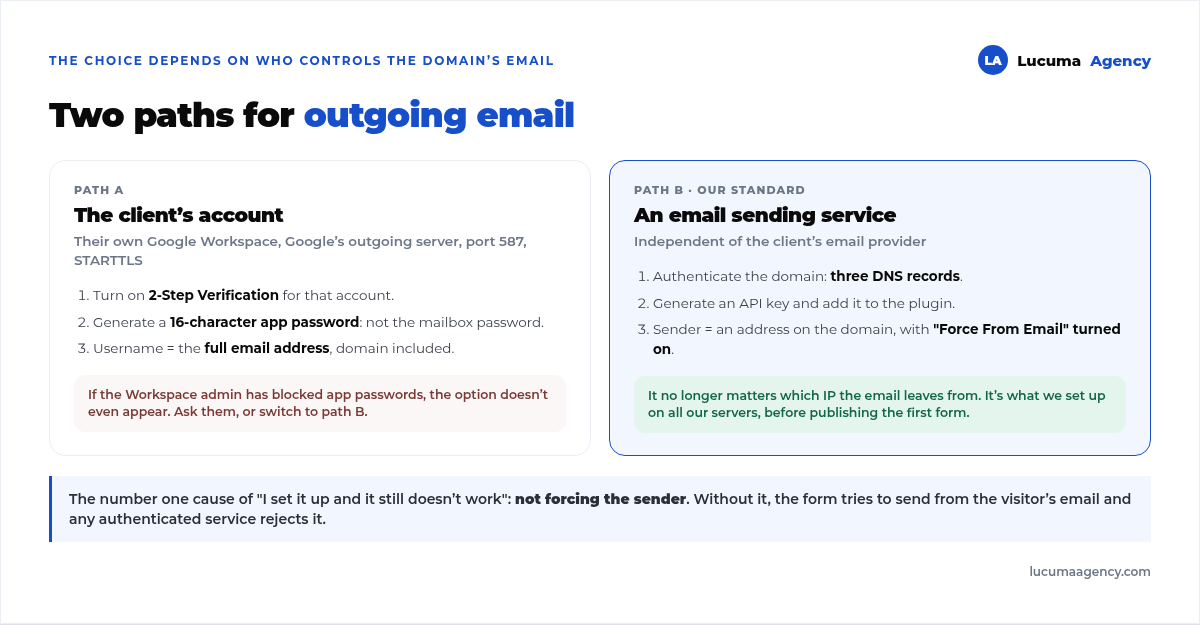
There are two routes, and the choice depends on who controls the domain's email.
Route A: the client's own Google Workspace account. You install an outgoing email plugin and configure it with Google's outgoing server, port 587 and STARTTLS encryption. Two details make this fail for almost everyone:
- The password isn't the mailbox password: it's a 16-letter app password generated separately, which requires two-step verification to be turned on for that account. Using the regular password always returns a credentials error.
- The username has to be the full email address, domain included.
And a roadblock that's out of your hands: if the client's Workspace admin has app passwords disabled, the option doesn't even show up. Then you have to ask them for it or switch to route B.
Route B: an external sending service. You authenticate the domain with the provider (three DNS records), generate a key and configure the plugin with it. It's the route we use by default when we don't control the client's email, and the one we recommend on all our servers. The advantage is that it no longer matters which IP the email comes from.
Two mistakes that cost you an afternoon
Using an agency email address as the sending account. It works in testing and it's a disaster in production: the provider rewrites the sender, the client's complaints go out “from” the agency, and consumers' replies land in the wrong inbox.
Not forcing the sender. If that option isn't turned on, forms try to send using the visitor's own email as the sender. No authenticated service allows that, because it's exactly what spoofing does, so it rejects the message. In our experience, this is the number one cause of “I set it up and it still doesn't work.”
The final check almost nobody does
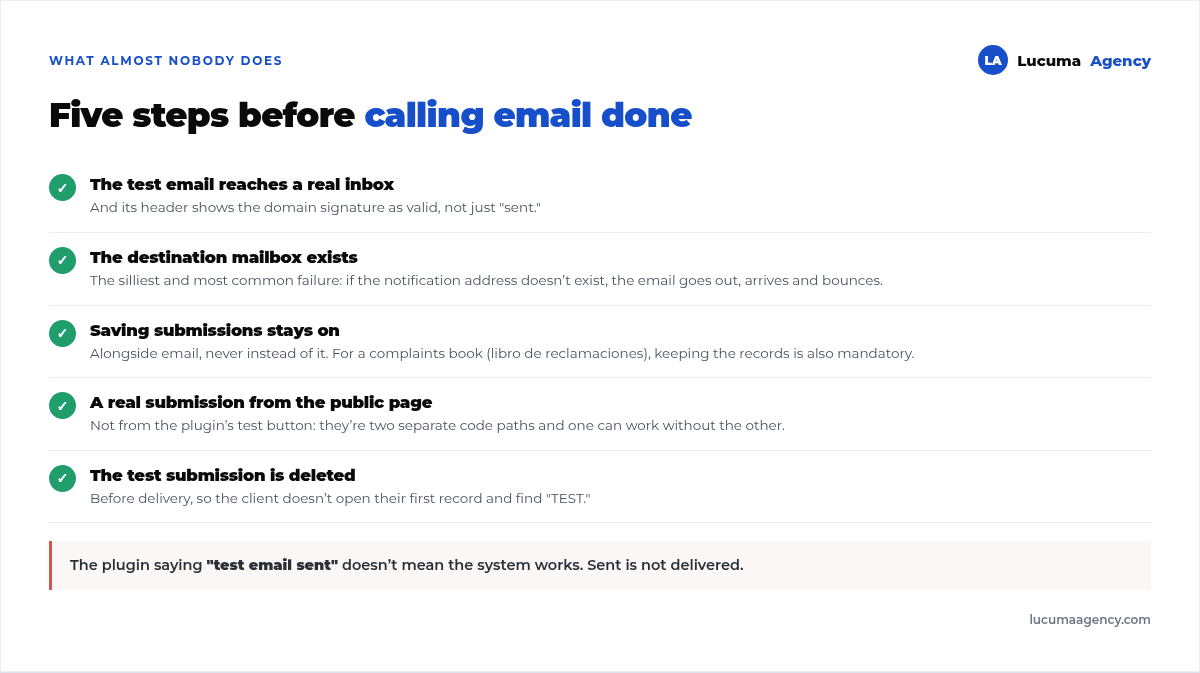
The plugin saying “test email sent” doesn't mean the system works. Our wrap-up is five steps:
- The plugin's test email arrives in a real inbox, and its header shows the domain signature as valid.
- The destination mailbox exists. Sounds obvious; it's the dumbest and most frequent failure. If the notification address hasn't been created in Workspace, the email goes out, arrives and bounces.
- Submission saving stays on, alongside email, not instead of it.
- A real submission from the public form, not from the plugin's test button. They're two different paths in the code.
- Delete the test submission from the database.
Why this happens so often in Peru
Because of a very common combination: the domain's email is on Google Workspace and the website is on hosting with Plesk or cPanel. Two different providers for two things the visitor sees as one. The web server has no permission to send on behalf of the domain, and nobody finds out until an important form stops arriving, often weeks later.
It's also why, on every server we set up, the site's email goes through an external service from day one, before a single form is published. It's part of what's included in the website maintenance, along with everything else we describe in WordPress maintenance.
Frequently asked questions about WordPress email
Why isn't WordPress sending emails?
Almost always for one of two reasons: the server doesn't have its mail function configured, or the domain's email is hosted with another provider and its authorization record rejects messages sent from the web server. Both are solved with an authenticated outgoing email plugin.
What is an app password and why do I need one?
It's a 16-letter key generated specifically so a program can access your email account without being given your real password. Google and most providers no longer accept the mailbox password for this kind of connection. It requires two-step verification to be turned on.
Do my form submissions get lost if email fails?
If email is the only action configured, yes, and without a trace. That's why the first thing we always turn on is saving submissions to the database. Email notifies; the database keeps the record.
Can I use my personal Gmail to send the website's emails?
Technically yes, but you shouldn't: the emails will go out from your personal address, replies will land there, and if you ever switch accounts the website stops sending. Use an address on the business's domain.
How much does this cost?
Nothing or next to nothing. Outgoing email plugins have a free version, and sending services include a few hundred emails a day at no cost, far more than a normal contact form handles. What costs money is the hour it takes to set it up properly.
Conclusion
A failing form is almost never a form problem. It's email: the server can't send, or doesn't have permission to send on behalf of the domain. The fix takes an afternoon, but order matters: first you stop losing data by saving submissions, then you authenticate the email, and finally you verify it with a real submission from the public page.
In Lucuma Agency, digital marketing agency in Lima, this is part of the standard setup of every website we deliver, and we check it at every maintenance round. If you haven't received form submissions in a while and don't know whether people aren't writing or their messages aren't reaching you, we see this on our websites for real estate developers and on the rest of our projects: web design for real estate developers or book a free consultation and we'll check it in 10 minutes.
Other posts you might like
At almost every real estate developer we work with, the lead takes the same absurd trip: it comes in through the form...
Switching servers is scary for a sensible reason: you rarely do it, and when it goes wrong, it goes wrong in public....
The question always comes the same way: “which payment gateway do you recommend?” And the useful answer doesn't start with a name, because the...
There's a moment, in quite a few projects, when the search for the right plugin becomes the problem. You tried three,...
Almost every online complaints book we audit complies on the outside and fails on the inside. They have the notice,...
The message came in like this: “the complaints book is throwing an error.” The Proba Inmobiliaria website, a page required by law,...
“Top 50 plugins” lists don't help you decide. They help you install fifty plugins. This is ours,...
Almost every business we ask has backups. Almost none has ever restored one. Those two sentences together are...
Almost every hosting conversation starts with price and ends up in the wrong place. The useful question is...
When a business wants to sell outside its country, the conversation almost always starts off wrong: with translation. And the...
Structured data is the piece of code that explains to Google, in a language that leaves no room for interpretation,...
The question comes up in almost every meeting: “if I use AI to write, will Google penalize me?” The short answer...