WordPress maintenance: what to do and how often
A website isn't a painting you hang and forget. It's more like a car: it needs servicing to run well and not leave you stranded halfway. The difference is that a car warns you. A website doesn't: it looks exactly the same the day before it breaks.
The WordPress maintenance is what keeps it fast, secure and working. It isn't an exotic or expensive technical task: it's a handful of checks on a fixed schedule. In this guide we explain what to do, how often, and what really happens when it doesn't get done.
It's part of our guide to why build your website on WordPress.
Why your website needs maintenance
Without maintenance, a website degrades in four ways at once, and none of them is visible from the outside.
WordPress, the theme and the plugins fall out of date, with vulnerabilities that are already known and published. The database fills up with junk and the website slowly gets slower. You start seeing broken links and 404 errors that Google counts against you. And if something breaks, there's no backup to go back to. How to make backups you can actually restore is covered in WordPress backups: the routine that saves you.
An important note: this applies to WordPress.org, the self-hosted version, which is what almost any business with its own website uses. On WordPress.com the platform takes care of it, in exchange for much less control, as we cover in WordPress.com vs WordPress.org vs custom code.
The schedule: what to do and how often
Maintenance isn't one task. It's three routines with different rhythms. This is the most practical one:
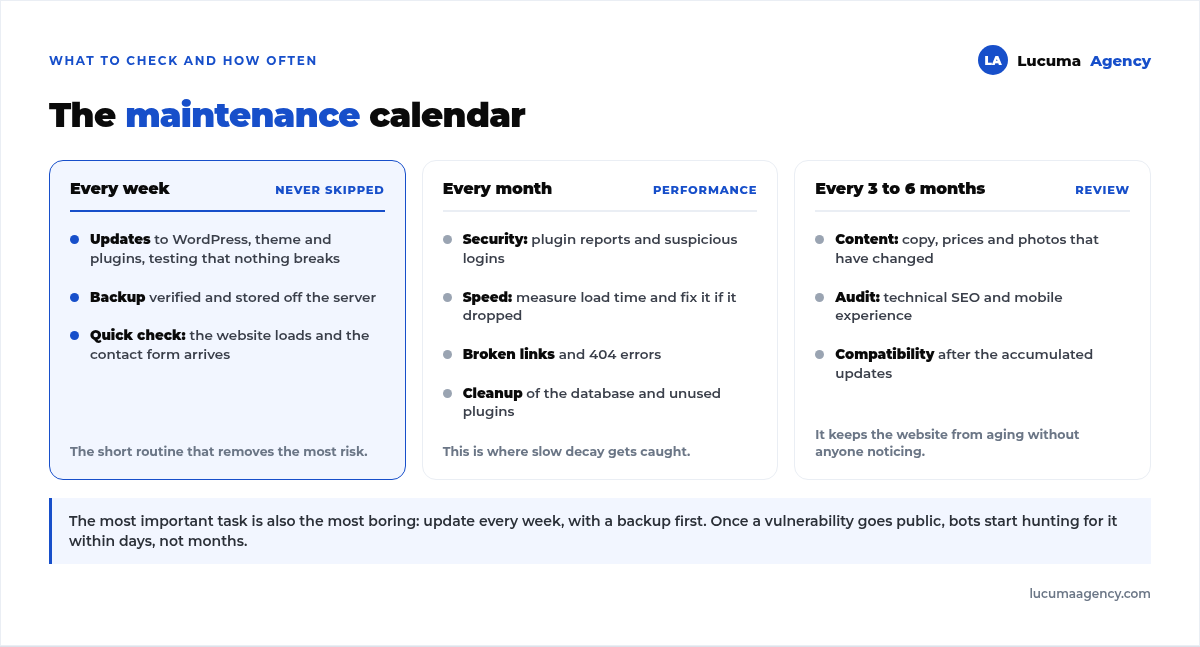
Every week
Updates. Review and apply updates for WordPress, the theme and the plugins, then check that nothing broke. It's the most important task for your website's security and the one most often neglected: once a vulnerability goes public, bots start looking for it within days.
Backup. It's not enough for the plugin to say it ran. You have to check that the backup exists and that it's stored off the server, because a backup that lives on the same server as the website goes down with it.
Quick check. Open the website, make sure it loads, and send the contact form to confirm the email arrives. Many forms quietly stop sending after an update.
Every month
Security. Review the security plugin's reports and any suspicious logins.
Speed. Measure load time and fix things if performance dropped. We cover it in how to speed up your WordPress website.
Broken links. Find and fix dead links and 404 errors.
Cleanup. Optimize the database and delete (not just deactivate) plugins and drafts you no longer use.
Every three to six months
Content review. Update text, prices, photos and details that have changed. This is the maintenance that also sells.
General audit. Review technical SEO, the mobile experience and the on-page SEO of your main pages.
Compatibility check. Make sure everything still works after the accumulated updates.
What a good maintenance plan includes
Here's the most common confusion. Many people think maintaining a website means logging in and hitting the update button. That isn't a plan: it's a one-off task, done without a safety net and with no one accountable if it goes wrong.
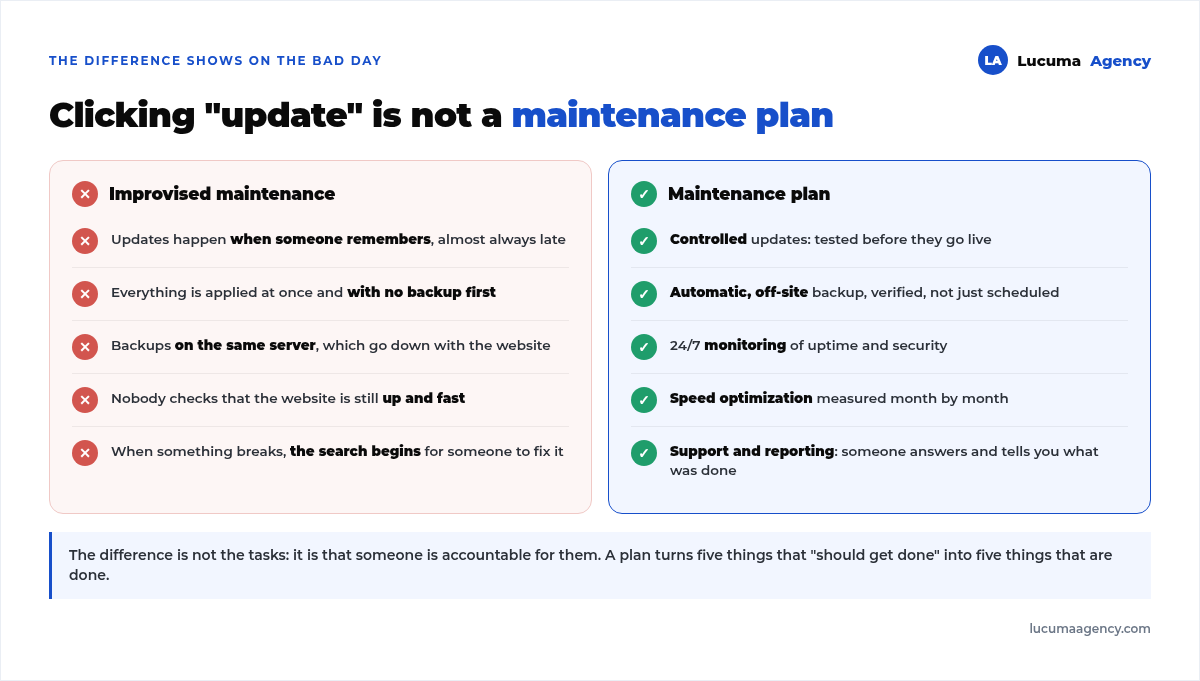
The real difference isn't the task list. It's that someone is accountable for it and tells you what was done. What to ask that someone before hiring them is covered in how to choose a WordPress agency in Peru.
The cost of not maintaining your website
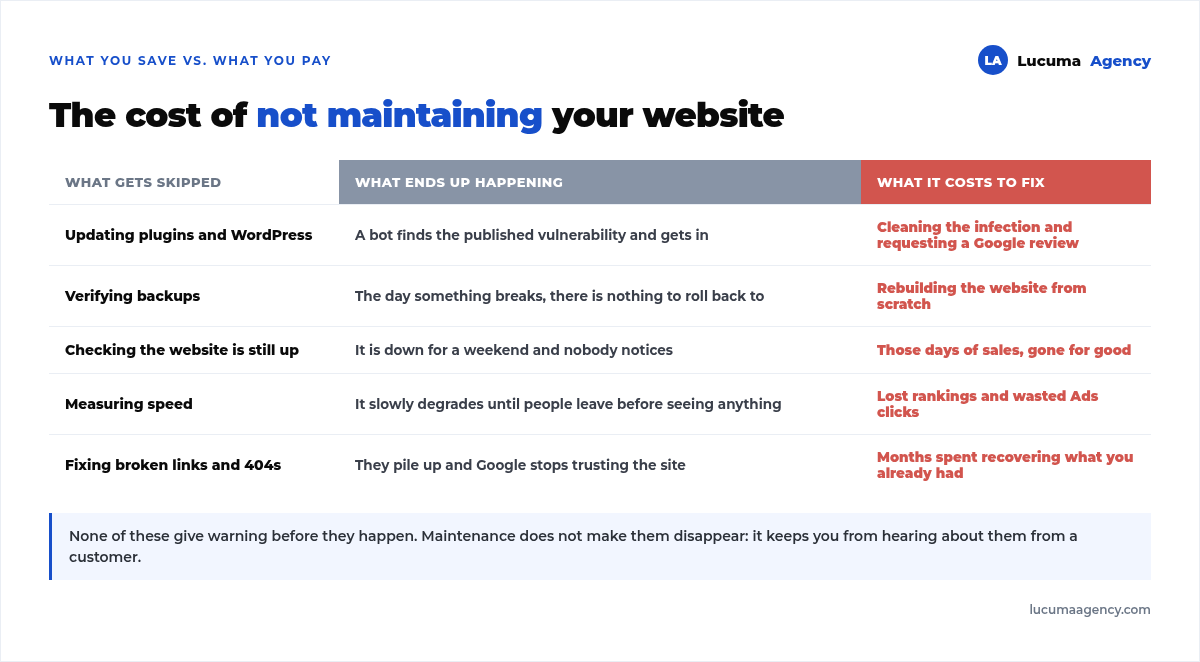
Skipping maintenance feels free for months, until suddenly it isn't. And the expensive part is never the task you didn't do: it's the work of fixing what happened because you didn't do it.
Can I do it myself?
The basic tasks, yes, if you have the time and you're careful. Updating with a backup first, checking that the website opens and clearing out unused plugins doesn't require being technical. And the fewer plugins, the less to maintain: the ones we keep on every website are in the 8 plugins we always install.
The risk is something else: an update breaks something and you don't know how to roll it back, or you neglect the backups in exactly the month you need them. That's why many businesses hand off maintenance, not because it's complex, but so they don't have to remember it. And many agencies hand it off too: for them there's white-label WordPress freelancer, which maintains their clients' websites without ever appearing in front of them.
If that sounds like you, our website maintenance plans start at S/ 150 a month and include updates, verified backups and downtime monitoring.
Frequently asked questions about WordPress maintenance
How often should I update WordPress?
Ideally every week, checking afterward that nothing broke and always with a backup first. Updates flagged as security updates get applied right away, without waiting for the weekly round.
Does maintenance affect my rankings?
Yes, for the better. A fast, secure website with no 404 errors ranks better. And the other way around: a hacked website can get flagged as a dangerous site on Google, which wipes out your traffic in a day.
Do I need maintenance if my website is simple?
Yes. A five-page website runs the same WordPress, the same plugins and has the same vulnerabilities as a fifty-page one. What changes is how long the work takes, not whether it's needed.
What if my website hasn't been touched in a year?
Don't update everything at once: it's the fastest way to break it. First a full backup, then updates in batches, testing the whole website between each one.
Do automatic updates solve the problem?
They help with security updates, but they're not enough. Nobody checks afterward whether the form still sends or whether an update broke the mobile layout. Automating without reviewing only changes when you find out.
Conclusion
WordPress maintenance is the difference between a website that works for you and a ticking time bomb. With up-to-date updates, verified backups, security and regular checks, your website stays fast, secure and reliable, and you can stop worrying about it.
And that's the part people underestimate: you don't notice maintenance when it works. You notice it the day it wasn't there.
In Lucuma Agency we offer web development with maintenance included: we make sure your website is always up to date. Want to stop worrying about your website? Book your free consultation.
Other posts you might like
At almost every real estate developer we work with, the lead takes the same absurd trip: it comes in through the form...
Switching servers is scary for a sensible reason: you rarely do it, and when it goes wrong, it goes wrong in public....
The question always comes the same way: “which payment gateway do you recommend?” And the useful answer doesn't start with a name, because the...
There's a moment, in quite a few projects, when the search for the right plugin becomes the problem. You tried three,...
Almost every online complaints book we audit complies on the outside and fails on the inside. They have the notice,...
The message came in like this: “the complaints book is throwing an error.” The Proba Inmobiliaria website, a page required by law,...
“Top 50 plugins” lists don't help you decide. They help you install fifty plugins. This is ours,...
Almost every business we ask has backups. Almost none has ever restored one. Those two sentences together are...
Almost every hosting conversation starts with price and ends up in the wrong place. The useful question is...
When a business wants to sell outside its country, the conversation almost always starts off wrong: with translation. And the...
Structured data is the piece of code that explains to Google, in a language that leaves no room for interpretation,...
The question comes up in almost every meeting: “if I use AI to write, will Google penalize me?” The short answer...