How to improve your WordPress website speed
A restaurant in Lima invested in ads for its new menu. The campaign brought people in, but almost no one got to see the dishes. The problem wasn't the ad or the price: the home page weighed eleven megabytes because of uncompressed photos, and on a phone it took eight seconds to appear. Most people left before that. They were paying for visits that never saw a thing.
It's the most frustrating case there is, because everything else was done right. The good news is that a WordPress website can be blazing fast, and the causes are almost always the same four. Here we explain what really slows it down, what Google measures and the seven actions that move the needle most, in order.
Part of our guide why build your website on WordPress.
Why speed matters so much
Speed affects two things you can actually measure in money.
Sales. Every second of waiting shows up in abandonment, and the effect is worse on mobile, which is where most of your traffic comes from. The key point: those visits are lost before seeing your offer, so it's not that your pitch fails to convince. It never got read.
The SEO. Speed is one of the signals Google measures, through Core Web Vitals. It's not the most important SEO factor, but it's one of the few you can fix in an afternoon. We also cover it in our technical SEO guide.
And there's an effect people underestimate: if you invest in advertising, a slow website makes every click more expensive. You pay the same for the visit but convert less, so your cost per customer goes up without anyone touching the campaign.
What makes a WordPress website slow
Before optimizing, it helps to know where to look, because slowness is rarely spread out: there's usually one clear culprit.
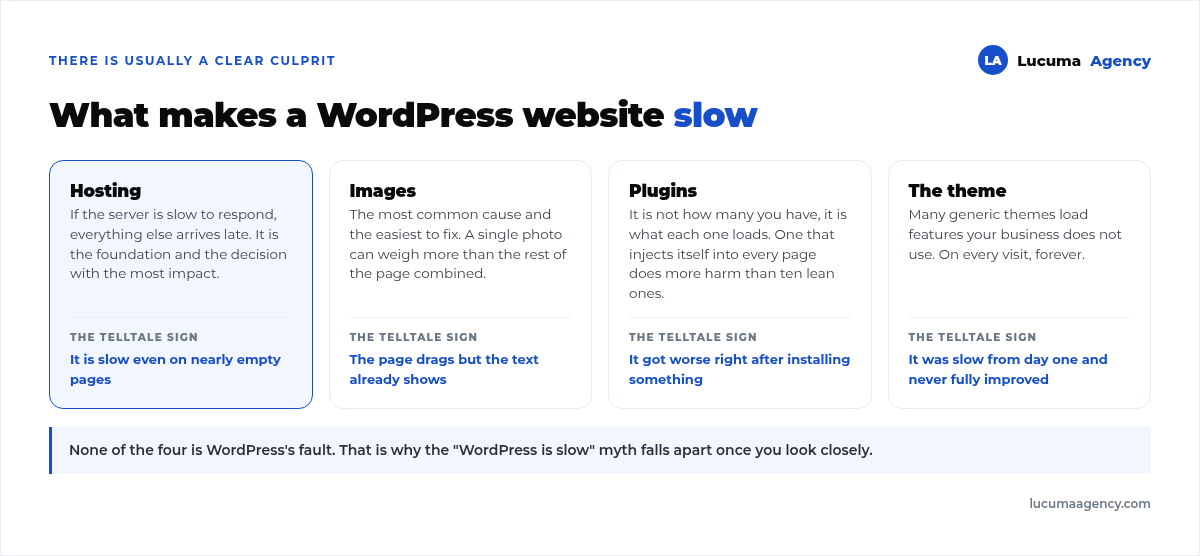
Hosting. If the server is slow to respond, everything else arrives late. You can tell because the website is slow even on nearly empty pages.
Speed isn't fixed once: it has to be maintained. Every new plugin and every unoptimized image wears it down, which is why regular checkups are part of website maintenance.
Images. The most common cause and the easiest to fix. A single five-megabyte photo can weigh more than the rest of the page combined.
Plugins. It's not how many you have, it's what each one loads. A plugin that injects its own files on every page does more damage than ten discreet plugins.
The theme or page builder. Many generic themes load features your business doesn't use, on every visit, forever.
Core Web Vitals: exactly what Google measures
"Loads fast" is too vague to work with. Google breaks it down into three metrics, the Core Web Vitals, and publishes the thresholds for each one:
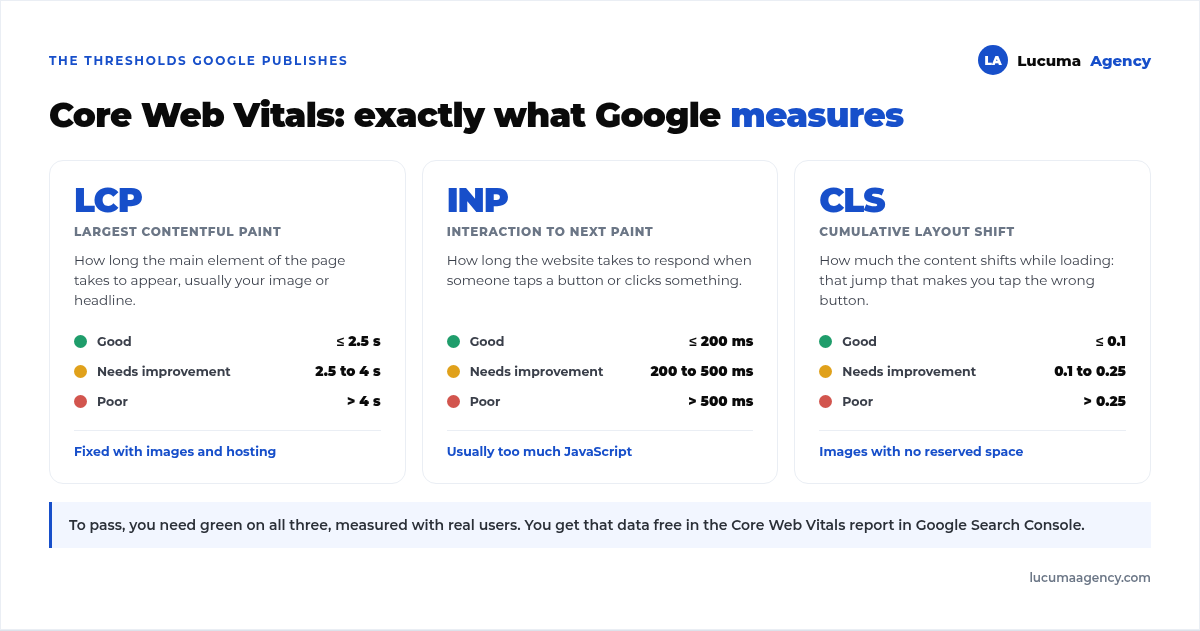
LCP measures how long the main element takes to appear, usually your image or your headline. The builder your website is made with also matters here: we measured the difference in Bricks vs Elementor vs Gutenberg. It's what people call "speed," and you fix it with images and hosting.
INP measures how long the website takes to respond when you tap or click. A page that looks fast but doesn't react when you press a button fails here, almost always because of too much JavaScript.
CLS measures how much the content shifts while it loads: that jump that makes you tap the wrong button. It usually comes from images without reserved space.
To pass, you need to be in the green on all three, measured with real users. You get that data for free in the Core Web Vitals report in Google Search Console, which is the source that really counts.
The seven actions, in order of impact
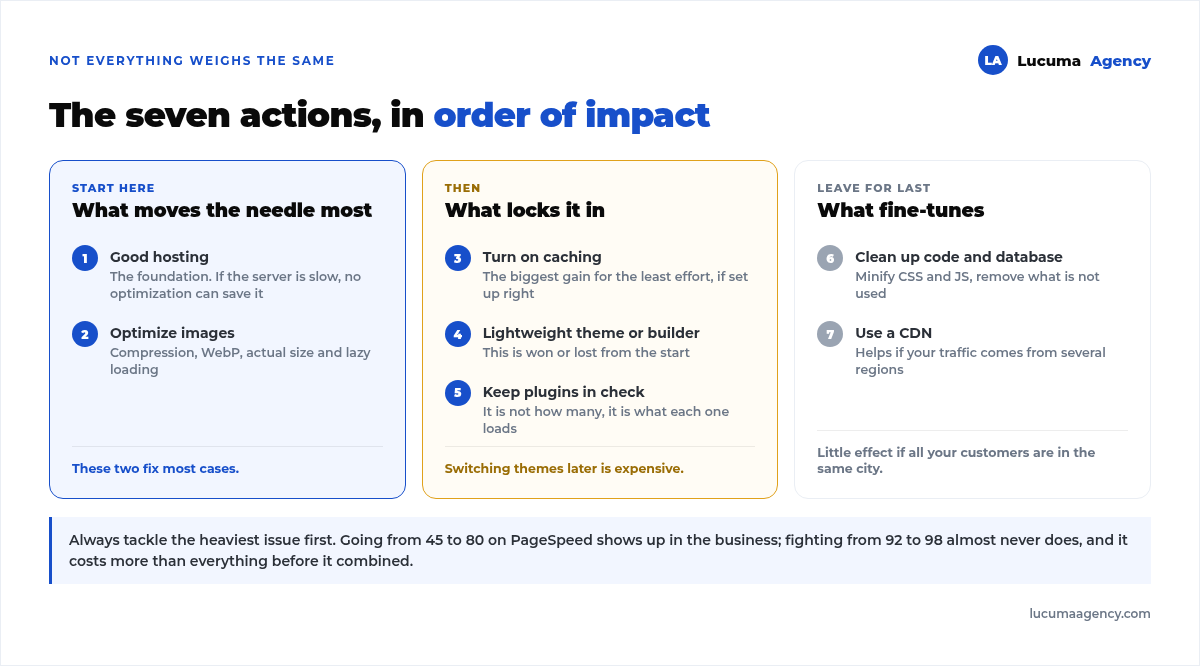
1. Choose good hosting
It's the foundation of everything and the decision with the most impact. Cheap, overloaded shared hosting will keep your website slow no matter how much you optimize it, because you share resources with hundreds of sites. In an online store it's twice as noticeable: in how we cut a WooCommerce store's cart from 8 to 1.5 seconds, the biggest lever was server-side object caching.
A quick note: this applies to WordPress.org, where you choose the server. On WordPress.com you don't choose your hosting, and in this comparison we look at what that means.
2. Optimize your images
Almost always the biggest improvement for the least effort. Four things:
Compress every image before uploading it.
Use modern formats like WebP: they weigh much less at the same quality.
Match the actual display size: don't upload a 4,000-pixel photo to show it at 600.
Turn on lazy loading so images further down don't delay what's seen first.
3. Turn on caching
The caching stores a ready-built version of your pages and serves it instantly, instead of rebuilding it on every visit. You turn it on with a plugin or at the server level.
A word of warning: if it's misconfigured, it shows outdated content or breaks an online store's cart.
4. Use a lightweight theme or builder
This is where you win or lose from the start. A custom theme loads only what your website uses; a generic template drags along dozens of features you'll never touch.
That's why, in proper web development speed is planned from the start, not patched on at the end: switching templates on a finished website is expensive, and choosing well at the beginning costs nothing.
5. Keep plugins in check
Install only the ones you need, delete (don't deactivate) the ones you don't use and be wary of the ones that do everything. If you suspect one, deactivate it and measure again: it's the fastest way to find the culprit. To avoid getting there, here's our list of the 8 plugins we always install and the 5 we never do.
6. Clean up the code and the database
Minifying and combining CSS and JavaScript files lightens the load, and removing unused code lightens it even more. The database also piles up junk over the years: old revisions, spam and leftovers from deleted plugins.
7. Use a CDN
A CDN serves your website from servers close to each visitor. It helps if you get traffic from several regions and much less if all your customers are in the same city. That's why it's last on the list.
How to measure your website speed
The go-to tool is PageSpeed Insights, free and made by Google itself. It gives you a score, your Core Web Vitals and a specific list of what to fix, sorted by how much you'd gain.
Three rules to make your measurements useful:
Test on mobile first. It's what Google prioritizes and where your traffic comes from.
Test several times. A single result doesn't tell you much.
Don't chase a 100. Going from 45 to 80 shows up in your business; fighting from 92 to 98 almost never does, and it costs more than everything before it combined.
And tackle what weighs the most first: almost always images and hosting. If you're going to use the opportunity to change the design, do it with a plan: in our guide to redesigning your website without losing rankings we explain how not to throw away what you've gained.
Frequently asked questions about WordPress speed
How fast should my website load?
Google's threshold is an LCP under 2.5 seconds on mobile, and the lower, the better. Test on a phone with mobile data, which is how most of your visitors arrive, not just on your computer with fiber internet.
Why is my website slow if I get so few visitors?
It's almost never because of traffic: it's usually a bloated theme, unoptimized images, too many plugins or overloaded hosting. If you suspect the server, we compare shared hosting, VPS and Plesk with load times measured on 32 Peruvian websites in WordPress hosting in Peru.
Do plugins slow down my website?
It's not how many you have, it's what each one does. Ten lightweight plugins can weigh less than a single one that loads its files on every page. Uninstall what you don't use; don't just leave it deactivated.
Can speed optimization break my website?
It can, which is why you do it with a backup and test afterward. The two steps that break things most often are a misconfigured cache and code minification: apply one at a time and check the whole website, not just the home page.
Does speed affect rankings?
Yes, it's one of the signals Google measures. But the bigger impact comes earlier: a slow website loses visitors before they see anything, and those are lost sales.
Conclusion
Speed isn't a technical luxury: it's what makes your website sell and your campaign budget pay off. With good hosting, optimized images, caching and a lightweight foundation, a WordPress website loads in under two seconds without any weird tricks. If the problem is your hosting and it's time to switch, the step-by-step guide is in how to migrate a website to another host without downtime.
And it's worth remembering where the problem comes from: most "slow websites" aren't slow because of WordPress, but because of how they're built. That's good news, because it means it can be fixed.
In Lucuma Agency we build fast, optimized WordPress websites from day one. Is your website slow? Book your free consultation and we'll give you a diagnosis.
Other posts you might like
At almost every real estate developer we work with, the lead takes the same absurd trip: it comes in through the form...
Switching servers is scary for a sensible reason: you rarely do it, and when it goes wrong, it goes wrong in public....
The question always comes the same way: “which payment gateway do you recommend?” And the useful answer doesn't start with a name, because the...
There's a moment, in quite a few projects, when the search for the right plugin becomes the problem. You tried three,...
Almost every online complaints book we audit complies on the outside and fails on the inside. They have the notice,...
The message came in like this: “the complaints book is throwing an error.” The Proba Inmobiliaria website, a page required by law,...
“Top 50 plugins” lists don't help you decide. They help you install fifty plugins. This is ours,...
Almost every business we ask has backups. Almost none has ever restored one. Those two sentences together are...
Almost every hosting conversation starts with price and ends up in the wrong place. The useful question is...
When a business wants to sell outside its country, the conversation almost always starts off wrong: with translation. And the...
Structured data is the piece of code that explains to Google, in a language that leaves no room for interpretation,...
The question comes up in almost every meeting: “if I use AI to write, will Google penalize me?” The short answer...