How to redesign your website without losing your rankings
A construction company in Lima wrote to us in January. They had launched a new website in December: much prettier, faster, with better photos. And their inquiries from Google had almost completely disappeared. Nobody had done anything wrong on purpose. They had simply changed every page address, and nobody redirected the old ones.
A redesign is one of the most profitable moves a business can make, and also one of the most damaging when it's done without a plan. The good news is that the risk comes down to a single question, and if you answer it right, you lose nothing.
In this guide we explain which types of changes put your SEO at risk, what you need to keep from the old website and how to sequence the process so your traffic doesn't drop.
The question that decides everything: are the URLs changing?
Not all redesigns carry the same risk. Changing the colors and changing the site structure are different operations, even though both are called a "redesign":
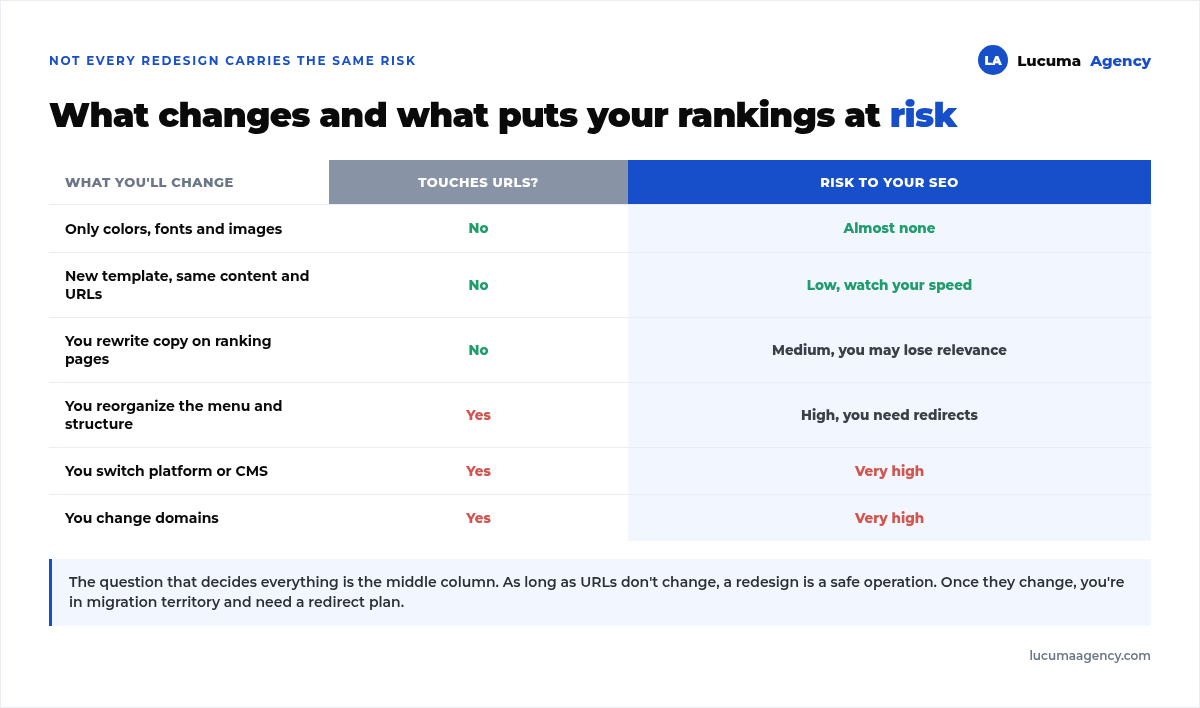
As long as the addresses don't change, a redesign is a fairly safe operation: Google keeps finding the same pages, they just look different. The moment the addresses change, you're no longer redesigning, you're migrating, and you need the same care we explain in how to migrate your website without losing rankings.
There's an in-between case people underestimate: rewriting the copy on pages that already rank. The URL doesn't change, so it seems harmless, but if that page ranked for certain keywords and you remove them from the text, you lose relevance without touching anything technical.
What to keep from the old website
This is work you do before you start, while the current website is still up. Afterward, once the site has been replaced, rebuilding this information is much harder.
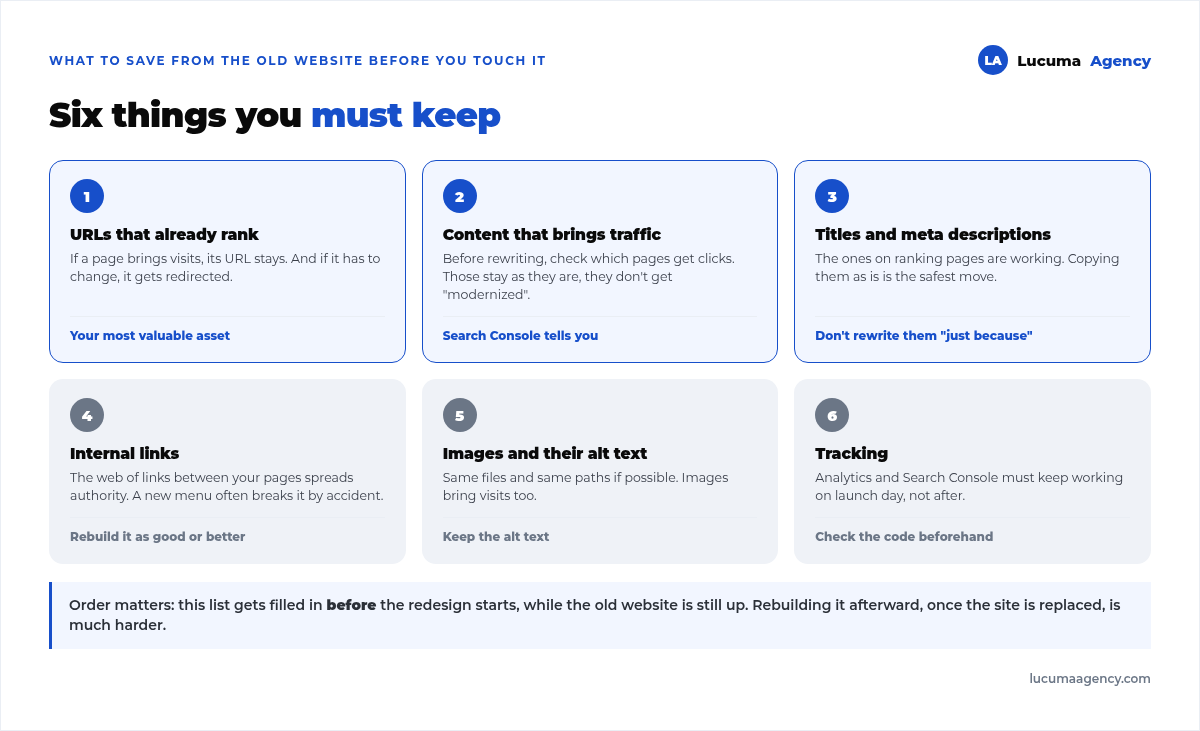
The starting point is Search Console. Go to the Performance report, filter by pages and sort by clicks. That list, the pages that actually bring you visits, is the one you need to protect, page by page.
And a word of warning about titles: if a page is on the first page of Google, its SEO title is working. Rewriting it because the new design "calls for something else" is one of the silliest ways to lose rankings. Copy them as they are and change them later, one at a time and measuring. When that time comes, follow the method in how we wrote the title and meta description for 30 service pages.
The three-phase plan
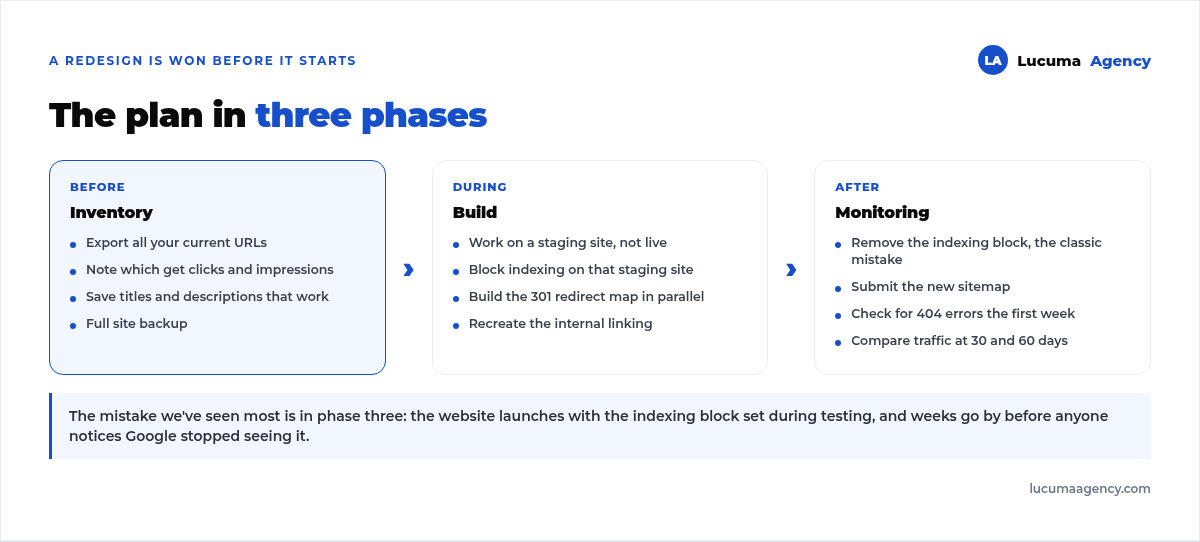
A redesign is won or lost before the design work even starts:
Before: the inventory
Export all your current URLs, note which ones get clicks and impressions, save the titles and descriptions that work and make a full backup. Without this list, any later problem will be impossible to diagnose.
During: the build
Work in a staging environment, never on the live website, and block indexing of that environment so Google doesn't confuse it with your real site. In parallel, build the 301 redirect map: every old URL pointing to its new equivalent.
And recreate the internal linking. A new menu often breaks, without anyone meaning to, the network of links that spread authority across your pages, and it shows weeks later. How to rebuild that network is in what internal linking is and how we handle it.
After: monitoring
This is the mistake we've seen most often: the website launches with the indexing block that was set during testing. It's the checkbox under Settings › Reading in WordPress. Weeks go by before someone notices that Google stopped seeing the entire site.
After launch: remove that block, submit the new sitemap, check for 404 errors during the first week and compare traffic at 30 and 60 days.
What's normal and what isn't after launch
It's normal for rankings to fluctuate for two or three weeks while Google recrawls everything. Don't panic on the first Monday.
It's not normal for traffic to drop by half and stay there. If it hasn't recovered after fifteen days, check indexing and 404 errors, in that order.
It's not normal for hundreds of new unindexed pages to show up. It usually means the sitemap is wrong or the staging block is still on.
If any of this happens, the diagnostic approach is the same one we always use: check the structure of each page and the indexing status before touching anything else.
The redesign as an opportunity
It's worth saying, because this guide reads like a list of dangers: a well-executed redesign improvement your rankings, it doesn't just preserve them.
It's the ideal time to fix the speed, split that "Services" page that crams eight things together into eight pages that each compete for their own topic, and get tracking properly set up from day one. All of that costs the same to do now as later, and now it gets done without breaking anything. If your website gets leads for real estate projects, the redesign is also the time to connect your forms to your CRM: we explain it in website integration with Sperant.
Frequently asked questions
How long does traffic take to recover after a redesign?
If URLs are kept or properly redirected, everything is back to normal in two or three weeks. If you lost traffic to broken URLs, recovery depends on how long it takes you to find and fix them.
Can I change the design without touching any SEO?
Yes, and it's the safest scenario: same structure, same URLs, same copy on the pages that rank. You change the skin, not the skeleton.
What if I want to use the opportunity to reorganize the menu?
You can, but then you're changing URLs and need redirects one by one. That's not a problem if it's planned; it is if you find out after launch.
Should I launch the new website all at once or in stages?
All at once, with everything tested. Launching in stages leaves the site in a mixed state that confuses Google and makes diagnosis harder if something fails. And if you're also switching servers, follow the procedure in migrating a website to another host without downtime or SEO loss.
Do I need to tell Google I redesigned?
There's no button for that, but it's a good idea to submit the updated sitemap and request indexing for your most important pages to speed things up.
Conclusion
Redesigning your website doesn't have to cost you rankings. All the risk comes down to one question, whether or not your page addresses change, and to prep work almost nobody does: taking inventory of what you have and what's bringing you visits before touching anything.
Take that inventory, prepare the redirects in parallel and check the indexing block on launch day. With those three things, a redesign goes from being a risk to being the best opportunity of the year to improve your SEO.
In Lucuma Agency we do web development keeping what already ranks, with the inventory and the redirect map done before design starts. Are you rebuilding your website? Book your free consultation and we'll review what needs protecting.
Other posts you might like
At almost every real estate developer we work with, the lead takes the same absurd trip: it comes in through the form...
Switching servers is scary for a sensible reason: you rarely do it, and when it goes wrong, it goes wrong in public....
The question always comes the same way: “which payment gateway do you recommend?” And the useful answer doesn't start with a name, because the...
There's a moment, in quite a few projects, when the search for the right plugin becomes the problem. You tried three,...
Almost every online complaints book we audit complies on the outside and fails on the inside. They have the notice,...
The message came in like this: “the complaints book is throwing an error.” The Proba Inmobiliaria website, a page required by law,...
“Top 50 plugins” lists don't help you decide. They help you install fifty plugins. This is ours,...
Almost every business we ask has backups. Almost none has ever restored one. Those two sentences together are...
Almost every hosting conversation starts with price and ends up in the wrong place. The useful question is...
When a business wants to sell outside its country, the conversation almost always starts off wrong: with translation. And the...
Structured data is the piece of code that explains to Google, in a language that leaves no room for interpretation,...
The question comes up in almost every meeting: “if I use AI to write, will Google penalize me?” The short answer...