SEO migration: how to migrate your WordPress website without losing rankings
A dental clinic in Miraflores launched its new website on a Friday. It was much better than the old one: faster, clearer, with better photos. The following Monday the phone stopped ringing, and it didn't ring the same way again for two months.
Nobody had deleted anything. The same pages were still there, with the same text. The only thing that changed was the URLs: the page that used to live at /servicios/ortodoncia was renamed /tratamientos/ortodoncia. To Google, the first one had vanished and the second was a stranger with no history. Two years of rankings, wiped out in an afternoon.
It's the most expensive and most avoidable mistake in digital marketing, and it doesn't come from building a new website: it comes from building one without a migration plan. Here's exactly what breaks, the three-phase plan and the redirect work that holds everything else together.
It's part of our guide on what SEO is and how it works.
What an SEO migration is
A SEO migration is the work that gets Google to transfer the authority and rankings your old website had to your new one. It isn't uploading the new site and waiting: it's showing Google, URL by URL, who inherits from whom.
The word "migration" is misleading, because it sounds like a big move. In reality, any change that alters your URLs or your server counts as a migration:
Domain change. You change your name, merge two brands or move from a .com to a .pe.
Redesign with a new structure. The most common case and the most underestimated, because from the outside it looks like only the design changed. It has its own guide: how to redesigning your website without losing rankings.
Content management system change. From Wix, Joomla or a custom-built site to WordPress, or the other way around.
Hosting change. The least dangerous, because the URLs don't change, but it can take the site down for a few hours if the domain points to the wrong place.
Moving from http to https. Technically every URL changes, even if it looks the same to you.
The first four change URLs. That's where traffic gets lost.
Why you lose traffic when you change websites
One idea explains almost all of it: Google doesn't rank your website, it ranks your URLs. Each URL builds up its own history, the links it has received and the trust it has earned. That capital isn't stored in your domain as a whole; it's attached to each specific URL.
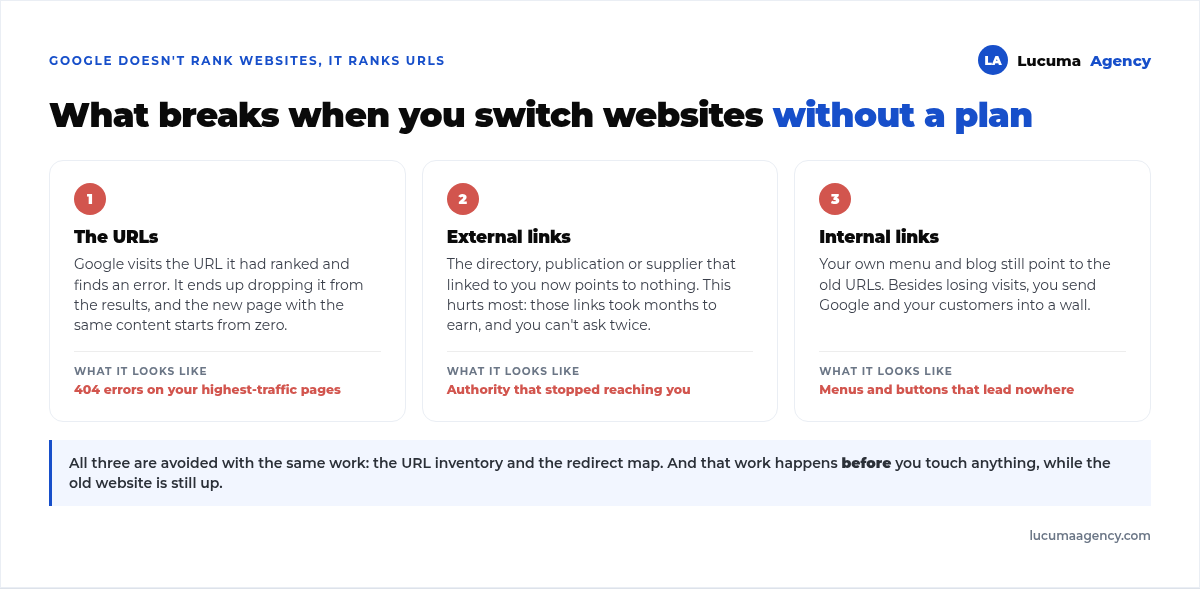
When the URL stops existing, three things break at once:
The URL returns an error. Google visits the URL it had ranked, hits a 404 and ends up removing it from the results. Your new page, with the same content, starts from zero.
External links stop counting. If a directory, a media outlet or a supplier linked to your services page, that link now points to nowhere. It's the most painful part, because those links took months to earn and you don't get them back by asking again.
Internal links end up broken. The links in your own blog and menu keep pointing to the old URLs, so on top of losing visits, you send Google and your visitors straight into a wall.
The good news: all three are avoided with the same work, and that work happens before you touch anything.
The migration plan, in three phases
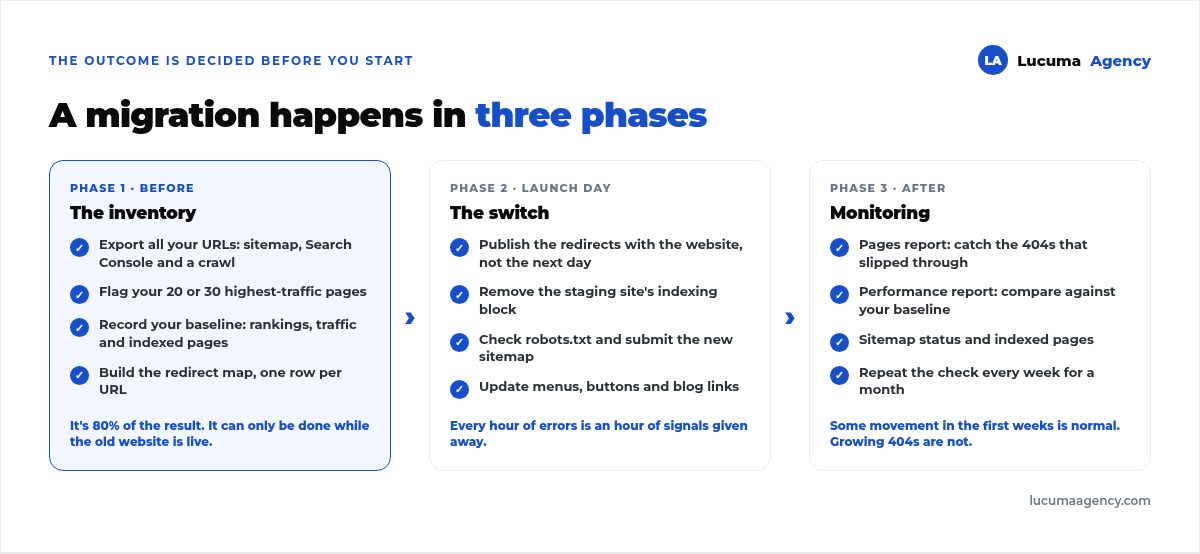
Phase 1. Before: the inventory
This phase is 80% of the result, and it's done while the old website is still live. If you skip it, there's no way to recover the information later.
Export all your current URLs. Pull them from your sitemap, from the pages report in Google Search Console and from a crawl of the site. All three sources together, because none of them has everything: the sitemap ignores orphaned pages and Search Console only shows what has received impressions.
Flag your important pages. Sort that list by traffic and keep the top 20 or 30. Those are the ones to watch closely afterward.
Record your starting point. Today's rankings, organic traffic and indexed pages. Without that snapshot you won't be able to tell whether the migration went well or badly; you'll only be able to guess.
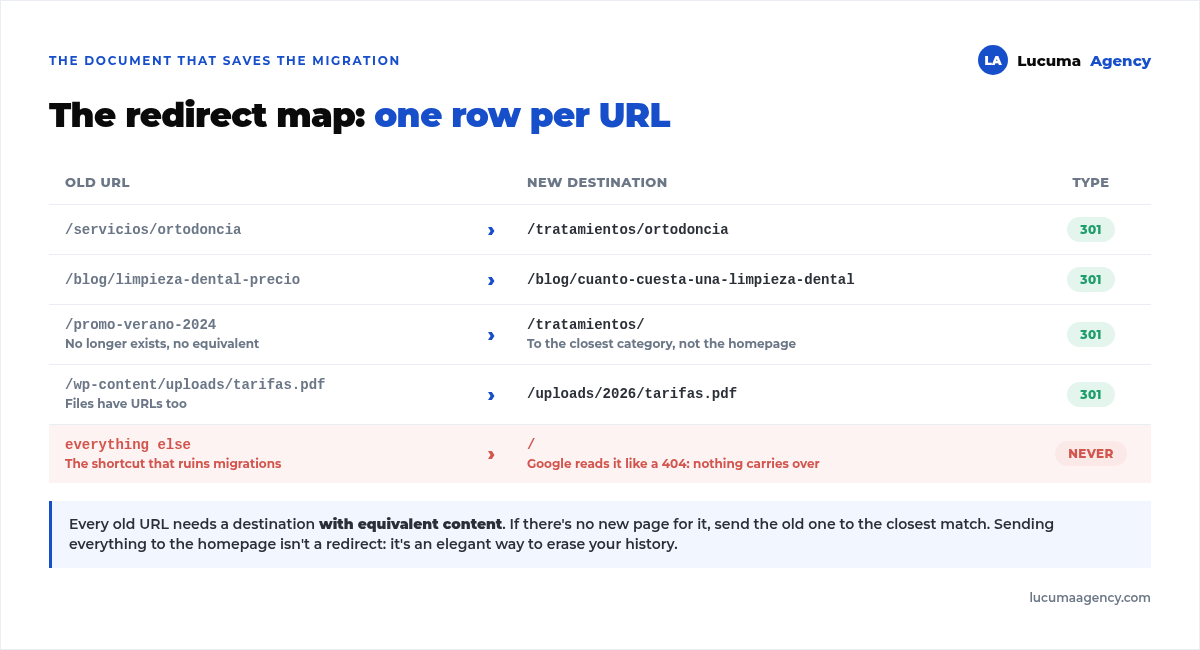
Build the redirect map. A spreadsheet with two columns: old URL and new URL. One row per URL, no exceptions.
The rule that prevents disaster: every old URL needs an equivalent destination. If the new page doesn't exist, send the old one to the closest match in content. Redirecting everything to the homepage is the shortcut we've seen most often, and it doesn't work: Google treats it as a page that no longer exists and handles it just like a 404.
Phase 2. Launch day
Publish the redirects at the same time as the website. Not the next day. Every hour an old URL returns an error is an hour of giving away signals.
Remove the block from the staging site. Almost every development environment is set up with the WordPress checkbox that asks search engines not to index the site. If you forget to uncheck it when going live, your new website is invisible no matter how well it's built. It's the most common mistake and the quietest, because nothing looks broken.
Check your robots.txt and submit the new sitemap in Search Console to speed up crawling of the new URLs.
Review your internal links. Update menus, buttons and blog links so they point directly to the new URLs. Redirects are the safety net for the outside world, not an excuse to leave your own website linking to dead URLs.
Phase 3. After: four weeks of monitoring
The migration doesn't end the day you publish. Over the following month, check Search Console every week: the pages report (to catch the 404s you missed), the performance report (to compare against your snapshot) and the sitemap status.
It's normal to see movement in the first few weeks while Google recrawls and re-understands your website. What isn't normal is for 404s to keep growing or for indexed pages to drop and not recover.
301 redirects: the heart of the migration
If you take away just one thing from this guide, make it this.
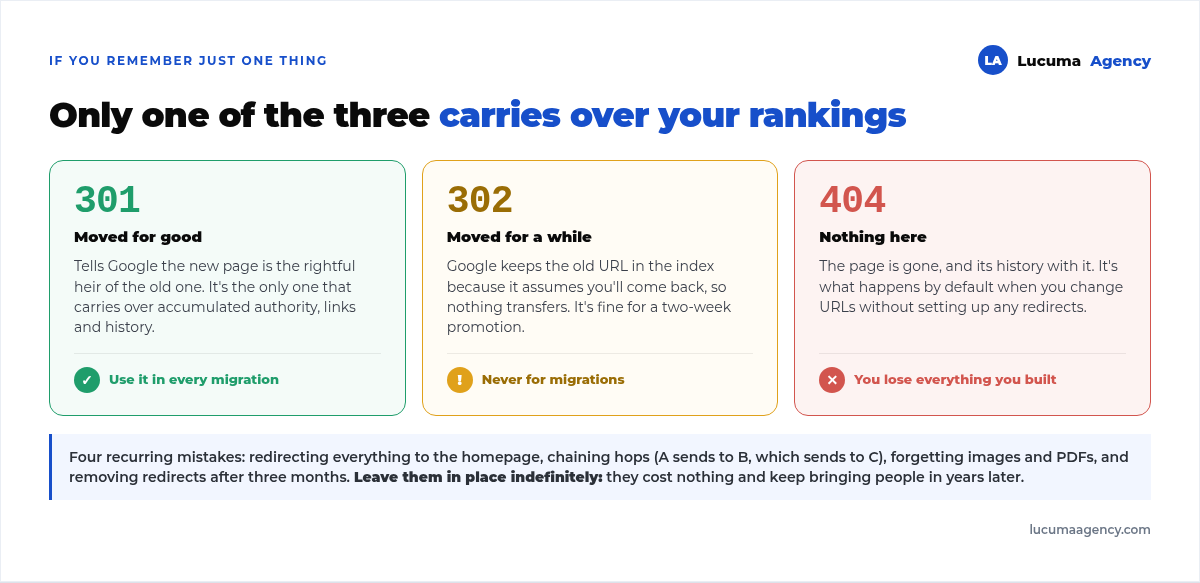
A 301 redirect tells Google the page has moved permanently and that the new URL is its rightful heir. It's the only one that transfers the accumulated authority.
A 302 says the move is temporary, so Google keeps the old URL in the index and passes nothing on. It's fine for a two-week promotion, not for a migration.
A 404 says nothing at all: the page is gone, and its history with it.
Four mistakes we see again and again:
Redirecting everything to the homepage. We've covered it already, but it's so common it's worth repeating.
Chaining redirects. Page A sends to B, which sends to C. Every hop dilutes and slows things down. Always point straight to the final destination.
Forgetting what isn't a page. Images, PDFs and files that someone linked to also have their own URLs, and they break too.
Removing redirects after three months. Leave them in place indefinitely. They cost nothing, and some old links keep bringing people in years later.
Migrating to WordPress, or away from WordPress
When the change is to your content management system, there is one more front: the content changes homes, not just addresses.
If you're coming from a custom-built site or a closed site builder, make sure the move keeps the titles and meta descriptions you already had. Many automatic migrations regenerate them and erase years of fine-tuning without warning. And if you're torn between WordPress.com and WordPress.org, the choice affects how much control you'll have over redirects, and we compare them in this guide.
And make the most of the moment. A migration is the only time you can change the structure at no extra cost, so it's when you should clean up your URLs, fix what was poorly set up and leave the website fast from day one. We cover the technical foundations in depth in our technical SEO guide.
How long it takes for rankings to recover
When the work is done right, you usually see some fluctuation in the first few weeks and a gradual return to previous levels as Google recrawls the whole site. The bigger the website, the longer it takes, because Google needs more passes to process all of it.
What nobody can promise you is a migration with zero movement or an exact recovery date: it depends on the size of the site, how much the structure changed and how often Google visits you. What can be guaranteed is the difference between the two real-world scenarios: a planned migration moves for a few weeks and comes back; an improvised one can take months and sometimes never fully comes back. The same applies when what changes are the slugs of a second language, as in the case of the multilingual WordPress website we took into three languages.
Frequently asked questions about SEO migration
Can I change my website design without losing rankings?
Yes, and in fact that's the norm. If you keep the same URLs and the same content, a redesign shouldn't move anything. The risk shows up when the redesign brings a new URL structure, which is what usually happens without anyone mentioning it in the meeting.
How long do I need to keep 301 redirects in place?
Indefinitely. Removing them is the same as turning those URLs into 404s, with everything they carry. They use no resources and keep recovering visits from old links for years.
What if I already migrated and lost traffic?
It can be fixed, and it's usually the same work, just late. Pull the list of old URLs from the Search Console pages report, check which ones return errors and set up the redirects that were missed. The sooner you do it, the more you recover.
Do I need a new Search Console property if I change domains?
Yes. Add the new domain as a property and use the Change of Address tool to notify Google. Keep the old property for a while too: it's where you'll see whether the old URLs are redirecting correctly. If you're only changing servers, with the same URLs, the process is different: migrate a website to another host without downtime.
Is it better to migrate everything at once or in stages?
All at once, unless it's a huge website. Migrating in stages stretches out the period of instability and multiplies the chances of leaving loose ends between one batch and the next. An extreme case, with 1,181 URLs retired with a 410 in a single operation, is in how we relaunched a media outlet with 1,486 posts and zero traffic.
Conclusion
A migration is one of the few things in SEO where the outcome is decided before you start. The URL inventory and the redirect map are boring work, with nothing to show in a meeting, and they are exactly what separates a new website that performs from day one from one that spends half a year recovering what it already had.
If you're thinking about rebuilding your website, decide the migration plan in the same conversation where you decide the design. After that, there's no cheap way to fix it.
In Lucuma Agency we do new websites without throwing away the rankings you already have. Are you about to migrate, or did you already migrate and notice the drop? Book your free consultation and we'll review your case.
Other posts you might like
At almost every real estate developer we work with, the lead takes the same absurd trip: it comes in through the form...
Switching servers is scary for a sensible reason: you rarely do it, and when it goes wrong, it goes wrong in public....
The question always comes the same way: “which payment gateway do you recommend?” And the useful answer doesn't start with a name, because the...
There's a moment, in quite a few projects, when the search for the right plugin becomes the problem. You tried three,...
Almost every online complaints book we audit complies on the outside and fails on the inside. They have the notice,...
The message came in like this: “the complaints book is throwing an error.” The Proba Inmobiliaria website, a page required by law,...
“Top 50 plugins” lists don't help you decide. They help you install fifty plugins. This is ours,...
Almost every business we ask has backups. Almost none has ever restored one. Those two sentences together are...
Almost every hosting conversation starts with price and ends up in the wrong place. The useful question is...
When a business wants to sell outside its country, the conversation almost always starts off wrong: with translation. And the...
Structured data is the piece of code that explains to Google, in a language that leaves no room for interpretation,...
The question comes up in almost every meeting: “if I use AI to write, will Google penalize me?” The short answer...