Why build your website on WordPress: advantages, myths and when it makes sense
An auto parts distributor in Lima had its website built by a vendor that used its own proprietary platform. Everything was fine for two years, until it wanted to add a filterable catalog and connect its store. The answer was that the platform didn't allow it and the site had to be rebuilt from scratch. The copy, the photos and the Google rankings it had earned couldn't be taken anywhere, because they were never really its own.
For selling online, WordPress with WooCommerce avoids the per-sale commission other platforms charge. We explain it in online store.
That's the story behind the question “why WordPress”. It's not about it being the trendy platform: it's about who owns your website and how far it lets you grow. WordPress powers more than 40% of all websites in the world, and that's no accident. In this guide we explain, without jargon, exactly what it is, its real advantages, the myths you'll hear, and when it makes sense and when it doesn't.
What is WordPress?
WordPress is a system for building and managing websites, known as a CMS (content management system). Its job is to separate content from code: you log into a dashboard, change some text, upload a photo or publish an article, and the website updates itself. You don't need a developer for every change.
It's open source and free. And it can take any design: in how to turn a JPG design into a pixel-perfect website we show how an image is reproduced down to the last detail. It's used for everything from the website of a three-person small business to those of major media outlets and international brands, because it scales without switching tools. It's also the platform agencies outsource development on the most; we explain how that model works in the white-label WordPress guide for agencies.
One important detail that confuses almost everyone: there are two WordPresses. WordPress.com is a service hosted by a company, simpler but more limited, where your website lives on their infrastructure and under their rules. WordPress.org is the self-hosted version, the one you install on your own hosting, and it gives you full control. When this article, and the professional world, talks about “building your website on WordPress”, it almost always means WordPress.org.
What you can build with WordPress
The idea that WordPress is “for blogs” comes from its origins, more than twenty years ago. Today it's a general-purpose platform, and the blog is just one of its features.
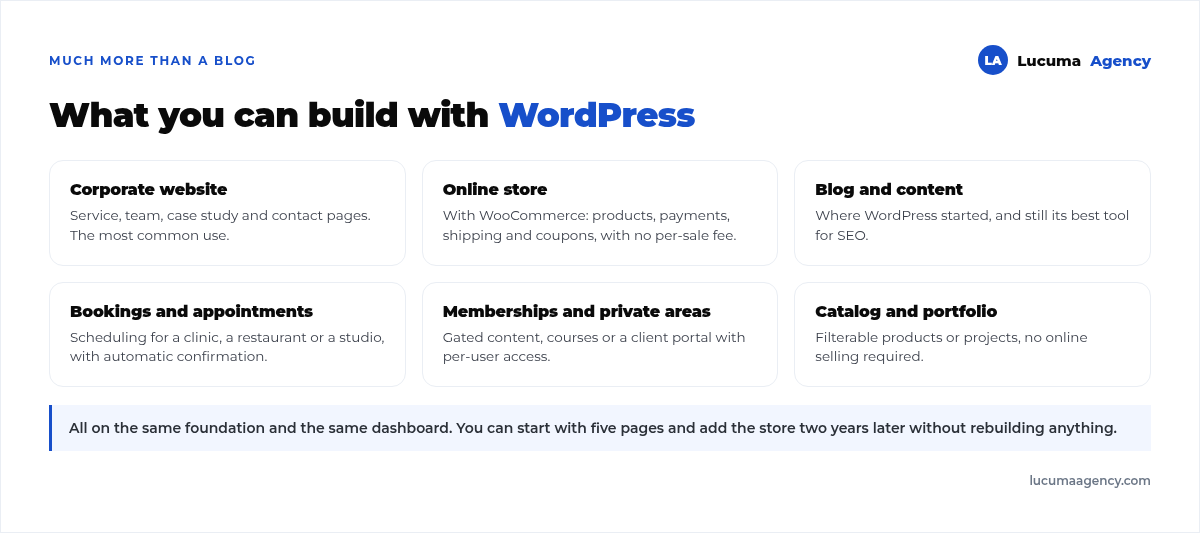
A corporate website with its service pages, a full online store with WooCommerce, a booking system for a clinic or a restaurant, a private client area, a filterable product catalog, a portfolio. All of that is built on the same foundation, with the same admin dashboard and the same team.
That has a practical consequence people underestimate: you can start with a simple five-page website and, two years later, add the store without rebuilding anything or moving your content elsewhere.
The real advantages of WordPress
1. It's yours: control and ownership
With WordPress.org, your website is yours. You have the files, the database and the content, and you can move them to another host or hand them over to another team whenever you want. You don't depend on a closed platform that can change its prices, limit features or shut down.
You notice this the day you want to switch vendors. With WordPress, you take your website with you; with a proprietary platform, you start over.
2. Flexible and scalable
You can start with the bare minimum and grow the website at your business's pace: add a blog, a store, bookings, memberships, languages or integrations with your CRM. WordPress grows with you instead of putting a ceiling on you.
3. Easy to manage
Once it's set up, updating text, uploading photos or publishing on the blog is simple and doesn't require touching code. That independence has direct value: if every price change or new photo depends on someone else, your website falls out of date out of sheer friction.
If you're the one delivering websites to clients, the logic flips: what you're looking for is a white-label WordPress designer who builds behind the scenes while you keep the client relationship.
4. Excellent for SEO
WordPress is very well prepared for ranking on Google: clean structure, full control of titles and metadata, friendly URLs, redirect management and compatibility with every technical SEO practice.
And there's something that matters more than it seems: on WordPress you can install your own tracking and measurement codes without asking permission. That means you can truly measure your advertising on Google Ads or Meta Ads, which is the difference between investing and guessing. Many closed platforms limit exactly this.
5. Huge ecosystem and guaranteed continuity
Thousands of themes and plugins let you add almost any feature without building it from scratch. And since it's the most widely used CMS in the world, documentation, support and professionals are easy to find.
That last part is a business advantage, not a technical one: if your website is orphaned tomorrow because your vendor disappears, finding someone to take it over is a matter of days. With proprietary or uncommon technology, it can be a serious problem.
The most common myths about WordPress
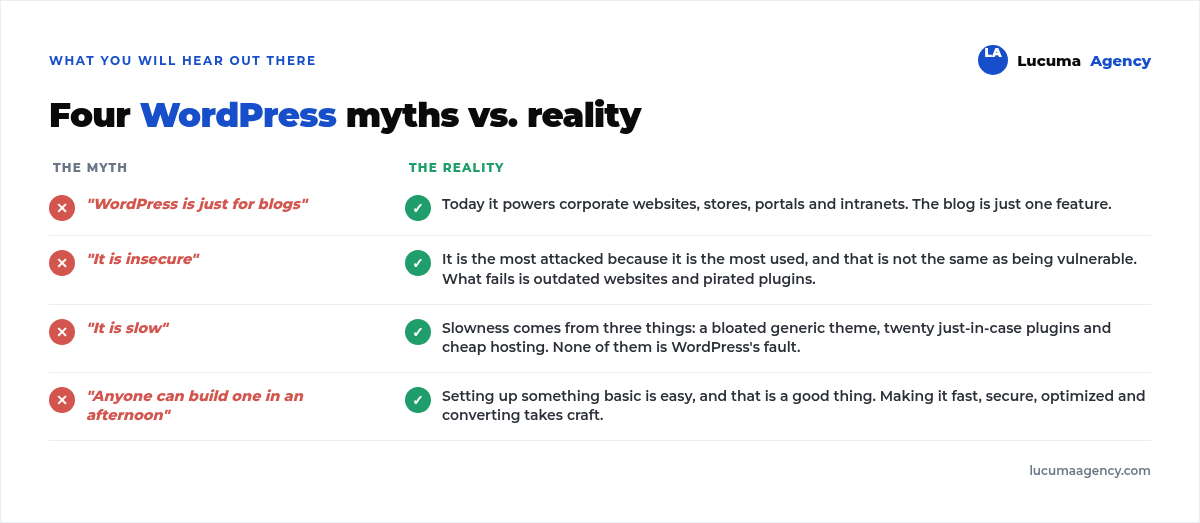
“WordPress is only for blogs.” False, as we saw above. Today it's used for corporate websites, online stores, portals, intranets and custom applications.
“It's insecure.” WordPress itself is secure. What fails are outdated websites, with pirated plugins or weak passwords. Since it's the most used platform, it's also the most attacked by sheer volume, but that's not the same as being vulnerable. With up-to-date updates, backups and good practices, it's as secure as any alternative. We go deeper in our WordPress security guide.
“It's slow.” A WordPress website can be lightning fast if it's well built. Slowness almost always comes from three specific things: a generic theme loaded with features you don't use, twenty plugins installed just in case, and cheap shared hosting. None of the three is WordPress's fault. We cover it in how to optimize your website's speed.
“Anyone can do it in no time.” Setting up something basic is easy, and that's a good thing. Building a website that's fast, secure, SEO-optimized and designed to turn visitors into customers takes strategy and craft. The platform is accessible; a professional result isn't automatic.
How much does a WordPress website cost?
There's a common confusion here, because “WordPress is free” is only partly true.
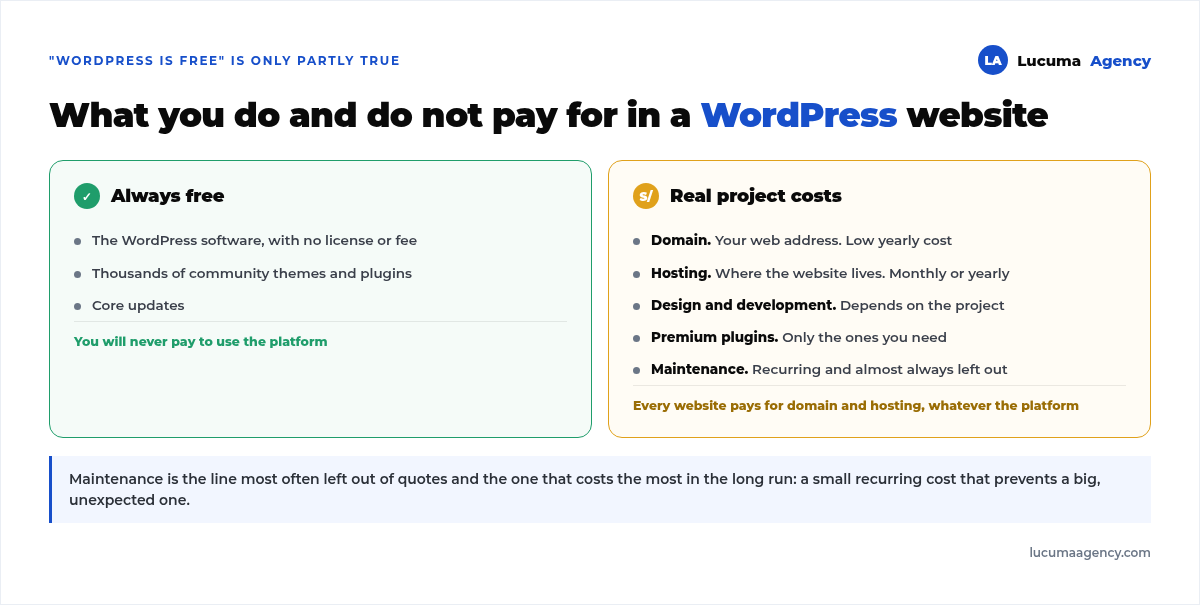
Free: the software itself, and thousands of community themes and plugins.
Always paid: the domain (your web address, a low annual cost) and hosting (where the website lives, monthly or yearly). Without these two there's no website, whatever the platform.
Paid depending on the project: design and development, any premium plugins you need, and maintenance.
That last item is the one most often left out of quotes and the one that costs the most in the long run. A website without maintenance gets outdated, breaks and, in the worst case, gets infected. It's a small recurring cost that prevents a big one. We break it down in our WordPress maintenance guide.
When does WordPress make sense and when doesn't it?
It makes sense if you want to own your website, plan to grow it, care about SEO, invest or plan to invest in advertising, and want to manage your own content without depending on anyone. For most businesses, this is the answer.
It might not be the best option if your project is a complex web application with very particular logic, more software than site; if you need a store with very specific requirements where a specialized platform fits better; or if you truly only need a single campaign page you'll never touch again.
It's worth being honest about the nuance: even in several of those cases WordPress is still viable. The right question isn't “what's the best platform in the world” but “which one lets me do what I need today without closing the door on what I'll need in three years”.
If you're right at that decision point, the full comparison between WordPress.com, WordPress.org and a hand-coded website is in our guide WordPress.com vs WordPress.org vs a coded website.
WordPress and design: visual page builders
Today you don't need to code every detail. There are visual page builders that let you design custom WordPress websites that are fast and free of the limitations of generic themes.
The difference between a well-used page builder and a purchased theme is big: the theme comes with hundreds of features your business doesn't use that still load on every visit; a custom design only loads what it needs. That's where speed is won or lost, and speed in turn affects SEO and conversion.
At Lucuma we work with modern tools like these to deliver fast websites that are 100% on brand.
What to check before hiring someone to build your WordPress website
1. That it's WordPress.org, not .com. Ask explicitly and confirm that the files and the database are in your name.
2. That the domain and hosting are in your name. Not the vendor's. That's the mistake that turns a website you own into a rented one.
3. That you get the administrator credentials. All of them, from day one.
4. That tracking is included. Search Console and analytics installed and working before launch, not after.
5. That it's clear who handles maintenance. And how often. In writing.
6. That it's designed mobile first. Most of your visitors will come in from a phone.
Frequently asked questions about WordPress
Is WordPress free?
The software is free. You pay for hosting, the domain and, depending on the project, design, premium plugins and maintenance. It's the same cost structure as any professional website, except that here you never pay for a platform license.
Can I manage my website myself?
Yes, and it's one of its big advantages. With a short training session you can manage text, photos, products and articles without depending on anyone. What's best left in technical hands are updates, backups and structural changes. How to choose who to leave it to is covered in what a WordPress agency in Peru.
Does WordPress work for online stores?
Yes. With WooCommerce you set up a complete store inside your own WordPress, with products, payments, shipping and coupons, and no per-sale platform commissions. To make that store sell through Google too, see how we chose keywords for an unclaimed niche.
What happens if my website grows a lot?
WordPress scales well. Large sites usually need better hosting and specific optimization, but not a platform change. The practical limit is almost never WordPress: it's cheap hosting.
Can I migrate my current website to WordPress?
Generally yes, and it's common. What matters is keeping the URLs that already rank on Google or redirecting them one by one, so you don't lose the traffic you already had. That work has its own method, and we detail it in our guide to how to migrate your website without losing rankings.
How often does WordPress need to be updated?
We recommend checking for updates at least once a month and applying security updates right away. The tool you build on top of WordPress also matters: we compare the options in Bricks vs Elementor vs Gutenberg. Always with a backup first, in case something conflicts.
Conclusion
For most businesses, WordPress is the best combination of control, flexibility and SEO potential. It lets you own your website, grow without switching tools and measure everything you invest in advertising.
The myths about its security or speed are almost always solved the same way: a well-built, well-maintained website. Because the key isn't just choosing WordPress, but how you build on top of it.
In Lucuma Agency we do web development on WordPress: fast, secure and optimized to sell. Want a website that scales with your business? Book your free consultation.
Other posts you might like
At almost every real estate developer we work with, the lead takes the same absurd trip: it comes in through the form...
Switching servers is scary for a sensible reason: you rarely do it, and when it goes wrong, it goes wrong in public....
The question always comes the same way: “which payment gateway do you recommend?” And the useful answer doesn't start with a name, because the...
There's a moment, in quite a few projects, when the search for the right plugin becomes the problem. You tried three,...
Almost every online complaints book we audit complies on the outside and fails on the inside. They have the notice,...
The message came in like this: “the complaints book is throwing an error.” The Proba Inmobiliaria website, a page required by law,...
“Top 50 plugins” lists don't help you decide. They help you install fifty plugins. This is ours,...
Almost every business we ask has backups. Almost none has ever restored one. Those two sentences together are...
Almost every hosting conversation starts with price and ends up in the wrong place. The useful question is...
When a business wants to sell outside its country, the conversation almost always starts off wrong: with translation. And the...
Structured data is the piece of code that explains to Google, in a language that leaves no room for interpretation,...
The question comes up in almost every meeting: “if I use AI to write, will Google penalize me?” The short answer...