How to turn a JPG design into a pixel-perfect WordPress website
Most “design to WordPress” tutorials assume the designer hands you a Figma file with layers, measurements and typefaces. In practice, what often arrives is an image. Coloriza Barrio Seguro, an urban art program for young people in Lima Norte, handed us their website that way: one long JPG with the entire design, and the reasonable expectation that the website would look the same. This is the process we followed to make that happen, with the real problems that came up and the rules we kept for next time.
First, understand what's in the image
A JPG has no measurements, no exact colors and no font names. The first step was to read it the way a developer would: sections, heading hierarchy, which elements repeat and which are unique. The Coloriza design had five blocks: a hero with a photo collage and stats, the program's value cycle in three cards, the open call with its closing date, the plans to sponsor talent, and an FAQ section.
Three things came out of the image that later became decisions:
- The palette: yellow fading into orange on black, pulled from the file itself with a color sampling tool, not “yellow-ish”.
- The typefaces: three different families by role, rounded headlines, heavy bold section titles and readable body text. We had to identify them and confirm they were available as web fonts.
- The resources: logos, collage, mural and 10 partner logos that didn't exist as separate files. We cropped them out of the JPG one by one, with a script, at their real size.
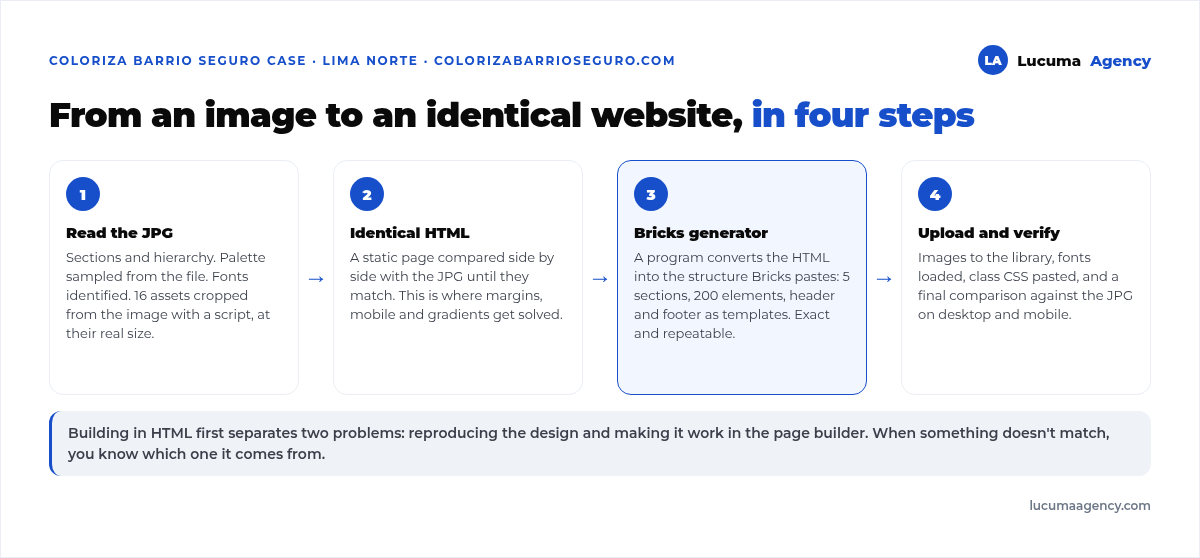
Second: an HTML version before touching WordPress
It may sound like double work, and it's the opposite. Building a static HTML and CSS page first, comparing it side by side with the JPG until they match, separates two problems: reproducing the design and making it work in WordPress. If you mix them, every time something doesn't look the same you don't know whether it's the design or the builder.
That version is where the fine decisions got settled: real margins, how the cards behave on mobile, which text is a heading and which is a label, and the radial gradients on the cards, which are easy in CSS and don't exist in the Bricks interface.
Third: convert the HTML to Bricks structure, with a generator
We build in WordPress with Bricks, and Bricks lets you paste entire sections from a text file with a defined structure. Instead of rebuilding the design by hand, dragging elements around, we wrote a small program that reads the HTML and generates that structure: the full page with its five sections and 200 elements, plus the header and footer as global templates.
This has two advantages a client doesn't see but pays for: the conversion is exact because it comes from the same HTML that already matched the JPG, and if the client asks for a structural change, it's fixed in the generator and everything is regenerated in seconds. We explain why we use this builder in Bricks vs Elementor vs Gutenberg.
What broke, and the rule it left
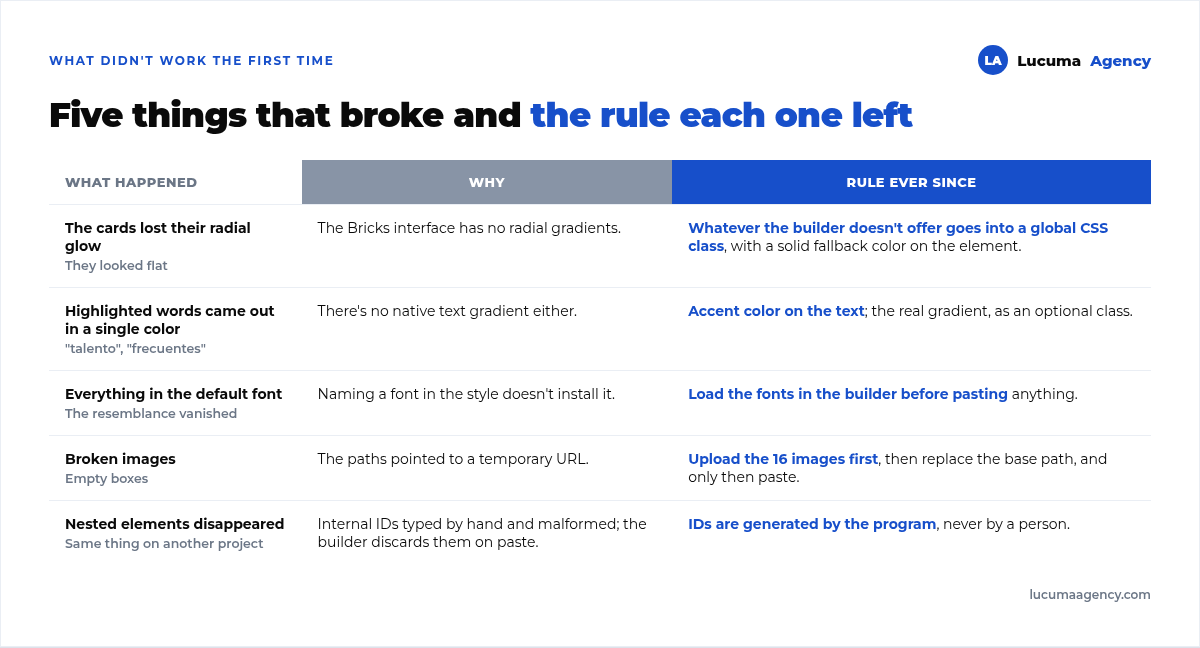
- The radial gradients on the cards don't exist in Bricks. Rule: whatever the builder doesn't offer goes into a global CSS class, with a solid fallback color on the element. If someone forgets to paste the CSS, the website still looks right, just without the glow.
- Neither do text gradients. Words like “talent” or “frequent” had a gradient. We solved it with an accent color on the text, and the real gradient was kept as an optional class.
- The fonts weren't loading. Naming a font in the styles doesn't install it. Rule: typefaces are loaded in the builder settings before pasting anything, or everything falls back to the default font and the resemblance is lost.
- The images pointed to a temporary path. Rule: first upload the 16 images to the WordPress media library, then replace the base path, and only then paste.
One more rule, learned on another project of the same kind: each element's internal IDs must be generated automatically, never written by hand, because the builder regenerates them on paste and silently drops nested elements when the IDs are malformed.
Fourth: the design system, so the client doesn't break it
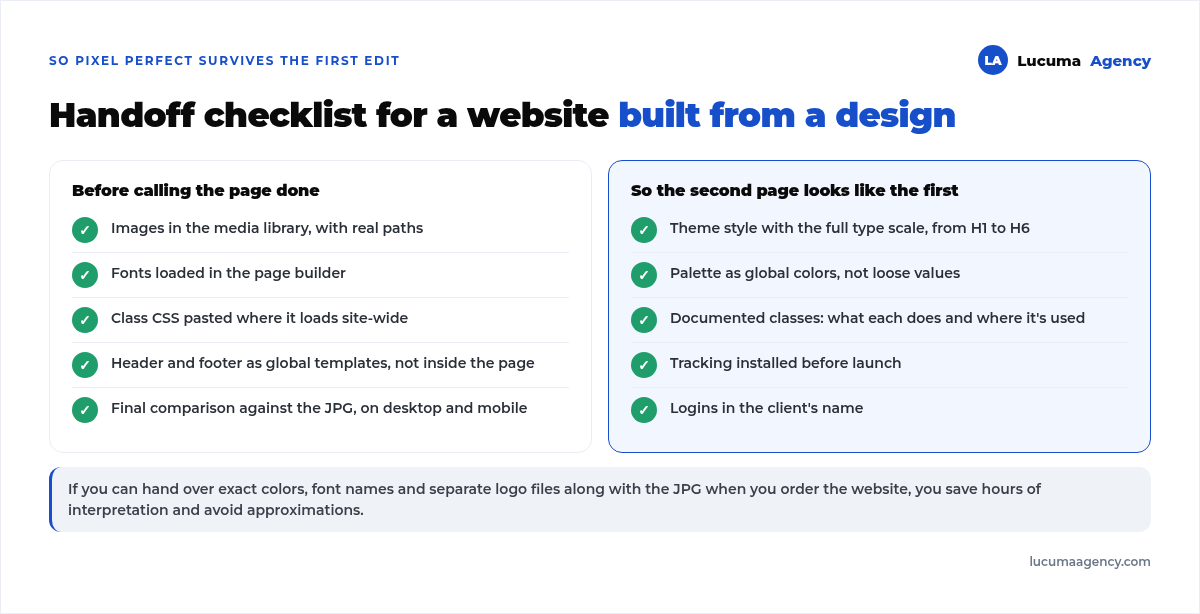
A pixel-perfect website lasts until someone edits a heading with a different size. To prevent that, along with the page we delivered the theme styles: the full type scale from H1 to H6 with its sizes, the palette as global colors, and documented CSS classes. That way, when the client creates a new page, it inherits the design without anyone having to remember that the H2 is 40 pixels.
What changes for you if you're commissioning a website from a design
- Delivering a JPG isn't a problem, but it adds interpretation work. If you can, also share the exact colors, the font names and the logos as separate files: you save hours and avoid approximations.
- Ask to see the HTML version or a side-by-side comparison before the website is in WordPress. That's the cheap moment to make corrections.
- Ask whether the website includes theme styles and a global palette. That's what makes the second page look like the first.
- Pixel perfect doesn't mean identical on every phone. It means faithful to the design and adapted with judgment where the screen forces a change. Ask to see the mobile version, not just the desktop one.
If you're deciding who to build it with, what to ask for in a website quote gives you the full list.
Frequently asked questions
Can you build a pixel-perfect website from a JPG?
Yes, with an intermediate interpretation step: extract the palette, fonts and assets from the image, and build a static version first that you compare against the design before taking it to WordPress.
Is it better to deliver the design in Figma?
Yes, because it includes exact measurements, colors and typefaces, plus exportable assets. But a well-made JPG can be converted just the same; it just takes more hours of interpretation.
What does pixel perfect mean for a website?
That the website faithfully reproduces the design on the screen it was designed for, and adapts on other screens following the same visual logic. It doesn't mean every pixel matches on every device, which is impossible.
Why build in HTML first if it's going to end up in WordPress?
To separate two problems: reproducing the design and making it work in the builder. That way, when something doesn't look the same, you immediately know which of the two it comes from.
How long does it take to convert a design to WordPress?
A five-section landing page like this one takes one to two weeks, including interpreting the JPG, the HTML version, the conversion and mobile testing. With a Figma design and separate assets, less.
Conclusion
Converting a JPG design into a pixel-perfect WordPress website is a four-step process: read the image and extract what it doesn't include, build an HTML version that matches, convert it to the builder with a generator instead of by hand, and deliver a design system so the fidelity survives the client's first edit. That's how it worked for Coloriza, and the rules our stumbles left behind are the ones we now apply from day one.
Going from design to code is only one part of building a website: the rest is in our digital marketing services. We explain the platform we build every design on in why we build websites on WordPress.
At Lucuma Agency we do WordPress web development from your design, whether it comes in Figma, PDF or as an image. Book a free consultation and we'll tell you what's missing from your file for the website to come out identical.
Other posts you might like
At almost every real estate developer we work with, the lead takes the same absurd trip: it comes in through the form...
Switching servers is scary for a sensible reason: you rarely do it, and when it goes wrong, it goes wrong in public....
The question always comes the same way: “which payment gateway do you recommend?” And the useful answer doesn't start with a name, because the...
There's a moment, in quite a few projects, when the search for the right plugin becomes the problem. You tried three,...
Almost every online complaints book we audit complies on the outside and fails on the inside. They have the notice,...
The message came in like this: “the complaints book is throwing an error.” The Proba Inmobiliaria website, a page required by law,...
“Top 50 plugins” lists don't help you decide. They help you install fifty plugins. This is ours,...
Almost every business we ask has backups. Almost none has ever restored one. Those two sentences together are...
Almost every hosting conversation starts with price and ends up in the wrong place. The useful question is...
When a business wants to sell outside its country, the conversation almost always starts off wrong: with translation. And the...
Structured data is the piece of code that explains to Google, in a language that leaves no room for interpretation,...
The question comes up in almost every meeting: “if I use AI to write, will Google penalize me?” The short answer...