WooCommerce with Yape and Plin: which payment gateway to choose in Peru
The question always comes the same way: "Which gateway do you recommend?" And the useful answer doesn't start with a name, because fees change every few months and what you get charged isn't what the next store gets charged. It starts with deciding what type of gateway you want, which is what really shapes your store: how people buy, what you see afterward and what breaks.
First things first: the two types of gateway
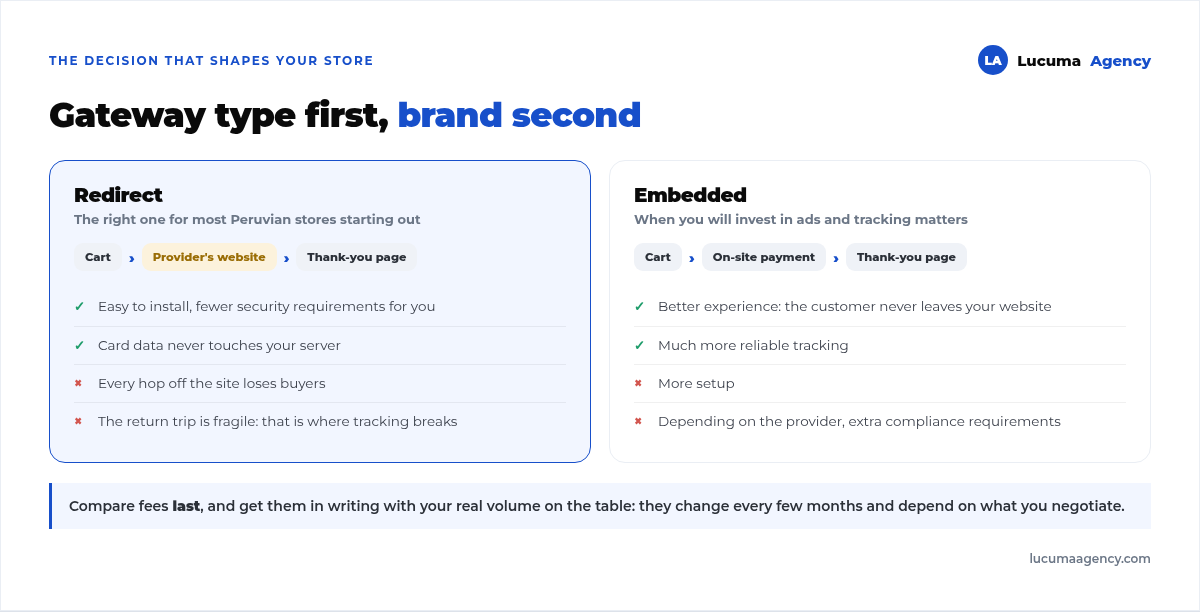
Redirect gateway. When customers click "pay," they leave your website for the provider's page, pay there and come back. It's the easiest to install and the one that asks the least of you on security, because card data never passes through your server. It has two costs: every hop loses buyers, and the return trip is fragile, as we'll see below.
Integrated gateway. Payment happens inside your own checkout page. The experience is better and tracking is more reliable, but it takes more setup and, depending on the provider, more compliance requirements.
For most Peruvian stores that are just starting out, a redirect gateway is the right call. You just need to know what you're accepting in exchange.
The redirect problem nobody tells you about
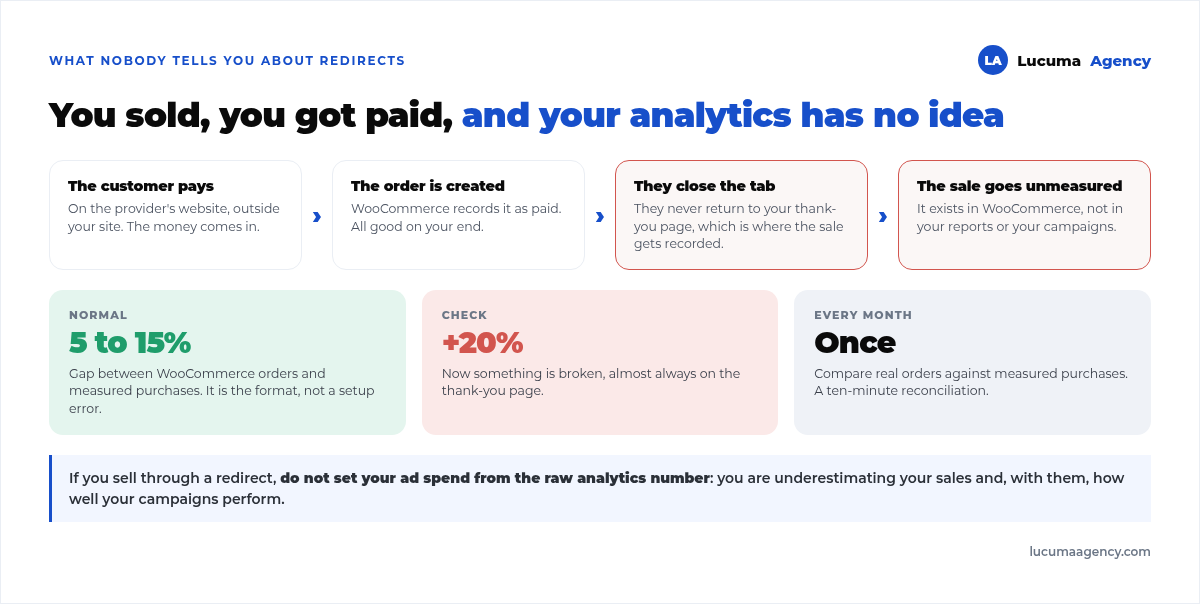
The sale is recorded in your analytics when the customer comes back to your thank-you page. If they pay and close the provider's tab without coming back, the order exists in WooCommerce and the money is there, but that sale doesn't show up in your reports.
We see it month after month at Vaporis, an online store we work with: a gap of 5 to 15% between actual WooCommerce orders and the purchases recorded in analytics is normal with redirect gateways. It's not an installation error: it's how the format works.
What to do about it:
- Compare every month WooCommerce orders against tracked purchases. If the gap shoots above 20%, then something really is broken.
- Don't make ad spend decisions based on the analytics number alone if you sell through a redirect. You're underestimating your sales, and with them, your campaigns' performance.
- Get your thank-you page right, because that's where everything gets recorded. We gave it its own article because it's the single point of failure for all your tracking.
How to set up tracking that doesn't lie is covered in how to track your website's conversions with Tag Manager and GA4, and it's included in our tracking and analytics.
Yape and Plin: how payments actually get collected
Here you need to separate two things that get mixed up all the time.
Yape and Plin as a method inside a gateway. Several Peruvian providers include them as a payment option alongside cards. Collection is automatic, the order is marked as paid on its own and the customer doesn't have to do anything else. That's what you want if you sell at some volume.
Yape and Plin "by hand." You show the QR code or phone number, the customer pays and uploads a screenshot. You set it up with WooCommerce's bank transfer method, changing its text. It works, it's free and it's how a huge number of Peruvian stores start. The cost is elsewhere: someone has to verify each payment by hand and mark the order. With five orders a day, it's doable; with thirty, it's a job.
The catch with this second route is tracking: if the order is marked as paid days later and by hand, your analytics doesn't record a sale when it actually happened, and your campaigns are left flying blind.
What no gateway will solve for you: Peruvian fields
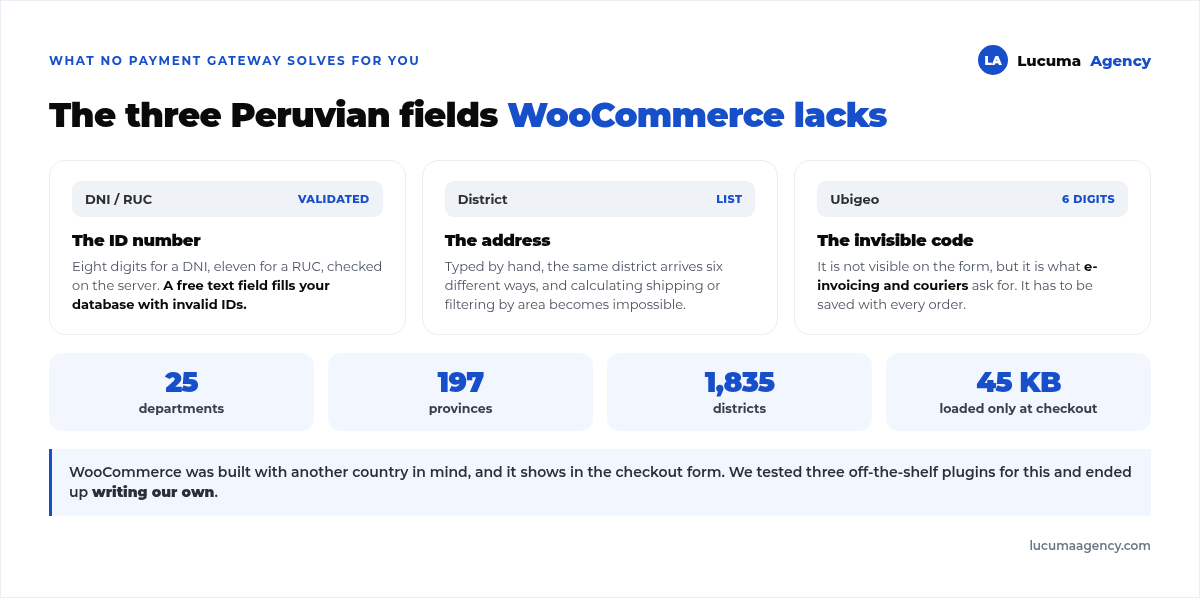
WooCommerce is designed for another country, and it shows in the checkout form. Three things are always missing:
1. DNI or RUC. You need it for the boleta or the factura, and it has to be validated: eight digits for a DNI, eleven for a RUC. A free text field fills your database with invalid ID numbers.
2. The district, from a list. Typed by hand, the same district reaches you in six different spellings, and calculating shipping or filtering orders by area becomes impossible.
3. The six-digit ubigeo code which is what electronic invoicing and couriers ask for, and which isn't visible but has to be saved on every order.
We tested three plugins on the market for this and ended up writing our own with the country's 25 departments, 197 provinces and 1,835 districts. Why we made that decision, and when it's not worth making, is covered in how to build a custom WordPress plugin.
How we choose, in practice
Four questions in this order, and the provider's name almost picks itself:
- How many orders a day do you expect in the first year? Below five, manual Yape and bank transfer are enough and you pay no fees. Above that, you need automatic collection.
- Do your customers pay by card or with a digital wallet? If your audience pays almost everything with Yape, an expensive card gateway doesn't add anything.
- Are you going to invest in advertising? If so, tracking matters a lot, and you'll want an integrated gateway or, at the very least, a very well-built return to the thank-you page.
- Who reconciles? An operational question, not a technical one. Decide who checks every day that what was collected matches what was ordered, because with any gateway there are stray cases.
You compare fees at the end, asking each provider for them in writing with your real volume on the table. They change often and depend on what you negotiate; any percentage you read in an article, this one included, may be out of date by the time you read it.
Frequently asked questions about WooCommerce payment gateways
Can I accept Yape in my WooCommerce store?
Yes, in two ways: through a gateway that includes it as a payment method, with automatic collection, or by showing the QR code and verifying payments by hand with the bank transfer method. The first one scales; the second is free but needs someone checking.
How many gateways should I enable?
Two or three at most. More payment options don't sell more: they create doubt at the last step, which is exactly where you don't want the customer stopping to think.
Why don't my WooCommerce sales match my analytics?
Almost always because of the redirect: the customer pays on the provider's site and doesn't come back to your thank-you page. A gap of 5 to 15% is normal. Above 20%, check the tracking on your thank-you page.
Do I need a special security certificate?
Your store needs HTTPS, no exceptions, even if you use a redirect. If you decide to process cards on your own site, there are additional compliance requirements that the provider will spell out for you.
Can the gateway plugin slow down my store?
It can, especially the ones that load their scripts on every page instead of only on the cart and checkout. It's one of the things we check when auditing a slow store; the full case study is in how we sped up a slow WooCommerce store.
Conclusion
Choose the type of gateway first and the brand second. If you sell little, manual Yape and bank transfer save you fees and keep things simple. If you plan to grow or invest in advertising, you need automatic collection and tracking that doesn't lose 15% of your sales along the way. And either way, you'll have to solve the Peruvian checkout fields yourself: no gateway comes with them.
In Lucuma Agency, digital marketing agency in Lima, we build the online store end to end: gateway, Peruvian fields, tracking and monthly reconciliation. If you're not sure your tracked sales are all of your sales, check out our services or book a free consultation and we'll compare them in 30 minutes.
Other posts you might like
At almost every real estate developer we work with, the lead takes the same absurd trip: it comes in through the form...
Switching servers is scary for a sensible reason: you rarely do it, and when it goes wrong, it goes wrong in public....
The question always comes the same way: “which payment gateway do you recommend?” And the useful answer doesn't start with a name, because the...
There's a moment, in quite a few projects, when the search for the right plugin becomes the problem. You tried three,...
Almost every online complaints book we audit complies on the outside and fails on the inside. They have the notice,...
The message came in like this: “the complaints book is throwing an error.” The Proba Inmobiliaria website, a page required by law,...
“Top 50 plugins” lists don't help you decide. They help you install fifty plugins. This is ours,...
Almost every business we ask has backups. Almost none has ever restored one. Those two sentences together are...
Almost every hosting conversation starts with price and ends up in the wrong place. The useful question is...
When a business wants to sell outside its country, the conversation almost always starts off wrong: with translation. And the...
Structured data is the piece of code that explains to Google, in a language that leaves no room for interpretation,...
The question comes up in almost every meeting: “if I use AI to write, will Google penalize me?” The short answer...