How to measure your website's conversions with Google Tag Manager and GA4
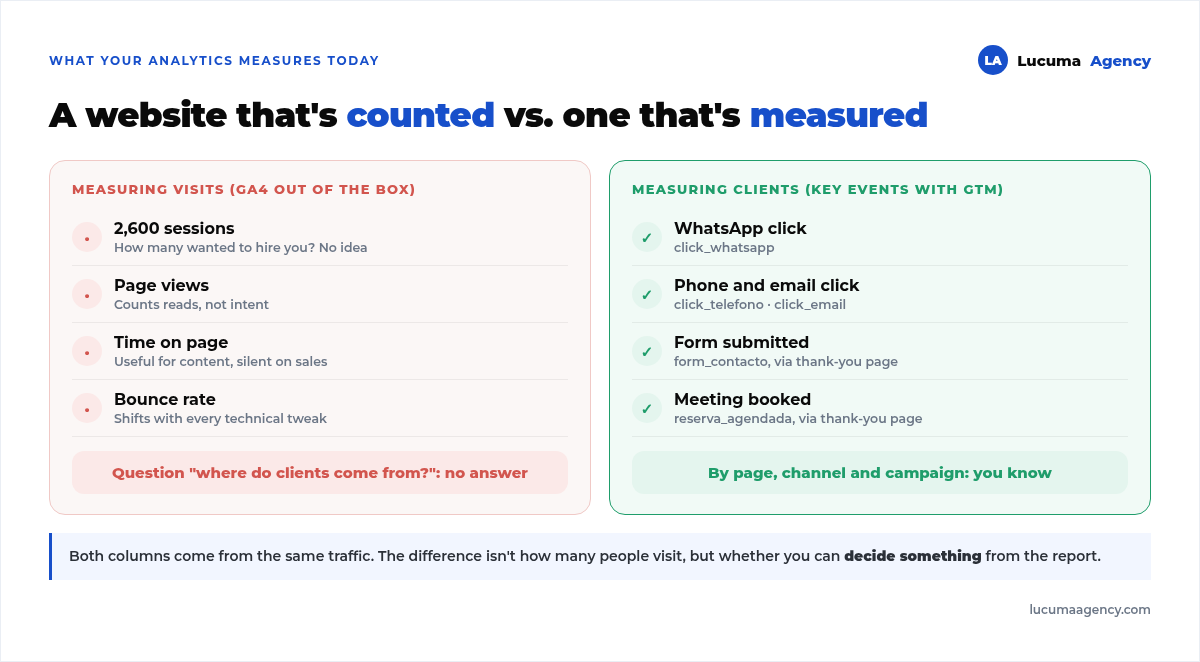
A report says your website had 2,600 visits last month. Sounds good until someone asks how many of those visitors messaged you on WhatsApp, called or booked a meeting. If the answer is "we don't know," your website isn't measured: it's counted. The same goes for the link in your social media bio: if it lives on a third-party service, it isn't even counted; we explain why in your own link in bio vs Linktree. And a counted website doesn't let you decide anything, because you don't know which page, which campaign or which channel brought in the real customers.
This guide explains how to go from measuring visits to measuring customers with Google's two free tools: Google Tag Manager (GTM) and Google Analytics 4 (GA4). It covers the five events worth measuring on almost any service business website in Peru, the method to set them up without coding, and the three errors we found in September when we reviewed our own tracking, which were inflating the data without anyone noticing.
Visits, events and key events: what each one is
GA4 records everything that happens on the website as an events: viewing a page, scrolling, clicking a link. By default it measures dozens of them, and almost none of them tell you whether someone wanted to hire you.
A key event (formerly called a conversion) is an event you flag as important because it represents a real step toward a sale: submitting the form, tapping the WhatsApp button, booking a meeting. GA4 only knows which ones they are if you tell it. Without that, every "conversions" report shows zero and the acquisition reports are useless for comparing channels.
Google Tag Manager is the piece that detects those clicks and submissions and passes them to GA4. It's a container you install once on the website; after that, each new event is set up from its dashboard, without touching the site's code.
The five events almost every service business website should measure
You don't need to measure a hundred things. For a website that sells services, five events cover 90% of your decisions:
1. WhatsApp click. In Peru it's the number one contact channel. You measure it by detecting clicks on links that contain wa.me or api.whatsapp.com.
2. Phone click. The tel: links people tap on their phones. On websites with a lot of mobile traffic, it often beats the form.
3. Email click. mailto: links. Less common, but they still show up in B2B.
4. Form submitted. The actual submission, not the click on "send": you need to measure the confirmation. The most reliable way is to have the form redirect to a thank-you page and measure views of that page.
5. Meeting booked. If you use a scheduling tool (TidyCal, Calendly, Google Calendar), you also measure it with a thank-you page the calendar redirects to on confirmation. An embedded calendar that doesn't redirect anywhere is impossible to measure, and that was one of our problems.
On top of these five, you can add scroll depth and FAQ opens, which aren't conversions but tell you whether the page gets read.
How to set it up without coding
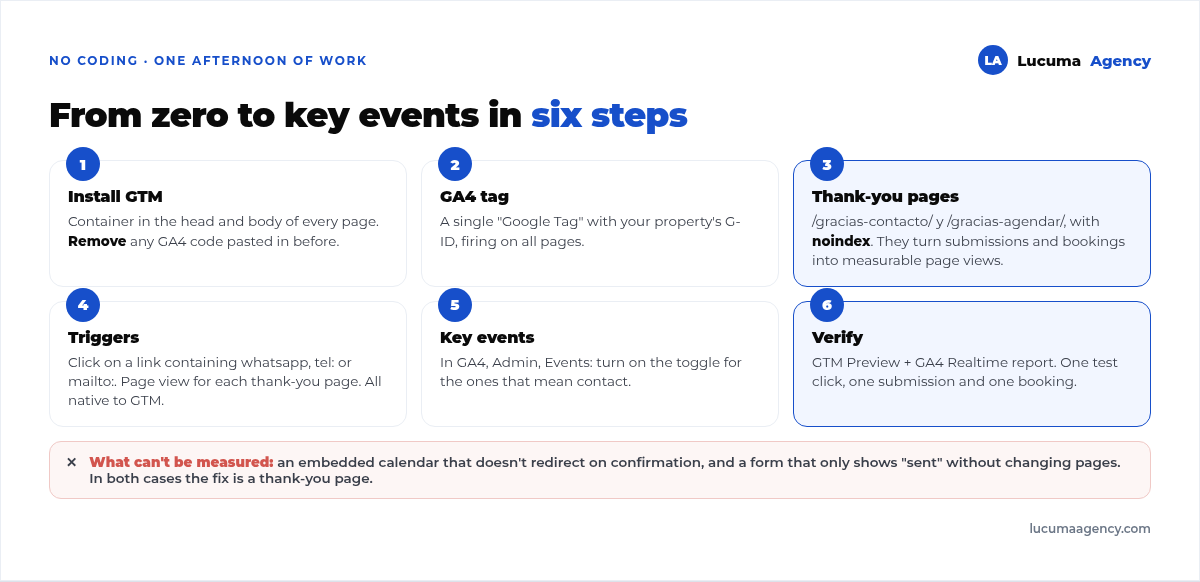
The method we use, start to finish, has six steps. Once GTM is installed, the rest is done from the dashboard in an hour or two.
1. Install GTM and remove any other Google tag
The GTM container goes in the head and at the top of the body on every page. In WordPress with Bricks, it goes in Theme Settings, in the custom code section. And here's the first common mistake: if you previously had the GA4 code pasted directly into the website, you need to remove it. If both stay, every visit gets counted twice.
2. Create the GA4 tag inside GTM
A single "Google Tag" type tag with your measurement ID (it starts with G-), set to fire on all pages. That tag sends the page views; the others send the events.
3. Create the thank-you pages
One for each action that ends in a confirmation: /gracias-contacto/ for the form and /gracias-agendar/ for the calendar. Both set to noindex, so they don't show up in Google. It takes ten minutes and turns two invisible actions into measurable page views. Before that, check that the form actually gets delivered: in form that never arrives we explain why it fails so often.
4. Set up the triggers
For WhatsApp, phone and email, a "link click" trigger with the condition that the URL contains whatsapp, tel: or mailto:. For the form and meeting, a "page view" trigger with the path of each thank-you page. Each trigger fires a GA4 event tag with a clear name: click_whatsapp, click_telefono, form_contacto, reserva_agendada. GTM comes with all these triggers built in; no code needed.
5. Mark the key events in GA4
In GA4, under Admin, in the Events section, each event coming from GTM shows up in the list within a few hours. That's where you turn on the "key event" toggle for the ones that represent a contact. Until this step, GA4 receives them but doesn't treat them as conversions.
6. Verify in real time
With GTM preview mode open, do a WhatsApp click, a form submission and a test booking yourself, and confirm each one shows up in GA4's real-time report. If you don't test it, you'll find the error a month from now, when there's no data left to recover.
The three errors that were inflating our own data
In September we reviewed our website's tracking before installing GTM. We're sharing it because these are silent errors: the website works, Analytics shows numbers, and nobody suspects a thing. Online stores have one more, the payment gateway that doesn't send the customer back to your website: we explain it in which payment gateway to choose in Peru.
Double counting. The GA4 code was pasted into the website and was also going to load from GTM. We removed it before publishing the container. It's the most common mistake when someone installs GTM without checking what was there before.
One tag shared across three sites. The serious finding. Our website's Google tag had, as destinations, our own property plus the properties of two clients. In practice, traffic from one client's website was landing in our Analytics as if it were ours. The "hostname" dimension made the split clear:
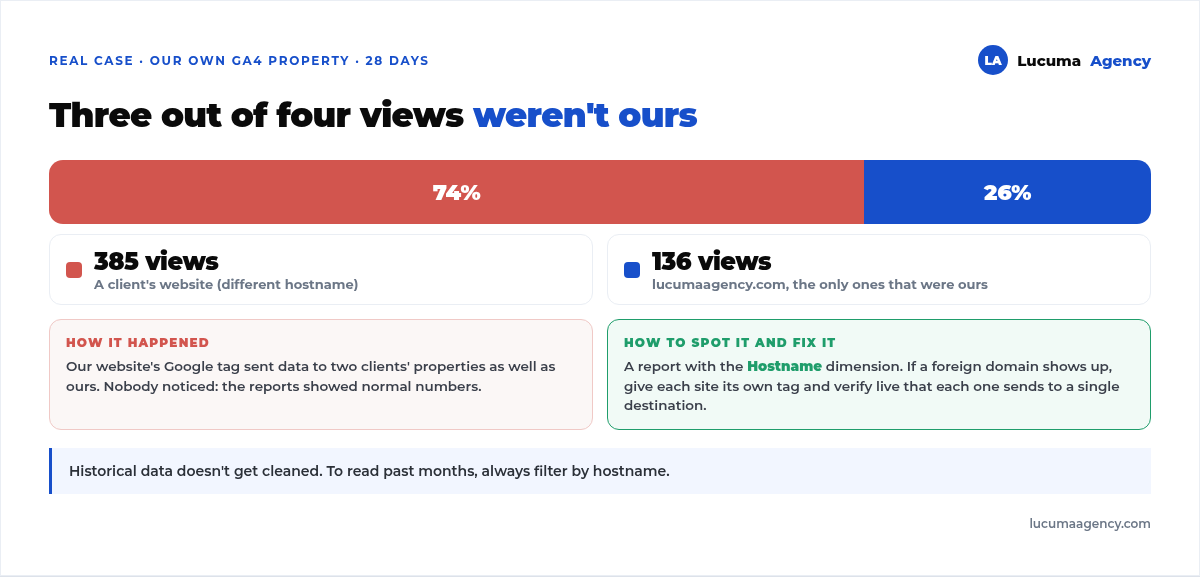
Three out of four views weren't ours. Every report from the previous months was inflated, and the historical data can't be cleaned up: you can only filter by hostname when reading it. The fix was to give each site its own tag and verify live that each one sends to a single destination.
A booking that was impossible to measure. The booking page had Google Calendar embedded, which doesn't redirect anywhere on confirmation. We knew how many people visited the page and nothing more. We replaced it with a calendar that redirects to a thank-you page, and since then every booked meeting shows up as a key event.
The lesson from all three: before looking at a report, confirm what it's measuring. An acquisition report with someone else's traffic or duplicate visits leads to wrong decisions made with all the confidence in the world. If you use Search Console alongside GA4, comparing the two is a good alarm: we explain it in what Google Search Console is for.
Measure all the way to the customer, not just the click
The five events measure the intent to make contact. The next level is knowing which of those contacts became customers, and that no longer lives in Analytics: it lives in your CRM or, at the very least, in a spreadsheet where you log where each lead came from. If you invest in ads, this step is what tells you whether the campaign is profitable, not just whether it brings inquiries. We walk through it with sample numbers in how much it costs to get a lead with Google Ads, and it applies to any industry.
With tracking working, the first month serves as your baseline. From the second month on you can compare: which page drives the most WhatsApp clicks, which channel brings meetings, which Google Ads campaign you should turn off. A well-built website launches with this tracking in place; an existing website can have it installed in an afternoon.
Frequently asked questions about measuring website conversions
Do I need Google Tag Manager, or is Google Analytics enough?
With GA4 alone you can measure page views and a few automatic events, like scroll and outbound clicks. To measure WhatsApp clicks, calls and form submissions with clear names and no coding, GTM is the simplest way. Plus, when you want to add the Meta pixel or the Google Ads tag, you do it from the same container.
How do I know if my website is counting everything twice?
Open the page source and look for your measurement ID (G- followed by letters and numbers). If it's pasted directly and you also have GTM installed with a GA4 tag, you're double counting. Another clue: an abnormally low bounce rate or a user count far higher than in Search Console. What to look at in Search Console to make that comparison is in how to measure SEO in Search Console without losing your mind.
What's the difference between an event and a key event?
Everything GA4 records is an event. A key event is one you marked as important. Only key events show up as conversions in reports, and they can be used to optimize Google Ads campaigns.
Can I measure WhatsApp conversations, not just the click?
From the website, only the click. What happens next takes place inside WhatsApp, and GA4 can't see it. To close the loop, you need to log in your CRM or in a spreadsheet where each conversation came from, or use the WhatsApp Business API, which is a separate project.
How much does it cost to have an agency set it up?
It depends on how many actions need to be measured and whether the website already has GTM. As a reference, at Lucuma Agency the full setup of GTM, GA4 and key events for a service business website starts at S/ 600 and is delivered already verified. It's detailed in our website tracking and analytics.
Conclusion
Measuring visits is counting; measuring customers is deciding. With GTM, GA4, five events and two thank-you pages, any service business website can know which page, which channel and which campaign brings in real contacts. And before trusting any report, check that it isn't double counting or mixing in someone else's traffic: it happened to us, and the numbers looked perfectly normal.
In Lucuma Agency we install full tracking and hand it over verified, as part of our tracking and analytics service or within any web project. Want to know what your website is measuring today? Book your free consultation and we'll review it together.
Other posts you might like
At almost every real estate developer we work with, the lead takes the same absurd trip: it comes in through the form...
Switching servers is scary for a sensible reason: you rarely do it, and when it goes wrong, it goes wrong in public....
The question always comes the same way: “which payment gateway do you recommend?” And the useful answer doesn't start with a name, because the...
There's a moment, in quite a few projects, when the search for the right plugin becomes the problem. You tried three,...
Almost every online complaints book we audit complies on the outside and fails on the inside. They have the notice,...
The message came in like this: “the complaints book is throwing an error.” The Proba Inmobiliaria website, a page required by law,...
“Top 50 plugins” lists don't help you decide. They help you install fifty plugins. This is ours,...
Almost every business we ask has backups. Almost none has ever restored one. Those two sentences together are...
Almost every hosting conversation starts with price and ends up in the wrong place. The useful question is...
When a business wants to sell outside its country, the conversation almost always starts off wrong: with translation. And the...
Structured data is the piece of code that explains to Google, in a language that leaves no room for interpretation,...
The question comes up in almost every meeting: “if I use AI to write, will Google penalize me?” The short answer...