How to measure SEO in Search Console without losing your mind
Search Console has dozens of reports, filters and comparisons, and most of them won't tell you anything useful about whether your SEO is working. We check the one for our own website every month and look at four things, always the same ones, in the same order. This article uses our real numbers from a 28-day period, because teaching with your own data forces you not to dress it up. If you already have the tool connected and don't know what to look at, this is the minimum you need to understand. To set it up from scratch, that's in the complete Search Console guide.
The four things, and in what order
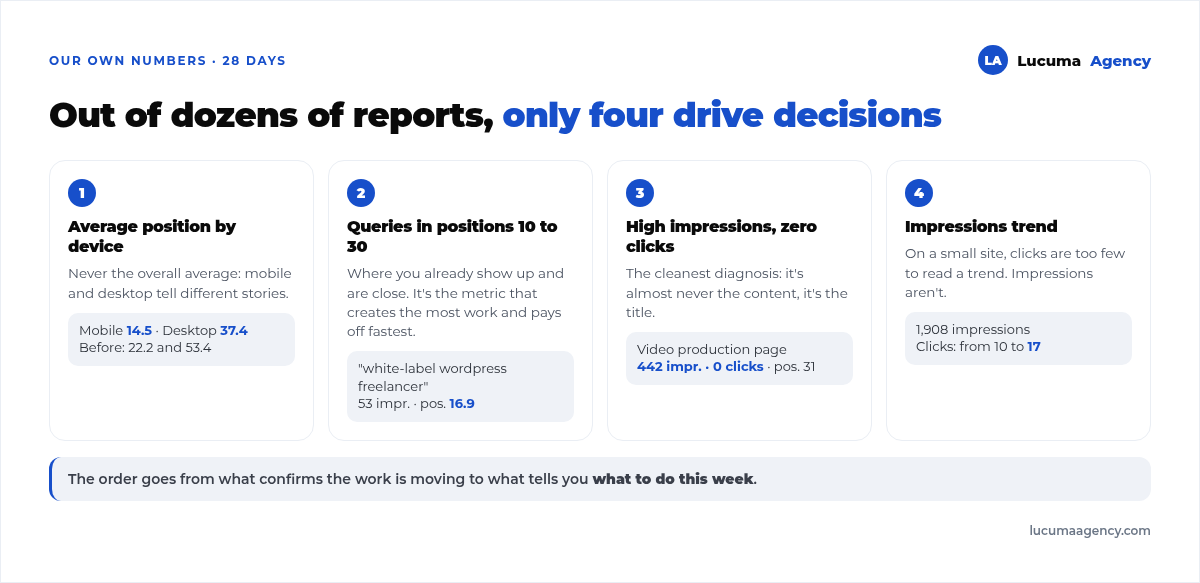
The order isn't random: it goes from what confirms the work is moving forward to what tells you what to do this week.
1. Average position, split by device
Almost nobody separates mobile from desktop, and it's the first thing you should do, because they usually tell different stories. In our case, over the last 28-day period, the average position on mobile was 14,5 and on desktop 37,4. In the previous period it was 22.2 and 53.4. Both improved, but mobile is twenty spots ahead, and since most local searches happen there, that's the figure that rules.
If your overall average barely moves, open the device breakdown before concluding that nothing is happening.
2. Queries between positions 10 and 30
This is the metric that generates the most work and pays off the fastest. These are searches where you already appear, but on the second or third page: you have something relevant and you're close. Going from position 60 to 40 changes nothing; going from 15 to 8 changes everything, because that's where clicks start.
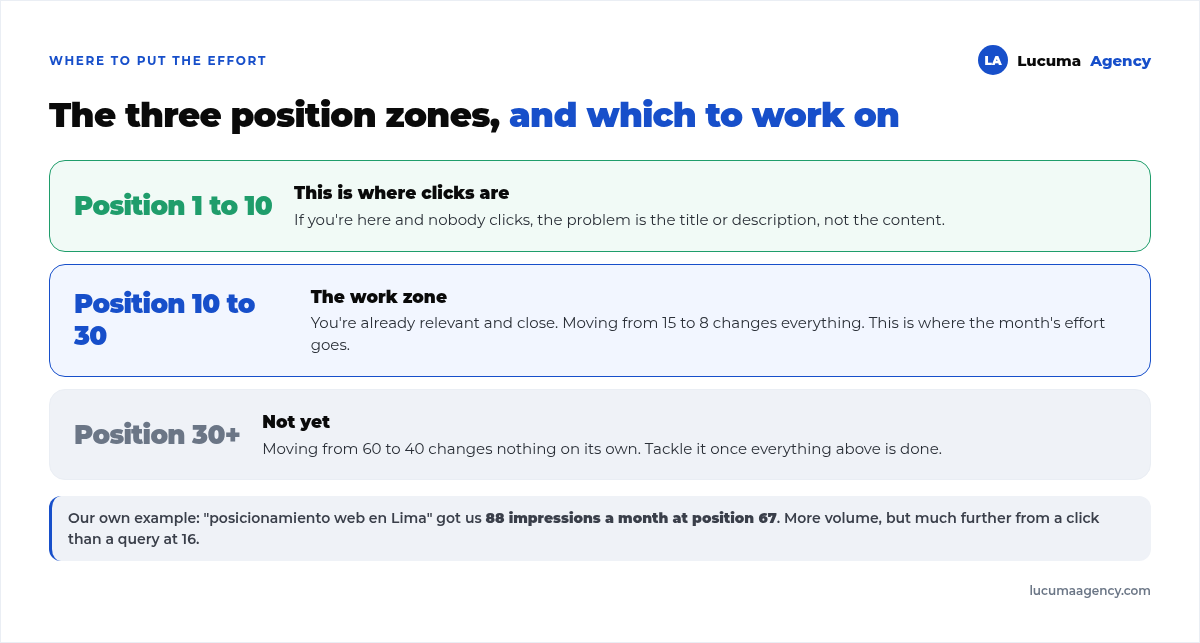
Our example: “posicionamiento web en Lima” (SEO in Lima) gave us 88 monthly impressions at position 67, and “freelance wordpress marca blanca” (white-label WordPress freelancer) 53 impressions at 16.9. We worked on the second one first, even though it has fewer impressions, because it's much closer to turning into clicks.
3. Pages with lots of impressions and zero clicks
It's the cleanest diagnosis the tool gives you. If a page shows up a lot and nobody clicks it, the problem is almost never the content: it's the title, or you're showing up for a search that isn't yours.
In our case, the video production page had 442 impressions and 0 clicks, with an average position of 31. The queries were “productora audiovisual lima” (video production company Lima) and similar. The diagnosis there is clear: we show up for a search where the user wants a production company, and our page talks about something else. It's not an SEO problem, it's a business decision: either we compete for that search for real, or we accept that it isn't our channel.
4. The impressions trend, not the clicks trend
A small site gets too few clicks to read a trend: we went from 10 to 17 clicks between two periods, and with numbers like that one odd week changes everything. Impressions, on the other hand, number in the thousands and move more meaningfully. If impressions go up and clicks don't, you're gaining ground but still in positions where nobody clicks through; that's exactly the time to work on points 2 and 3.
A fifth report worth watching starting this year
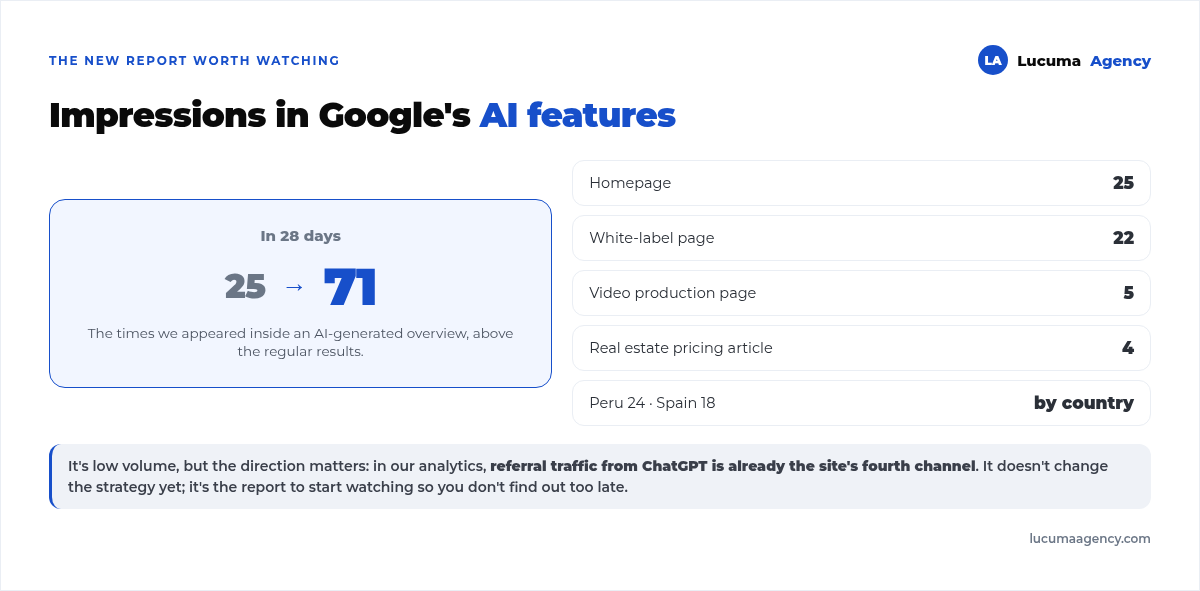
Search Console now reports impressions in artificial intelligence features separately, the summaries Google shows above the results. Ours went from 25 to 71 in 28 days. It's small in volume, but the direction matters: in our analytics, referral traffic from ChatGPT is already the site's fourth channel. It doesn't change the strategy yet, but it's the report you need to start watching now so you don't find out too late.
What you don't need to check every month
- The entire coverage report. It only matters if lots of excluded pages suddenly appear; otherwise, it's noise.
- Core Web Vitals, every week. It moves with accumulated data from real users, so checking it often adds nothing.
- External links. Interesting once a quarter, useless as monthly tracking.
- The site's overall average position. It mixes your best queries with hundreds of irrelevant ones. Always broken down, never on its own.
Frequently asked questions
How often should I check Search Console?
Once a month is enough to make decisions, and once a week if you're in the middle of a big change, like a migration or a redesign. Checking it every day doesn't improve anything and makes you mistake noise for a trend.
Why do Search Console and Analytics show different numbers?
Because they measure different things. Search Console counts what happens in the search engine, before people reach your website; Analytics counts what happens inside it. They shouldn't match, and if someone shows you a report where they line up exactly, be suspicious. How to set up internal tracking properly is covered in how to track conversions with Google Tag Manager and GA4.
What's a good average position?
It depends on the queries behind it. A site with an average position of 8 made up of searches for its own brand is worse off than one with an average position of 20 on commercial searches. The average is only useful compared with itself, month over month.
I have lots of impressions and few clicks. Is that bad?
Not necessarily: it's normal when you're between positions 15 and 40. It becomes a problem when you're in the top 10 and people still don't click, because then it really is the title or the description that's failing.
Is Search Console useful if I just launched my website?
Yes, and it's the first thing you should connect, because the data isn't retroactive: you'll only see it from the day you connect it. We detail the work for those first months in how long it takes to rank a website on Google.
Conclusion
Measuring SEO isn't about looking at more reports, it's about always looking at the same four: average position by device, queries between positions 10 and 30, pages with impressions and no clicks, and the impressions trend. With that you know whether you're making progress and, most importantly, you know what to work on this week. Everything else is context you can review every three months without missing anything.
In Lucuma Agency we set up and explain this reading as part of our plans for tracking and analytics, so the monthly report tells you what to do and not just what happened. If you want us to go over your Search Console with you, book a free consultation 30-minute call.
Other posts you might like
At almost every real estate developer we work with, the lead takes the same absurd trip: it comes in through the form...
Switching servers is scary for a sensible reason: you rarely do it, and when it goes wrong, it goes wrong in public....
The question always comes the same way: “which payment gateway do you recommend?” And the useful answer doesn't start with a name, because the...
There's a moment, in quite a few projects, when the search for the right plugin becomes the problem. You tried three,...
Almost every online complaints book we audit complies on the outside and fails on the inside. They have the notice,...
The message came in like this: “the complaints book is throwing an error.” The Proba Inmobiliaria website, a page required by law,...
“Top 50 plugins” lists don't help you decide. They help you install fifty plugins. This is ours,...
Almost every business we ask has backups. Almost none has ever restored one. Those two sentences together are...
Almost every hosting conversation starts with price and ends up in the wrong place. The useful question is...
When a business wants to sell outside its country, the conversation almost always starts off wrong: with translation. And the...
Structured data is the piece of code that explains to Google, in a language that leaves no room for interpretation,...
The question comes up in almost every meeting: “if I use AI to write, will Google penalize me?” The short answer...