Online complaints book in WordPress: how to comply with Indecopi
Almost every virtual complaints book we audit complies on the outside and fails on the inside. They have the notice, they have the form, they have the fields. And they don't keep a single complaint form, because the only place the claim went was an email that never left the server. This is what you need to set up in WordPress for the complaints book to actually work, and what we see fail.
Necessary disclaimer: this article covers the technical side, which is our part. Confirm the legal details that apply to your industry with your advisor; the regulation is enforced by Indecopi and has specifics by sector.
What it is and who needs it
Every commercial establishment in Peru that serves consumers is required to have a complaints book (Libro de Reclamaciones). If you also sell or serve customers online, you additionally need the virtual version, accessible from your website, with a visible link.
Two concepts that get confused all the time, and that the form itself must tell apart:
- Claim (reclamo): dissatisfaction with the product or service received.
- Complaint (queja): displeasure with the customer service, without there being a problem with the product itself.
The consumer chooses which of the two they're filing. It's not a cosmetic detail: it changes how it's processed.
The fields the form includes
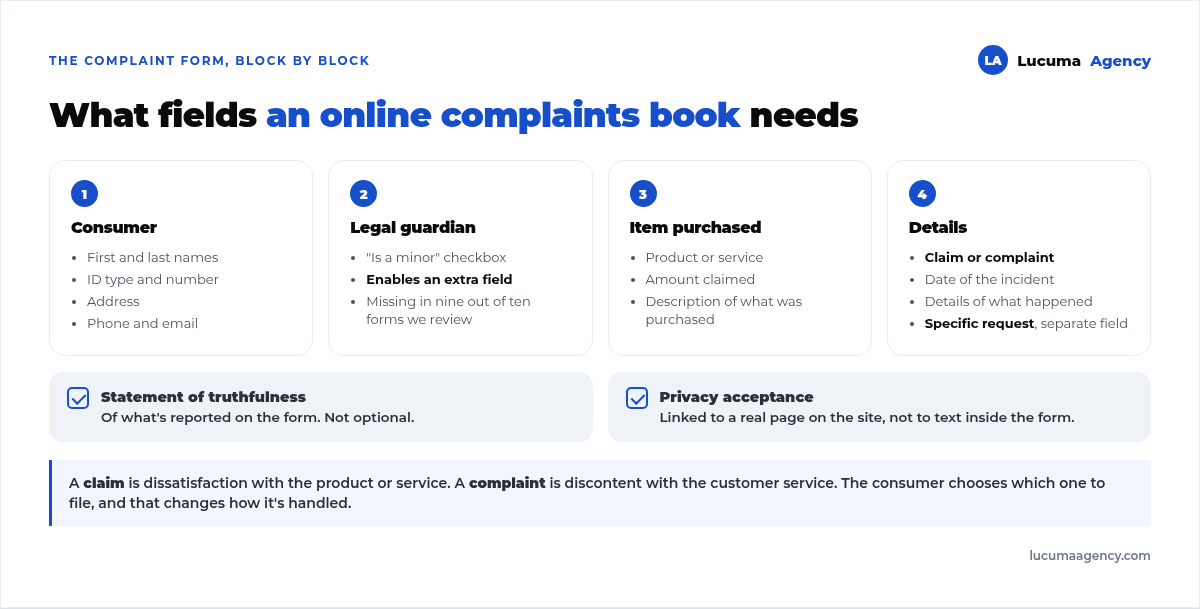
Grouped into four blocks:
1. Consumer identification. Full name, document type and number, address, phone and email.
2. Guardian, if the consumer is a minor. It's a checkbox that reveals an extra field. It's missing in nine out of ten forms we review.
3. Identification of the goods or services purchased. Whether it was a product or a service, the amount claimed and a description of what was purchased.
4. Details. Form type (claim or complaint), date of the incident, the details of what happened and the consumer's specific request which is its own field, separate from the details.
And two closing checkboxes that are not optional: the truthfulness statement for the information provided and the acceptance of the privacy policy, because you're collecting personal data. That policy has to exist as a real page on your website, not as text inside the form.
What really fails: the form isn't saved
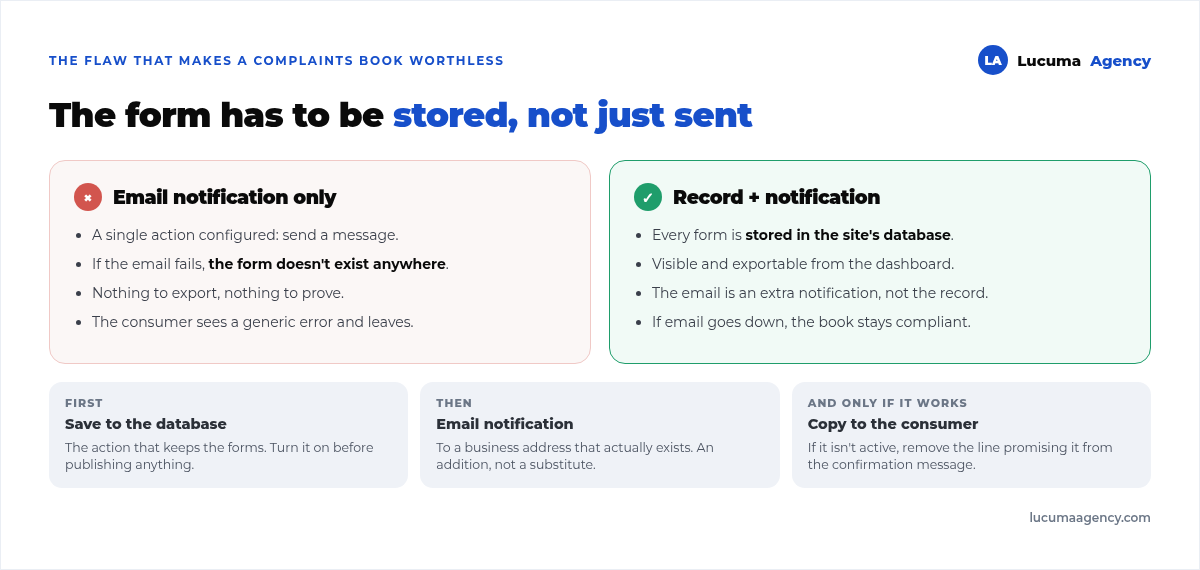
Here's the failure that turns a complaints book into a dead letter. Most forms have only one action set up: send an email. If that email fails (and it fails more often than you think), the complaint form doesn't exist anywhere.
We ran into exactly that scenario on the Proba Inmobiliaria website: the form returned an error, nobody received anything and nothing was recorded. The complete fix is in how we fixed WordPress outgoing mail, but the order of priorities is the lesson:
- First, save to the database. Every submitted form is recorded on the site, visible and exportable from the dashboard. This is what lets you prove you keep the forms.
- Then, the notification email, to a business address that actually exists, as an additional action and not instead of saving.
- And the copy to the consumer, if you decide to send it. If email isn't working, remove the sentence that promises it from the confirmation message.
That third point matters: don't promise on screen something the system doesn't do. It's the first thing that gets checked if someone claims they never received their copy.
What the website has to show besides the form
- A visible link to the complaints book, usually in the sitewide footer.
- The response deadline, stated in the confirmation message. The standard we use is a maximum of 15 business days.
- A number or code for each form, so the consumer can refer to their claim.
- A privacy policy page that's real, linked from the acceptance checkbox.
And something you don't see but definitely notice: the form has to work on mobile. A complaints book that can only be filled out from a computer is, in practice, a complaints book nobody can access.
How we set it up in WordPress
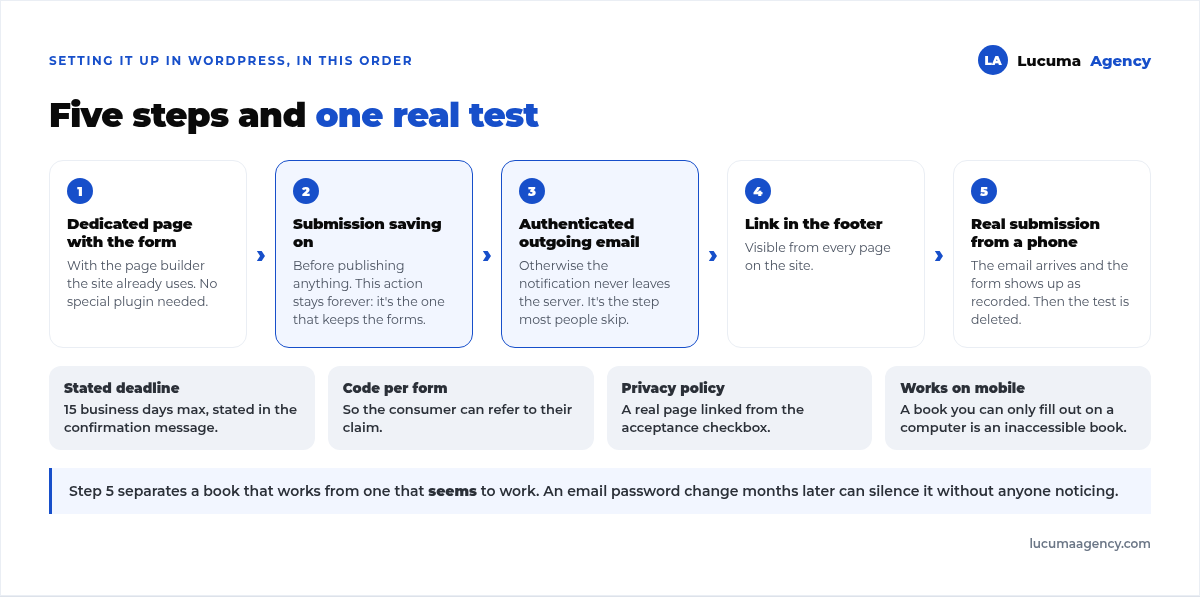
Five steps, in this order:
1. A dedicated page with the form from the builder the site already uses. You don't need a specific complaints book plugin; the ones that exist tend to add a layer of settings nobody maintains. A well-built form is enough.
2. Turn on submission saving in the builder before publishing anything. This action stays on for good: it's what keeps the forms.
3. Set up authenticated outgoing email, because otherwise the notification never leaves the server. It's the step most people skip.
4. Link it in the footer of every page on the site.
5. Test with a real submission from the public page, on mobile, and check both things: that the email arrives and that the form shows up as recorded. Then delete that test.
Step five is what separates a complaints book that works from one that only looks like it works. We do it on every delivery, and it's part of our website maintenance: a change to the email password months later can leave the complaints book silent without anyone noticing.
Frequently asked questions about the virtual complaints book
Do I need a complaints book if I only sell online?
Yes. If you serve consumers, you need a complaints book, and if your channel is the web, you need the virtual version accessible from it. For an online store it's part of the basic setup, along with the terms and the privacy policy.
How long do I have to respond to a claim?
The deadline we state in the forms we set up is 15 business days at most. What matters operationally is that someone at the business gets the notification the same day: the clock starts when the form is submitted, not when someone sees it.
Do I have to keep the forms? For how long?
Yes, you're required to keep them, and that's exactly why they should be saved in the database and not just sent by email. Confirm the exact period with your advisor; we set up the system so the forms are kept and can be exported at any time.
Does a regular contact form work?
No. It's missing required fields (form type, the consumer's request, truthfulness statement, guardian for minors) and, above all, it's missing the record. A regular contact form is a notification, not a complaints book.
Can I just post a PDF for download?
It's the bare minimum, and it's a bad idea: it forces the consumer to print, fill out and send it on their own, and you have no record of anything. The online form complies better and also keeps your data organized.
Conclusion
A well-built virtual complaints book is recognizable by one thing: every submitted form is saved on the site, exportable, regardless of whether the notification email arrived. The fields are easy to copy; the record and the authenticated email are what almost nobody sets up, and they're exactly what you're asked for the day there's a problem.
In Lucuma Agency, digital marketing agency in Lima we set it up as part of every website we deliver, tested on mobile before handoff. If you're not sure whether yours is saving the forms, check out all our services or book a free consultation: it takes five minutes to check.
Other posts you might like
At almost every real estate developer we work with, the lead takes the same absurd trip: it comes in through the form...
Switching servers is scary for a sensible reason: you rarely do it, and when it goes wrong, it goes wrong in public....
The question always comes the same way: “which payment gateway do you recommend?” And the useful answer doesn't start with a name, because the...
There's a moment, in quite a few projects, when the search for the right plugin becomes the problem. You tried three,...
Almost every online complaints book we audit complies on the outside and fails on the inside. They have the notice,...
The message came in like this: “the complaints book is throwing an error.” The Proba Inmobiliaria website, a page required by law,...
“Top 50 plugins” lists don't help you decide. They help you install fifty plugins. This is ours,...
Almost every business we ask has backups. Almost none has ever restored one. Those two sentences together are...
Almost every hosting conversation starts with price and ends up in the wrong place. The useful question is...
When a business wants to sell outside its country, the conversation almost always starts off wrong: with translation. And the...
Structured data is the piece of code that explains to Google, in a language that leaves no room for interpretation,...
The question comes up in almost every meeting: “if I use AI to write, will Google penalize me?” The short answer...