WordPress.com vs WordPress.org vs a coded website: which one is right for you?
Choosing your website's platform isn't a technical detail: it's the decision that determines how much you'll be able to grow on Google and how much you'll be able to invest in ads without roadblocks. And this is where three options people often confuse come together: WordPress.com, WordPress.org, and a website built in pure code. In this guide we explain, in plain terms, the difference between the three and why, if you care about SEO and advertising, there's a clear winner.
If you're new to the topic, we recommend first reading why you should build your website on WordPress.
WordPress.com and WordPress.org are not the same thing
Although they share a name, they're different things, and confusing them is the most common mistake.
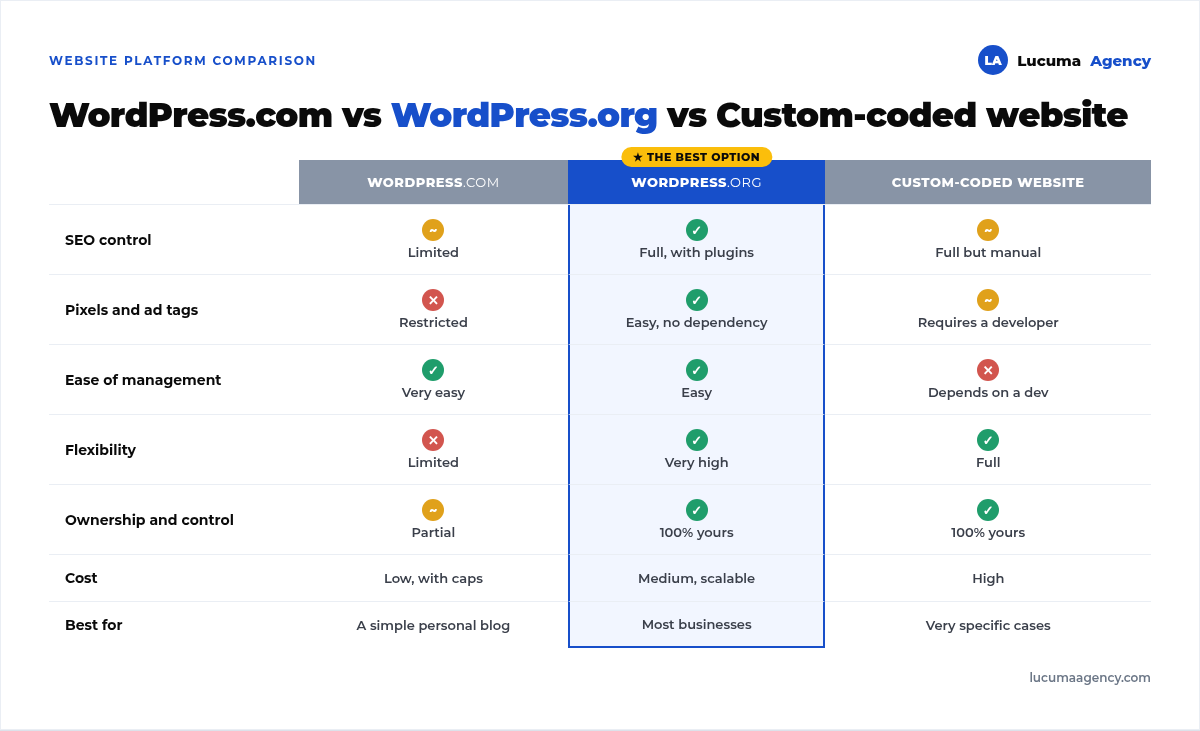
WordPress.com is an “all-inclusive” service hosted by them. You sign up and you already have a website. It's easy, but in exchange it limits you: on the basic plans you can't install the plugins you want, you don't fully control SEO, and you can't add your own tracking scripts. You use their platform under their rules.
WordPress.org is the “real” WordPress, the one professionals use. It's free software that you install on your own hosting. Here you have full control: you install the plugins you need, control every SEO detail, add any pixel or tag, and the website is 100% yours.
In short: WordPress.com is like renting a storefront with lots of rules; WordPress.org is owning your own storefront and doing whatever you want with it.
What about a website in pure code (custom-built)?
The third option is coding the website from scratch, without any content management system. It gives you absolute technical freedom, but it has a hidden cost: for every change you depend on a developer. Changing some text, adding a page, adjusting an SEO title, or installing a new ad pixel is no longer something you do yourself: you have to request it, wait for it and, often, pay for it.
For most businesses, that dependency is exactly the opposite of what they need, because SEO and ads require frequent changes.
The point that decides everything: SEO
If you want Google to find you, your platform has to let you work on SEO in depth. And here the differences are huge.
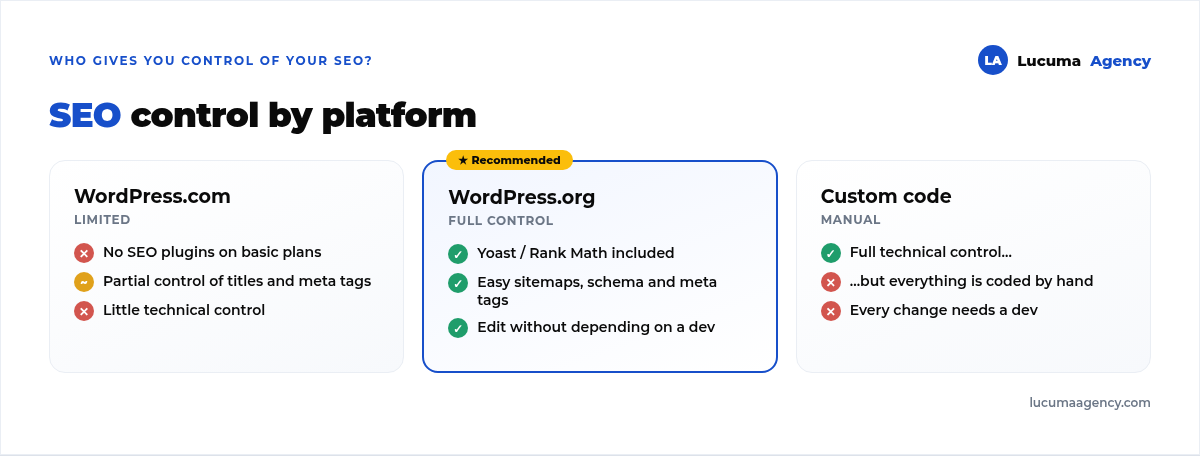
WordPress.com lets you do the basics, but on the affordable plans you can't install powerful SEO plugins or control all of your technical SEO. You fall short right when you want to compete seriously.
Pure code does give you full control of SEO, but with a catch: everything is coded by hand. Every title, every meta description, every piece of structured data (schema), and every technical improvement is a development task. It's powerful, but slow and expensive to maintain.
WordPress.org gives you the best of both worlds: full control and ease. You install a plugin like Yoast or Rank Math and manage titles, meta tags, sitemaps, schema, and redirects from a dashboard, without coding. Want to optimize a page following on-page SEO best practices? You do it yourself in minutes. That autonomy is gold for SEO, because SEO is optimized continuously, not just once.
The other key point: ads and tracking
If you're going to invest in Google Ads or Meta Ads, you absolutely need to install things on your website: the Meta pixel, the Google Ads tag, Google Analytics 4 (GA4), and the conversion events that tell you whether your ads are selling. Without that, you're investing blind.
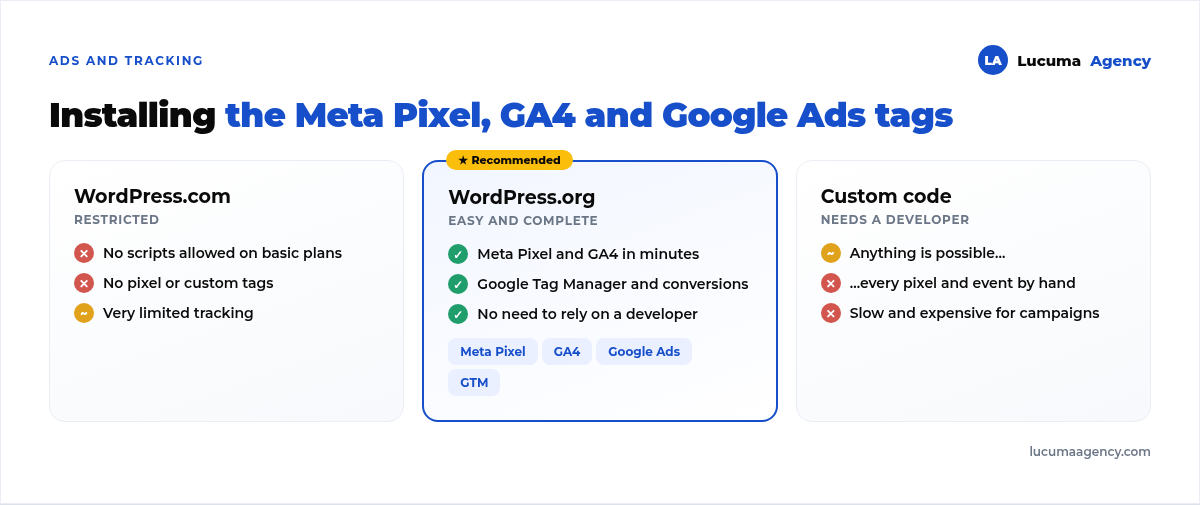
WordPress.com restricts installing your own scripts on its basic plans. Translation: you can't add your pixel or properly track your conversions. A serious problem if you want to run campaigns.
Pure code lets you install everything, but again, every pixel, every event, and every tag needs a developer. For a campaign that changes week to week, that friction slows you down and costs you money.
WordPress.org lets you install the Meta pixel, GA4, Google Tag Manager, and Google Ads conversions in minutes, with a plugin or with GTM, without relying on anyone. You can create and adjust your conversion events at the pace of your campaigns. For advertising, this autonomy is the difference between optimizing fast and getting stuck.
Autonomy: SEO and ads require constant changes
This is the core argument. Neither SEO nor ads are a “do it once and you're done” thing: they're living processes. Every week you want to adjust a title, publish new content, create a landing page for a campaign, change a conversion event, or test something.
With WordPress.org, you (or your agency) make all those changes quickly, without bottlenecks. With WordPress.com you run into the platform's limits. With custom code you run into the developer's schedule. Within WordPress.org there's one more decision, the page builder, which we explain in Bricks vs Elementor vs Gutenberg. The speed to make changes is, in practice, the speed to grow.
When would pure code make sense?
To be fair: custom code has its place. It can make sense for very particular projects (a complex web application, a very specific feature no system handles, or a large-scale digital product with a dedicated development team). But for the website of a business that wants to rank on Google and advertise, it's almost always overkill: more expensive, slower to maintain, and with less autonomy.
So, which one should you choose?
For the vast majority of businesses, the answer is WordPress.org. It gives you full control of SEO, freedom to install any ad pixel or tag, autonomy to manage your website without depending on a developer, and it's still 100% yours. Plus, done right, it's fast, secure, and scalable, as we explain in our guides on WordPress speed and security.
WordPress.com can work for a very simple personal blog, and pure code for very specific technical cases. But if your goal is to show up on Google and sell with ads, WordPress.org is the platform that won't get in your way.
Frequently asked questions
Is WordPress.org free?
The software is. You pay for hosting, the domain and, where applicable, design, premium plugins, and maintenance. In exchange, you get full control.
Can I migrate from WordPress.com to WordPress.org?
Yes. It's a common path when a business starts on .com and later needs more control for its SEO and ads. Do it with a redirect plan so you don't lose the rankings you already had: we explain it in our guide on SEO migration.
Isn't pure code faster and better for SEO?
It can be very fast, but a well-built WordPress.org site is fast too, and on top of that it gives you autonomy. speed depends on how the website is built, not on whether it's custom or not.
Do I need to know how to code to use WordPress.org?
Not for day-to-day management. It is worth having a good team build it right from the start, with solid foundations in speed, SEO and security. If you're an agency or freelancer and don't have that team in-house, there's the option of a white-label WordPress designer who builds under your brand.
Conclusion
The difference between WordPress.com, WordPress.org, and a coded website isn't just technical: it's how much freedom you'll have to grow your business. If you care about SEO and ads (and any business that wants customers should), WordPress.org is the option that gives you control, autonomy, and room to scale, without depending on anyone for every change.
In Lucuma Agency we do web development on WordPress, optimized for SEO and ready for your campaigns. Want a website that doesn't get in your way? Book your free 30-minute consultation.
Other posts you might like
At almost every real estate developer we work with, the lead takes the same absurd trip: it comes in through the form...
Switching servers is scary for a sensible reason: you rarely do it, and when it goes wrong, it goes wrong in public....
The question always comes the same way: “which payment gateway do you recommend?” And the useful answer doesn't start with a name, because the...
There's a moment, in quite a few projects, when the search for the right plugin becomes the problem. You tried three,...
Almost every online complaints book we audit complies on the outside and fails on the inside. They have the notice,...
The message came in like this: “the complaints book is throwing an error.” The Proba Inmobiliaria website, a page required by law,...
“Top 50 plugins” lists don't help you decide. They help you install fifty plugins. This is ours,...
Almost every business we ask has backups. Almost none has ever restored one. Those two sentences together are...
Almost every hosting conversation starts with price and ends up in the wrong place. The useful question is...
When a business wants to sell outside its country, the conversation almost always starts off wrong: with translation. And the...
Structured data is the piece of code that explains to Google, in a language that leaves no room for interpretation,...
The question comes up in almost every meeting: “if I use AI to write, will Google penalize me?” The short answer...