On-page SEO: how to optimize your pages so they rank
Picture a wedding photographer in Lima: two years posting beautiful work and not a single inquiry from Google. Their website has no serious problem. It has nine pages titled “Servicios”, “Portafolio” and variations, all talking about the same thing, and none of them telling Google which search it wants to show up for.
That's On-page SEO: everything you can optimize within your own pages so Google understands them and your customer stays. It's the part of SEO you have full control over, so it's where you see improvements fastest. Here we explain, point by point, how to do it and in what order.
If you don't have the big picture clear yet, start with our guide to what SEO is and how it works.
What is on-page SEO (and what isn't it)?
On-page SEO is the optimization of a page's content and internal elements: its copy, its title, its structure, its images and its links. Its goal is twofold: for Google to understand what the page is about, and for the person to find what they're looking for and take action.
It's worth separating it from its two siblings. Technical SEO is the machine-level foundation: making sure Google can crawl your website, that it loads fast and that it works on mobile. Off-page SEO is what happens outside your site: the links and mentions other sites give you. The practical difference is control: those two depend on third parties or specialized hands, while on-page depends only on you. That's why it's the best place to start.
1. One keyword per page
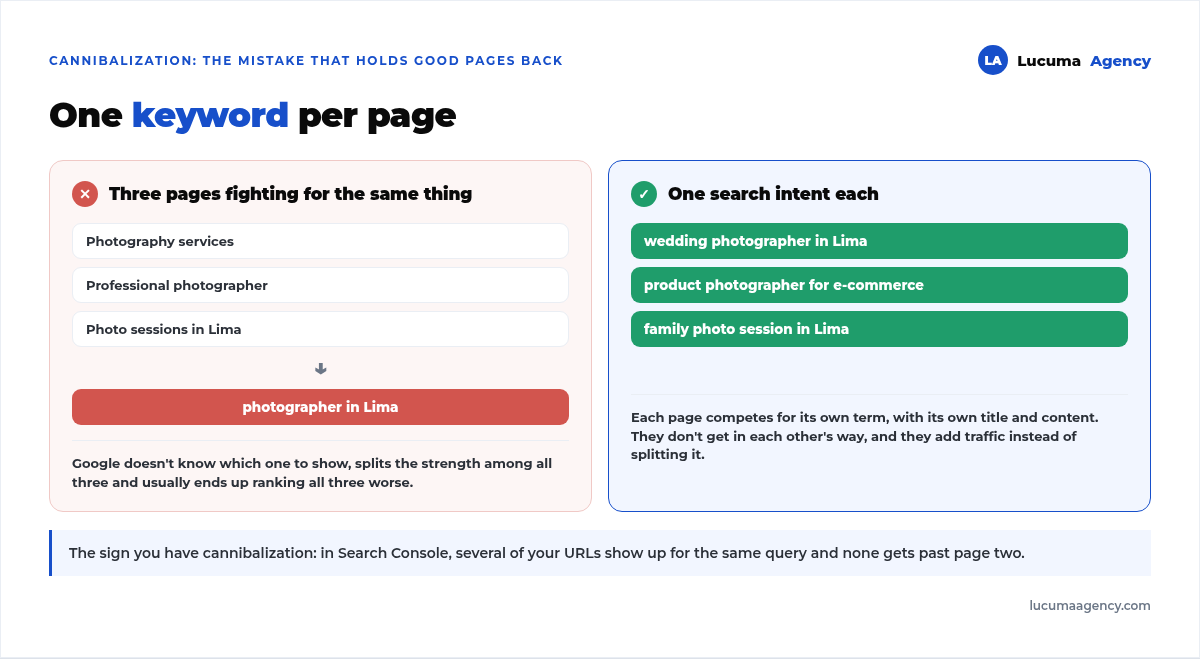
Each page should have a single main keyword that's clear: the one that represents what it offers. Don't mix five topics on a single page: it's better to have one focused page for each search intent.
The problem in the opening example has a name: keyword cannibalization. When three of your pages compete for “fotógrafo en Lima” (photographer in Lima), Google doesn't know which one to show, splits the strength among all three and usually ends up ranking all three worse. One page per intent solves the problem and also makes your content more useful, because each page answers a specific question. In an online store, choosing those intents is half the work: we show it in SEO for an online store, with the keywords of four competitors.
2. The SEO title (title tag)
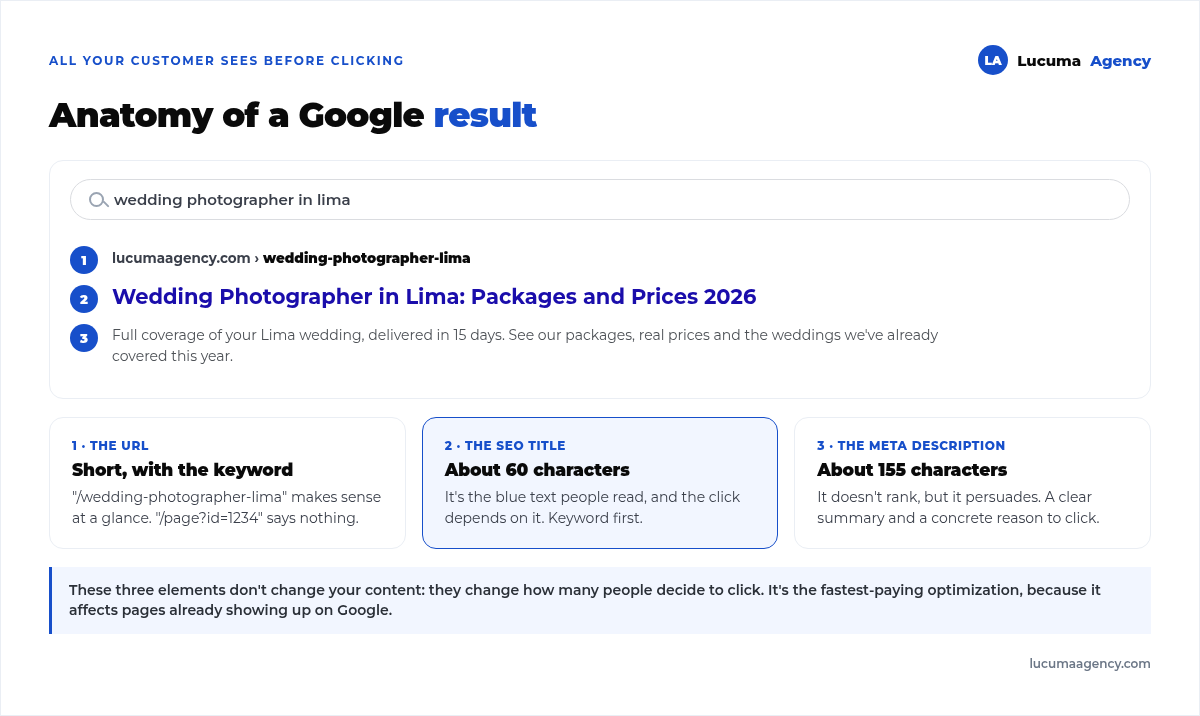
It's the blue text that appears in Google results and one of the most important signals. It should:
Include your keyword, ideally at the beginning.
Be around 60 characters so it doesn't get cut off.
Be appealing, because it determines whether people click.
3. The meta description
It's the gray text below the title. It doesn't directly affect rankings, but it does affect how many people click. Write a clear, persuasive summary of about 155 characters, with the keyword and a concrete reason to click: a price, a timeline, a guarantee, something the competition isn't saying. Here's how we applied it on our own website in how we wrote the title and meta description for 30 service pages.
4. The URL
Use short, clear URLs that include the keyword. “/fotografo-bodas-lima” is understood at a glance; “/pagina?id=1234” says nothing.
An important warning: if the page already exists and gets visits, don't change its URL lightly. Changing it without a redirect wipes out the ranking it had in one go. If you need to do it, it's done with a 301 redirect, and we explain it step by step in our guide to how to migrate your website without losing rankings.
These three elements, title, URL and description, are all your customer sees before deciding whether to click:
5. Headings (H1, H2, H3)
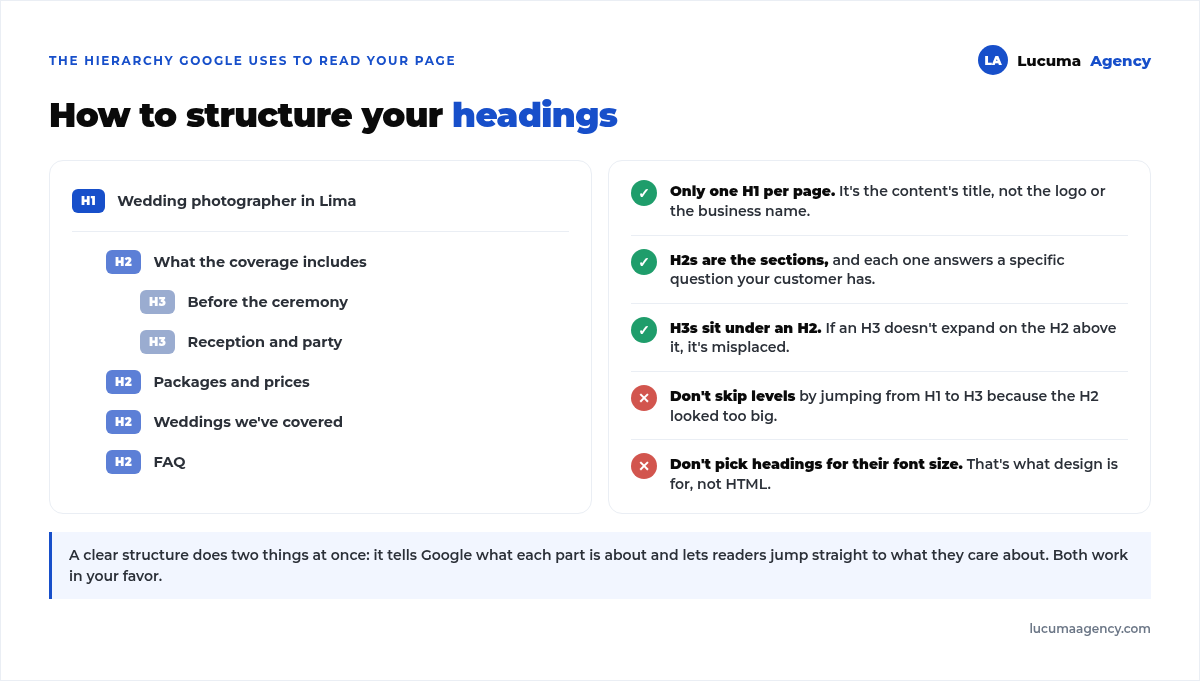
Headings structure your content and help Google understand the hierarchy:
H1: the page's main title. Only one per page.
H2: the main sections.
H3: the subsections within an H2.
A good structure makes your content scannable for the reader and understandable for Google. The most common mistake is using headings for their font size, not their hierarchy.
6. Content: useful, complete and original
Content is the heart of on-page SEO. Google rewards the pages that answer the search intent best and most completely. Write for your customer, not for the search engine: solve their problem, answer their questions and do it better than whoever holds the top spot today.
A trick that works: search for your keyword, open the top five results and note what they all answer. That's the minimum your page has to cover. Whatever none of them answers well is your opportunity. If the volume of content is too much for you, a content creation service takes care of exactly that part.
7. Images
Images also rank, and they affect speed. Optimize them:
Compress the file size before uploading them, because heavy images are the number one reason a page is slow.
Use alt text to describe the image, which helps both SEO and accessibility.
Name the file properly before uploading it: “fotografo-bodas-lima.jpg”, not “IMG_4471.jpg”.
8. Internal links
Linking your pages to each other, the way this article links to others, helps Google discover your content and spreads authority across your website. It also keeps readers browsing instead of going back to Google. How we added 42 new links across 18 pages of our website is covered in what internal linking is and how we handle it.
Two rules: link naturally, within the text where the mention comes up on its own, and use descriptive anchor text. “Our local SEO guide” tells you something; “click here” tells you nothing.
9. The reader's experience
Google measures how people interact with your page. A website that loads fast, looks good on mobile and is easy to read keeps visitors, and that helps your rankings. This is where on-page relies on the foundation: if your website takes four seconds to load, the best copy in the world won't make up for it. We cover it in depth in how to speed up your WordPress website and in our technical SEO guide.
Where to start if you're short on time
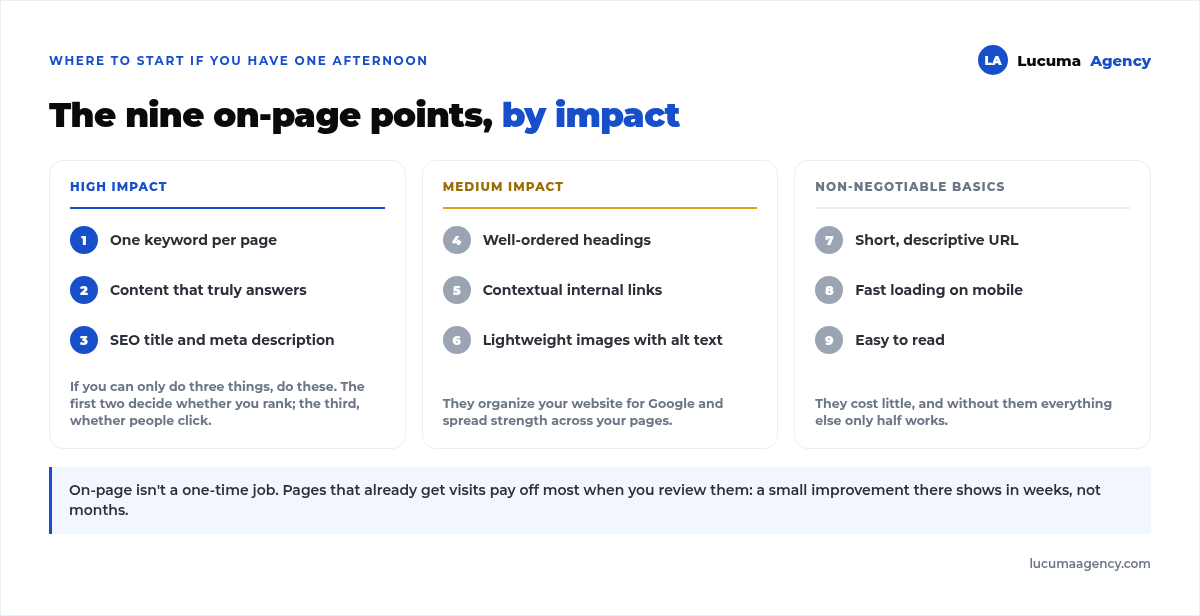
All nine points add up, but they don't carry the same weight. If you can only spend one afternoon on it, this is the order that pays off most:
How to tell if it's working
On-page has one advantage over the rest of SEO: it's quick and free to measure. In Google Search Console, filter by the page you optimized and look at two numbers:
CTR. If it goes up after rewriting the title and description, it worked. It's the change that delivers results fastest, because it affects pages that already appear on Google.
Average position. It moves more slowly, over weeks, and responds mainly to content and internal links.
Common on-page SEO mistakes
Forcing the keyword in over and over (keyword stuffing).
Generic or duplicate titles across pages.
Thin content that doesn't really answer the question.
Heavy images that slow down the page.
Not linking internally.
Changing URLs without redirecting the old ones.
On-page SEO FAQ
How many times should I repeat the keyword?
There's no magic number. Use it in the title, in the H1, in the introduction and wherever it fits naturally. Google has understood synonyms and context for years, so repeating it twenty times won't boost you, and it will read badly.
Can I use the same keyword on several pages?
It's better not to. If two pages compete for the same thing, Google doesn't know which one to show and usually ends up ranking both worse. This is called cannibalization: one main keyword per page.
How many words should a page have to rank?
As many as it needs to answer the search well. A local service page can work with 600 words, and a complete guide may need 2,000. Padding the text to hit a word count usually makes the result worse.
Does on-page SEO work if my website is slow?
It helps, but only halfway. Page speed and indexing are technical SEO, and they're the foundation: if Google takes too long to load your page or can't read it properly, content optimization can't fully make up for it.
How often should you review a page's on-page SEO?
A yearly review is fine for most pages, and sooner if you change your services or prices. Pages that already get visits deserve more frequent reviews, because that's where a small improvement shows quickly. And if you're wondering when you'll see results, we answer that in how long it takes for a website to rank.
Conclusion
On-page SEO is the base everything else is built on: if your pages are well optimized, clear and useful, you give Google everything it needs to rank you. And your customer, everything they need to choose you.
In Lucuma Agency we optimize your website with a strategy built on SEO and a web development designed to convert. Want us to review your website? Book your free consultation.
Other posts you might like
At almost every real estate developer we work with, the lead takes the same absurd trip: it comes in through the form...
Switching servers is scary for a sensible reason: you rarely do it, and when it goes wrong, it goes wrong in public....
The question always comes the same way: “which payment gateway do you recommend?” And the useful answer doesn't start with a name, because the...
There's a moment, in quite a few projects, when the search for the right plugin becomes the problem. You tried three,...
Almost every online complaints book we audit complies on the outside and fails on the inside. They have the notice,...
The message came in like this: “the complaints book is throwing an error.” The Proba Inmobiliaria website, a page required by law,...
“Top 50 plugins” lists don't help you decide. They help you install fifty plugins. This is ours,...
Almost every business we ask has backups. Almost none has ever restored one. Those two sentences together are...
Almost every hosting conversation starts with price and ends up in the wrong place. The useful question is...
When a business wants to sell outside its country, the conversation almost always starts off wrong: with translation. And the...
Structured data is the piece of code that explains to Google, in a language that leaves no room for interpretation,...
The question comes up in almost every meeting: “if I use AI to write, will Google penalize me?” The short answer...