Technical SEO: the invisible foundations of your rankings
Say a dental clinic in Surco rebuilds its website. It looks beautiful, it's faster, the copy is better. Three weeks later the phone stops ringing and nobody understands why. The cause was a single checkbox: during development someone ticked the option asking Google not to index the site, and at launch nobody unticked it. The new website beat the old one in every way, but for Google it had stopped existing.
That's Technical SEO: the foundations that make everything else work. You can have the best content in the world, but if Google can't crawl your website, it loads slowly or it doesn't look right on mobile, you won't rank. Here we explain what to check and how, no programming required.
If you're just getting started, first read what SEO is for the full picture, and for the other half of the work, On-page SEO.
What is technical SEO?
The Technical SEO is the optimization of the machine-facing side of your website: making sure Google can crawl and index it, that it loads fast, that it's secure and that it works on any device. Users don't see it, but they feel it: a technically solid website comes across as fast, trustworthy and easy to use.
There are seven fronts, and they don't carry the same weight:
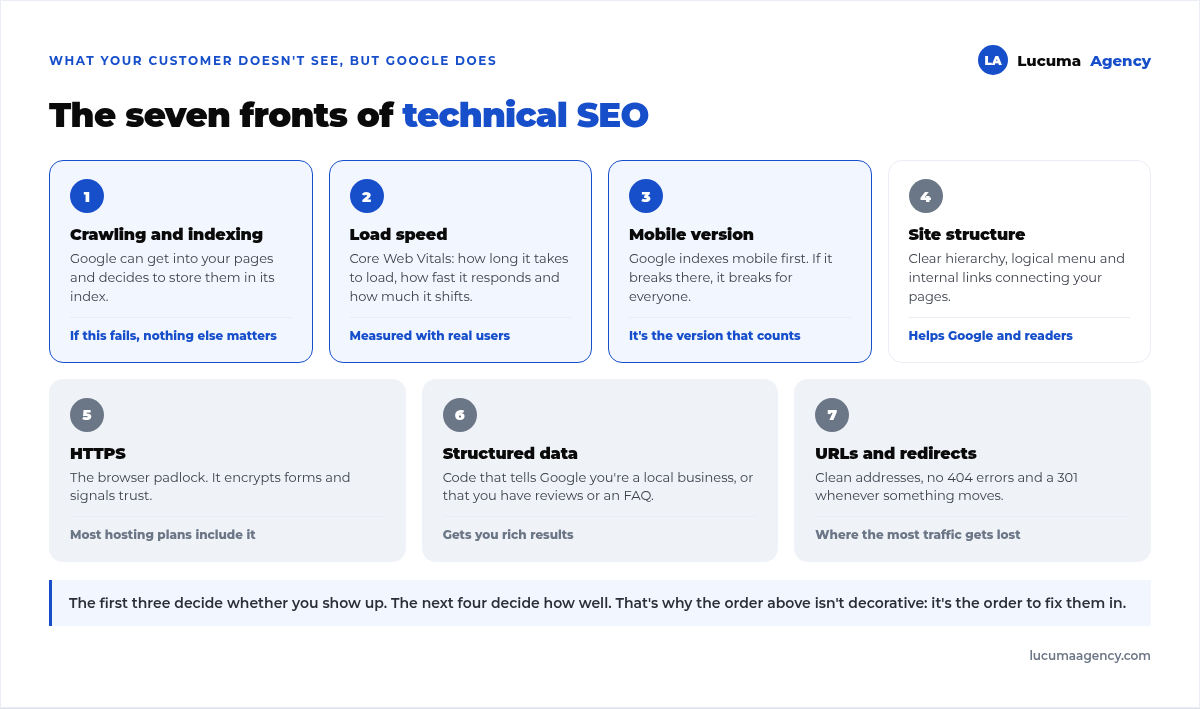
1. Crawling and indexing: the front that decides everything else
This is the point that saves the most traffic and gets checked the least. Before competing for a position, your page goes through two filters: Google has to be able to get in and read it (crawling) and then decide to store it in its index (indexing). Only after that does ranking begin.
If the journey breaks at either of the first two steps, your page isn't poorly ranked: it simply doesn't exist for Google. And the causes are usually boring and easy to fix.
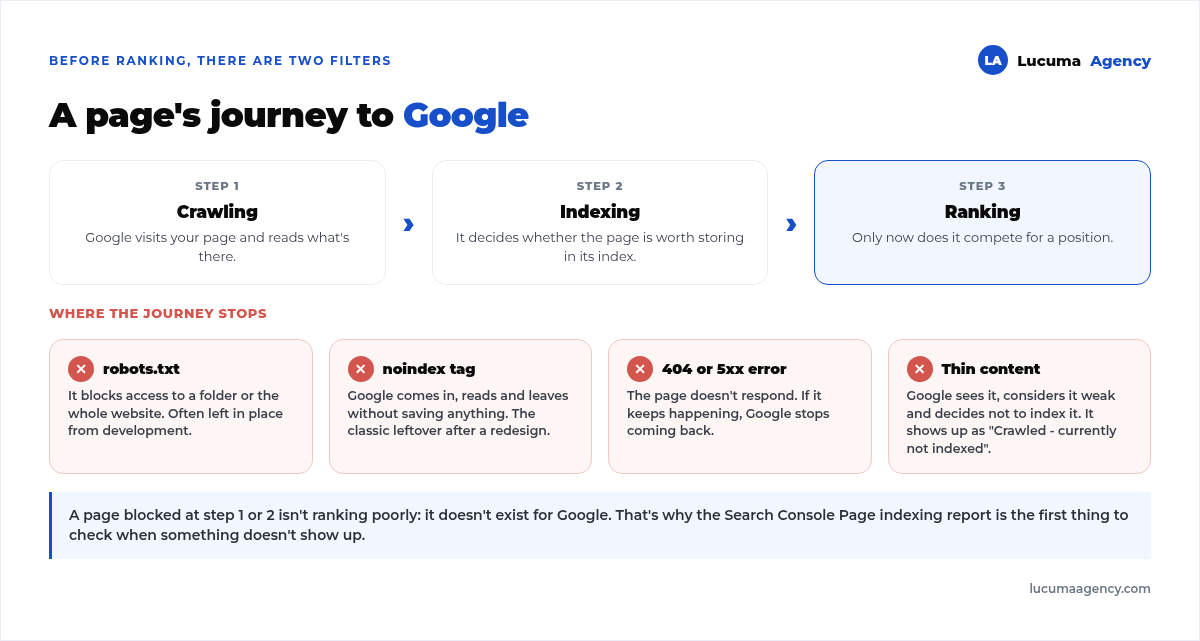
The three pieces that control this front are the sitemap, which hands Google the list of your important pages; the robots.txt, which tells it what it can and shouldn't crawl; and noindex tags, which exclude a page from the index. All three are useful, and all three, set up wrong, erase your website from search.
2. Page speed and Core Web Vitals
Speed is one of the most visible factors. A slow website loses visitors before they see anything, and on top of that it makes every click you pay for in advertising more expensive. Google measures the experience with Core Web Vitals: how long the main content takes to load, how quickly the page responds to interaction and how visually stable it is while loading.
To improve it you optimize images, code, server and cache, and we walk through it step by step in how to speed up your WordPress website. It's also one of the reasons it pays to have web development done right from the start: changing the foundations later costs three times as much.
3. Mobile website (mobile-first)
Google indexes using the mobile version of your website first. If it looks bad on a phone, breaks or loads slowly, your rankings suffer even if it looks perfect on a computer. It's not a design detail: it's the version Google uses to decide your positions, desktop ones included.
The most honest test costs nothing: open your website on your own phone, on mobile data rather than wifi, and try to complete the contact form.
4. Site structure and internal links
A well-organized website, with a clear hierarchy and few layers of depth, helps Google and users find everything. The rule of thumb: no important page should be more than three clicks from the homepage.
The internal links are the other half. They connect your pages to each other, spread authority and show Google which of your pieces of content are related. A page nobody links to, not even you, is a page Google rarely visits. It happened on our own website: not a single service page linked to an article. We tell the story in what internal linking is and how we handle it.
5. Security (HTTPS)
Your website should load over HTTPS, the padlock in the browser. It's a trust signal for Google and for customers, and it's essential on any form. A website without a certificate signals distrust and loses rankings. Most hosting plans include it at no cost.
Security doesn't end there: a hacked website can end up flagged as a dangerous site in search results, and that wipes out your traffic in a day. We cover it in depth in WordPress security.
6. Structured data (schema)
Structured data is extra code that explains details of your content to Google: that you're a local business, that you have reviews, that an article includes frequently asked questions. In return, Google can show rich results (stars, prices, expandable FAQs) that grab more attention and raise your click-through rate. For a local business, which types are worth adding and which aren't is covered in structured data for local businesses.
They don't move you up on their own, but they make your result take up more space and look better than the one next to it. At the same position, that means clicks.
7. Clean URLs and redirects
Clear URLs, no broken pages and correct redirects when something moves. This is where the costliest technical mistake lives: changing addresses without redirecting the old ones can wipe out years of rankings in one afternoon. When it's time to move or rebuild the website, you do it with a 301 redirect map, and we explain it step by step in how to migrate your website without losing rankings.
How to tell how your technical SEO is doing
You don't need an expensive audit to get started. The core tool is free and comes from Google itself: Search Console. Its indexing report tells you which pages are in and which aren't, with the reason for each; the Core Web Vitals report shows you speed measured with real users.
The most useful thing is learning to read the symptom you're already seeing and knowing where to check it:
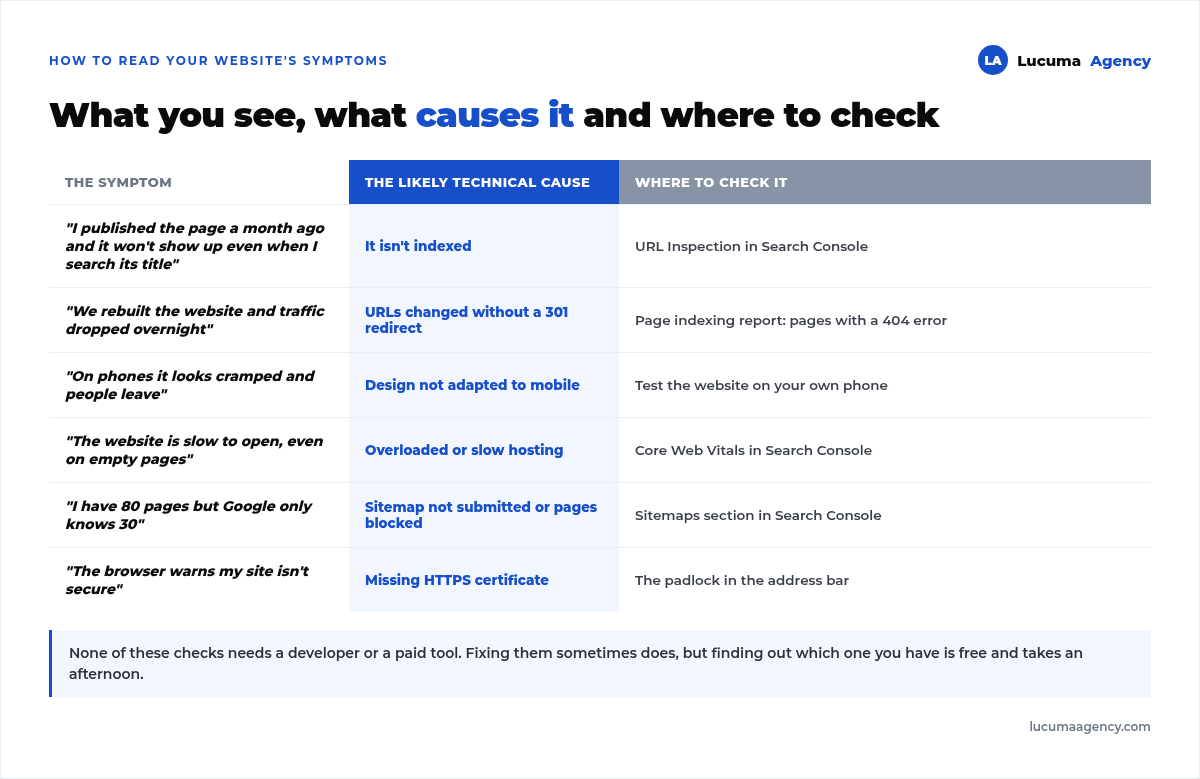
And the priority rule: fix first what keeps you from showing up (indexing), then what drives people away (speed and mobile), and finally what adds nuance (structured data).
Technical errors that hold your website back
Important pages blocked or not indexed, often because of a tag forgotten after a redesign.
A slow website due to heavy images or overloaded hosting.
A neglected mobile version.
Broken links and 404 errors with no redirect.
No HTTPS.
An outdated sitemap, or one never submitted to Google.
Frequently asked questions about technical SEO
Do I need to be a programmer to work on technical SEO?
To diagnose it, no. Search Console and your own phone tell you almost everything. To fix some server, code or redirect issues, it does make sense to lean on someone technical.
How often should I review it?
A quarterly review is enough for a stable website. After any big change (redesign, hosting switch, migration) you check it the same day, not the following month. The point-by-point review we do before starting a project is in how we audit a website before doing SEO.
Is technical SEO worth anything if my content is weak?
It lets you compete, but it doesn't win on its own. The foundations let your content perform; without useful content there's nothing to rank.
Is technical SEO the same as speed?
No. Speed is one of the seven fronts, the most visible one, but indexing matters more: a slow page at least shows up, an unindexed page doesn't exist.
How long does it take for a technical fix to show?
It depends on the fix. Unblocking an indexable page can show results within days. Improving Core Web Vitals takes weeks, because Google uses accumulated data from real users. And if what's slow is the buy button, the diagnosis is different: we cover it in how to speed up a slow WooCommerce store. The full timelines, from indexing to the top 10, are in how long it takes for a website to rank.
Conclusion
Technical SEO isn't visible, but it shows in everything: a fast, secure, well-structured website ranks better, converts more and builds trust. It's the base that lets content and authority perform. If the foundations fail, everything else costs twice as much, and sometimes it's no use at all.
In Lucuma Agency we build technically optimized websites from day one and do SEO on solid foundations. Want an audit of your website? Book your free consultation.
Other posts you might like
At almost every real estate developer we work with, the lead takes the same absurd trip: it comes in through the form...
Switching servers is scary for a sensible reason: you rarely do it, and when it goes wrong, it goes wrong in public....
The question always comes the same way: “which payment gateway do you recommend?” And the useful answer doesn't start with a name, because the...
There's a moment, in quite a few projects, when the search for the right plugin becomes the problem. You tried three,...
Almost every online complaints book we audit complies on the outside and fails on the inside. They have the notice,...
The message came in like this: “the complaints book is throwing an error.” The Proba Inmobiliaria website, a page required by law,...
“Top 50 plugins” lists don't help you decide. They help you install fifty plugins. This is ours,...
Almost every business we ask has backups. Almost none has ever restored one. Those two sentences together are...
Almost every hosting conversation starts with price and ends up in the wrong place. The useful question is...
When a business wants to sell outside its country, the conversation almost always starts off wrong: with translation. And the...
Structured data is the piece of code that explains to Google, in a language that leaves no room for interpretation,...
The question comes up in almost every meeting: “if I use AI to write, will Google penalize me?” The short answer...