5 ways to use AI to automate your work as a marketing freelancer
As a marketing freelancer, your time is your product. And a big chunk of that time goes to repetitive tasks: writing the same kind of copy, putting together reports, researching keywords, answering the same messages. Today's AI isn't here to take your work away: it's here to take away the boring part, so you can focus on what really pays, which is strategy and your client relationships.
In this guide I'll show you 5 concrete ways to use AI to automate your work, with real examples of how to apply them today. The idea isn't for AI to do everything for you, but to turn you into a freelancer who does the work of three.
And if your bottleneck isn't your time but delivering websites, there's another route: outsource the development and keep billing under your own name. We explain it in White-label WordPress for freelancers.
Before you start: what to automate (and what not to)
The golden rule is simple: automate what's repetitive and predictable; keep the strategic and human work for yourself.
AI is brilliant for first drafts, mechanical tasks and heavy data work. It's bad (and it shows) at deep strategy, judgment, a brand's unique voice and the client relationship. Automate the first group and you gain hours. Try to automate the second and you deliver generic work and lose the client.
With that clear, let's get to the 5 ways.
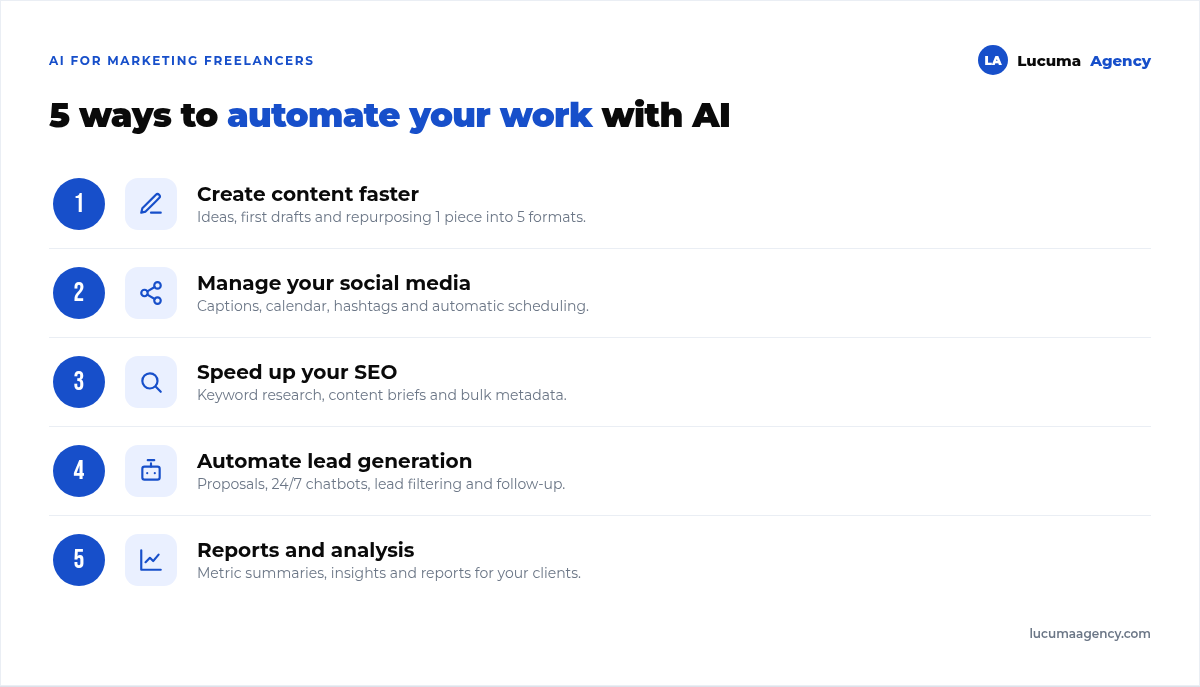
Note: below you'll see how to apply each one, with examples.
1. Create content faster (without sounding like a robot)
Content creation is probably where you can win back the most time. An AI assistant (like ChatGPT, Claude or Gemini) doesn't replace your judgment, but it speeds up the whole process.
Ideas and angles. Instead of staring at a blank screen, you ask it for 20 content ideas for a client, say a coffee shop, and you keep the 5 that work. What used to take an hour now takes five minutes.
First drafts. You give it a good brief (topic, tone, audience, key points) and it returns a draft that you edit and bring to life. Editing is much faster than creating from scratch.
Repurposing. This is where the gold is. With AI, a single blog article becomes a social thread, five posts, a short video script and an email. You multiply your content without multiplying your time.
Adapting format and length. “Summarize this in 3 points”, “make it shorter for Instagram”, “give me 5 alternative titles”. Two-minute tasks that used to be tedious.
The key tip: never publish what AI writes as is. Use it as raw material, not as the final product. Edit it, add real examples, give it the brand's voice. AI gets you 70% of the way; that final human 30% is what makes you worth hiring. If you want to go deeper, keep in mind that content creation with a strategy behind it is still what makes the difference.
2. Run your social media almost on autopilot
Managing several clients' social accounts is a marathon of small, repetitive tasks. AI turns that marathon into a jog.
Captions and variations. Instead of writing ten captions by hand for ten posts, you give it the context and it returns ten options in seconds. You pick and tweak.
Content calendar. You ask it to build a monthly calendar with daily topics for a specific industry, and you start from a ready-made structure instead of a blank sheet.
Hashtags and adapting to each platform. AI suggests relevant hashtags and adapts the same message to the tone of Instagram, LinkedIn or TikTok, each with its own style.
Automatic scheduling. This is where AI meets classic automation: social media management tools let you schedule the whole month at once and publish on their own. You add AI to create and scheduling to distribute.
Replies to comments and messages. You can prepare base answers to frequent questions and let an assistant suggest replies, which you review before sending.
The limit: AI helps you produce and distribute, but community is built with real presence. The important comments, crises and real conversations: answer those yourself.
3. Speed up your SEO and research
SEO involves a huge amount of repetitive and research work that AI cuts down dramatically. Used well, it makes you faster without lowering the quality of your SEO. If you want the full picture, here we explain what SEO is and how it works.
Keyword research and clustering. SEO tools already have AI built in to suggest keywords and group them by topic and intent. What used to be an endless spreadsheet now gets organized in minutes. And the free starting point is still Google Search Console.
Content briefs. You ask AI to analyze what Google's top results cover for a keyword and build you an article outline with the subheadings you should include. You start writing with a map, not blindfolded.
Metadata and structured data. SEO titles, meta descriptions and even structured data (schema) code: mechanical tasks that AI generates in bulk so you only have to review them.
Optimizing existing copy. “Rewrite this paragraph so it's clearer and includes this keyword naturally”. Ideal for improving old content.
The important warning: AI doesn't understand Google better than you do. It generates drafts and saves steps, but the strategy (which keywords to go after, what intent they have, how to stand out) is still your job. Mass-publishing AI content with no judgment or real value is the perfect recipe for never ranking. We saw it in a media site with 1,486 generated articles; exactly what Google penalized is covered in AI-generated content and SEO.
4. Automate communication and client acquisition
This is the one most freelancers ignore, and the one that can give you the most time (and clients). A big part of your day goes to writing emails and proposals and replying to prospects.
Proposals and emails. Use AI to create templates for your proposals, follow-up emails and frequent replies. Then you only customize the client's details. You go from writing every email from scratch to adjusting one that's already done.
24/7 replies to prospects. You can set up an AI assistant or chatbot that answers the typical questions from people who reach out (services, ballpark prices, availability) while you sleep or work on something else. You catch prospects while they're interested instead of losing them by replying late.
Lead qualification. AI can help you filter inquiries: telling the serious client apart from the one who's just asking, so you can prioritize your time.
Automated follow-up. Follow-up email sequences that fire on their own when someone downloads your portfolio or fills out a form. The classic “just checking in to see if you're still interested”, on autopilot.
This is exactly the heart of what we at Lucuma call automation with AI: chatbots that respond 24/7 and flows that capture and follow up with clients without you lifting a finger. What works for a business works for you as a freelancer.
The nuance: automate the first contact, not the relationship. The chatbot responds and filters; you build the close and the trust yourself, as a person.
5. Reports and data analysis without the pain
Putting reports together is the task almost every freelancer hates, and it's where AI shines, because data is exactly its home turf.
Metric summaries. You give it the month's numbers (visits, clicks, conversions, reach) and AI writes a clear summary in human language, ready for your client. No more explaining cold tables.
Insights and recommendations. “What takeaways would you draw from this data?” AI spots patterns and suggests hypotheses (the raw material for growth marketing) that you validate with your own judgment. It doesn't decide for you, but it gives you a starting point.
Reports in bulk. If you handle several clients, you can template the report format and use AI to fill in the narrative part of each one, in minutes instead of hours.
Turning data into decisions. The most valuable part: turning a pile of numbers into “this worked, this didn't, and here's what I propose for next month”. AI helps you write it; you bring the strategy.
The key here: always double-check the data and the conclusions. AI can misread or make things up (what's called “hallucinating”). You're the quality filter before anything reaches the client.
The mistake to avoid: automating without judgment
If there's one idea to take away, it's this: AI is a copilot, not the pilot. The freelancer who just copies and pastes whatever AI spits out delivers generic work with no voice and no strategy, and ends up competing on price against everyone else doing the same.
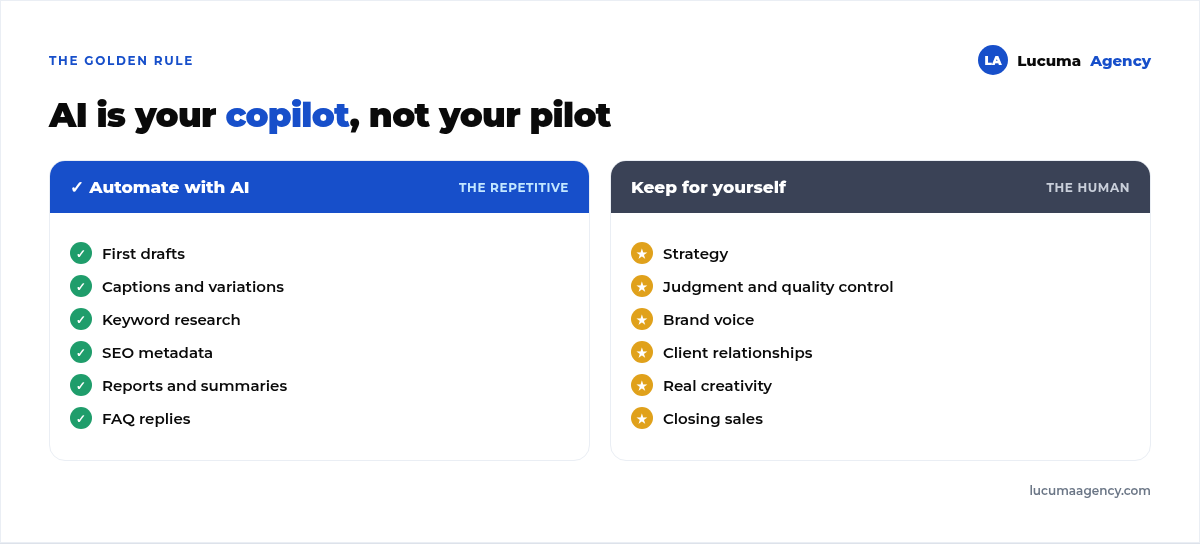
The freelancer who wins is the one who uses AI to move faster on the mechanical stuff and puts that saved time into what no AI can replicate: deeply understanding the client's business, thinking through strategy, bringing real creativity and building a relationship of trust. AI makes you more productive; your judgment makes you irreplaceable.
How to start today (without getting overwhelmed)
Don't try to automate everything at once. A simple plan:
1. Identify your most repetitive task. What do you do every week that bores you and eats up your time? Start there.
2. Pick a single tool. Master one AI assistant before jumping to ten apps. A good one covers 80% of what you need.
3. Create your base templates and “prompts”. Save the best prompts that work for you (for captions, briefs, emails). That library is your asset.
4. Measure the time you save. And reinvest it in strategy or in landing more clients, not in working more hours.
Frequently asked questions
Will AI replace marketing freelancers?
Not the good ones. It replaces people who only did mechanical tasks. For the strategic freelancer, AI is a boost that makes them more competitive.
Do I need to know how to code to use AI in my work?
No. Most of these tools work by typing instructions in plain language. What you need to learn is how to write good briefs (prompts).
Does AI-generated content rank on Google?
Google doesn't penalize the use of AI itself, but it does penalize low-quality, generic or worthless content. Use AI to produce faster, not to mass-produce junk.
How much does it cost to get started?
You can start with the free or low-cost plans of AI assistants. The biggest investment is your time learning to use them well.
Conclusion
AI is the biggest productivity lever a marketing freelancer has had in years. Used with judgment, it frees you from the repetitive work (content, social media, SEO, communication and reports) and leaves you time for what really matters: strategy and your clients. The key isn't getting AI to work for you, but working better with it.
And if you're a business that would rather hand all of this to a team that already masters AI, automation and marketing, at Lucuma Agency we do it for you. We offer AI applied to your business, hand in hand with all your marketing. Ready to automate and grow? Book your free 30-minute consultation.
Other posts you might like
At almost every real estate developer we work with, the lead takes the same absurd trip: it comes in through the form...
Switching servers is scary for a sensible reason: you rarely do it, and when it goes wrong, it goes wrong in public....
The question always comes the same way: “which payment gateway do you recommend?” And the useful answer doesn't start with a name, because the...
There's a moment, in quite a few projects, when the search for the right plugin becomes the problem. You tried three,...
Almost every online complaints book we audit complies on the outside and fails on the inside. They have the notice,...
The message came in like this: “the complaints book is throwing an error.” The Proba Inmobiliaria website, a page required by law,...
“Top 50 plugins” lists don't help you decide. They help you install fifty plugins. This is ours,...
Almost every business we ask has backups. Almost none has ever restored one. Those two sentences together are...
Almost every hosting conversation starts with price and ends up in the wrong place. The useful question is...
When a business wants to sell outside its country, the conversation almost always starts off wrong: with translation. And the...
Structured data is the piece of code that explains to Google, in a language that leaves no room for interpretation,...
The question comes up in almost every meeting: “if I use AI to write, will Google penalize me?” The short answer...