How to Optimize Your Google Business Profile Step by Step
Two dental clinics in Surco. Both have a Google Business Profile, both show up on the map. One gets twenty calls a month from its listing and the other, three. The difference is almost never the location or the price: it's how complete and how active the listing is. Google shows first whoever gives it more information and more signs of activity, and customers call first whoever earns their trust in ten seconds.
This guide goes point by point through everything you can optimize, in order of impact. It goes deeper into one part of our complete guide to Google My Business. And if you also want to show up in several districts or cities, complement this with the local SEO and city-by-city rankings.
Before you start: what Google looks at in a listing
Google decides who to show on the map using three criteria: relevance (whether your listing says what the person is looking for), distance (how close you are to the person searching), and prominence (how well known and active you appear: reviews, photos, posts, mentions). You don't control distance. You do control the other two, and every step in this guide works on one of them.
1. Complete 100% of your profile
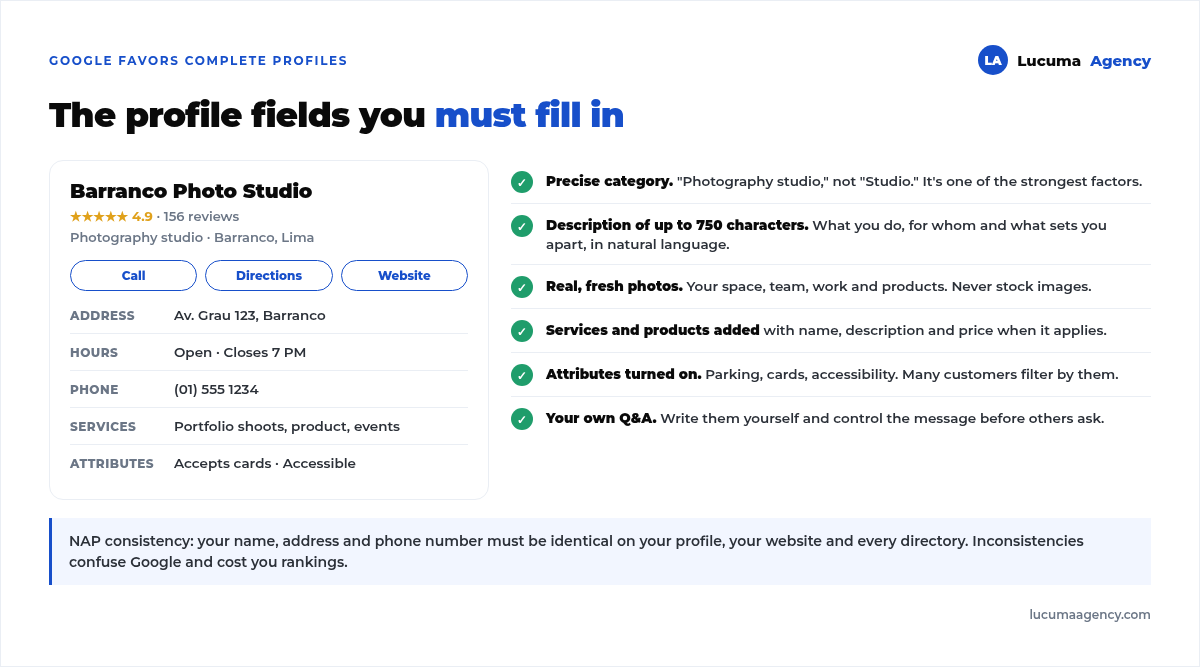
Google favors complete listings over those that leave fields empty. Fill in everything: name, category, address or service area, phone, website, hours, description, services, products, and attributes. A listing at 100% gives Google more information to show you in more searches.
A detail that gets overlooked: your hours. If you set “open 24 hours” when you're not, Google may show you as open at 2 a.m., and the customer who calls and gets no answer goes to the competition. Set your real hours and mark holidays.
2. Choose the right primary category
The category is one of the strongest ranking factors. Be specific: “Photography studio” is better than “Studio”, and “Dental clinic” is better than “Medical center”. Google has more than four thousand categories; type the first few letters of your industry into the field and review all the options before deciding.
Also add secondary categories for everything you offer, without overdoing it. A veterinary clinic in Miraflores can use “Veterinarian” as primary and “Pet store” and “Dog groomer” as secondary, if it really offers those. Each category must represent something real: if Google detects it doesn't fit, it can suspend the listing.
3. Write a good description
You have up to 750 characters to describe your business. Explain what you do, for whom, and what makes you different, naturally using the words your customers search for. Don't stuff it with forced keywords: write for the person.
A structure that works: a first sentence with what you do and where (“Dental clinic in Surco with 12 years of experience”), a second with your main services, a third with what sets you apart (extended hours, same-day appointments, specialists), and a final one inviting people to call or message you. Google doesn't allow links or offers in the description, so save those for your posts.
4. Upload real photos and videos
Listings with photos get many more direction requests and clicks than those without. Upload real, high-quality images: your logo and cover photo, your location inside and out, your team and your work, and your products or services.
Stock photos are obvious and undermine trust. A well-lit phone photo of your reception desk is worth more than a model smiling in an office that isn't yours. If your business has no storefront, like an agency or a shared office, use your workspace, your team at work, samples of what you do, and screenshots of results.
Refresh your photos regularly: three or four new photos a month keep the listing fresh, and that's a signal of activity Google rewards.
5. Use Google posts
Your listing lets you post updates, offers, events, and products, like a mini social network inside Google. Posting every week or every two weeks keeps your listing active, shows offers and news directly in the results, and gives customers more reasons to choose you.
You don't need inspiration: a weekly post can be a service explained in three lines, a frequently asked question answered, a photo of a finished job, or a notice about special hours. “Update” posts expire after six months, so consistency matters more than volume.
6. Add your products and services
List your services and, if applicable, your products with name, description, and price. This helps Google understand exactly what you offer and show you for the right searches. A plumber who lists “Drain unclogging”, “Water heater installation”, and “Leak detection” as separate services shows up in searches where a plumber with an empty listing doesn't.
If you don't want to show prices, leave the field empty, but don't make up a “starting at” price you won't honor: it's the number one complaint in reviews.
7. Set up attributes
Attributes are details that matter to customers: “accepts cards”, “has parking”, “online appointments”, “wheelchair accessible”. Turn on every one that applies; many customers filter by them, and Google shows them as labels on the listing. In Lima, “accepts Yape or Plin” and “parking” are among the ones that most often decide a visit.
8. Add questions and answers
On your listing, anyone can ask, and anyone can answer, including a competitor or someone who doesn't know. Get ahead of it: create the frequently asked questions yourself, with their answers, to control the information and clear up doubts before they come up. The five almost every business gets: whether there's parking, whether they take walk-ins, which payment methods they accept, whether they deliver or make house calls, and how much the basic service costs.
9. Get and respond to reviews
Reviews are a central part of optimization: they weigh on rankings and decide the call. Ask for them consistently, at the moment the customer is happy, with a direct link via WhatsApp. And reply to all of them, good and bad, within 48 hours. We cover it in depth in how to get Google reviews.
10. Keep your NAP consistent
Your name, address, and phone number (NAP) must be identical on your listing, your website, and every directory. Inconsistencies confuse Google and cost you positions. “Av. San Martín 645” on the listing and “Avenida San Martin 645, of. 3” on the website is already an inconsistency. And if you have a website, make it a fast website that matches your listing details and shows them in the footer of every page.
The step almost nobody takes: maintaining it
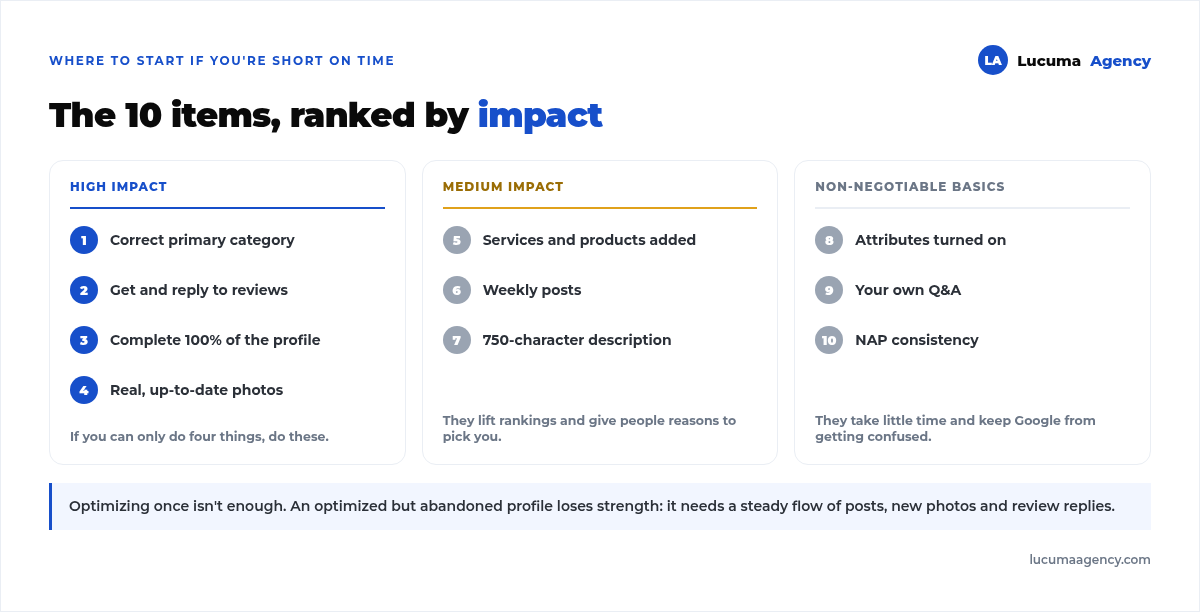
Optimizing the listing once isn't enough. The listing needs consistent activity: posts, new photos, review replies, and up-to-date information. An optimized but abandoned listing loses strength over time, and the competitor who posts every week ends up on top.
A realistic routine for a business without a marketing team: one post a week, three photos a month, asking for two reviews a week, and checking new questions every Friday. That's less than two hours a month. If even that isn't possible, it's exactly the work our service covers: Google Business Profile & local SEO.
Frequently asked questions about optimizing your Google Business Profile
How long does it take for listing optimization to show results?
Changes to category, description, and services usually show up within days. The effect on map rankings shows in two to eight weeks, depending on how competitive your industry is in your district. Reviews and consistent activity are what sustain the results over time.
Can I optimize my listing if I don't have a physical location?
Yes. Set it up as a service-area business: you hide the address and define the districts you cover. Everything else in this guide applies the same way. What you shouldn't do is list an address where you don't serve customers: it's grounds for suspension.
Is it worth paying for an optimization service?
If you have the time, you can do it yourself with this guide; it's free. Paying makes sense when you won't keep up the routine of posts, photos, and reviews, which is where most people give up. What isn't worth it is paying someone who promises “guaranteed first place on Google Maps”: nobody can guarantee that.
How many photos should my listing have?
There's no official number. As a practical reference, a listing with fewer than ten photos looks abandoned, and one with more than twenty real, varied photos signals an active business. More important than quantity is that they're yours and that new photos go up every month.
What do I do if Google suspended my listing?
First check the most common cause: details that don't match reality (an address where nobody is, a category that doesn't fit, a name with added keywords). Fix that and request reinstatement through Google's form with documents that prove the business exists. Appealing without fixing almost always ends in rejection.
Conclusion
Optimizing your Google Business Profile is one of the highest-return actions in local marketing: it's free and puts you in front of customers who are already looking for you. The key is to complete it 100%, keep it active, and work on your reviews.
In Lucuma Agency we optimize and manage your Google Business Profile as part of our work on Local SEO. Want a listing that brings in customers? Book your free consultation.
Other posts you might like
At almost every real estate developer we work with, the lead takes the same absurd trip: it comes in through the form...
Switching servers is scary for a sensible reason: you rarely do it, and when it goes wrong, it goes wrong in public....
The question always comes the same way: “which payment gateway do you recommend?” And the useful answer doesn't start with a name, because the...
There's a moment, in quite a few projects, when the search for the right plugin becomes the problem. You tried three,...
Almost every online complaints book we audit complies on the outside and fails on the inside. They have the notice,...
The message came in like this: “the complaints book is throwing an error.” The Proba Inmobiliaria website, a page required by law,...
“Top 50 plugins” lists don't help you decide. They help you install fifty plugins. This is ours,...
Almost every business we ask has backups. Almost none has ever restored one. Those two sentences together are...
Almost every hosting conversation starts with price and ends up in the wrong place. The useful question is...
When a business wants to sell outside its country, the conversation almost always starts off wrong: with translation. And the...
Structured data is the piece of code that explains to Google, in a language that leaves no room for interpretation,...
The question comes up in almost every meeting: “if I use AI to write, will Google penalize me?” The short answer...