Google My Business (GMB): the complete guide to getting your business on Google
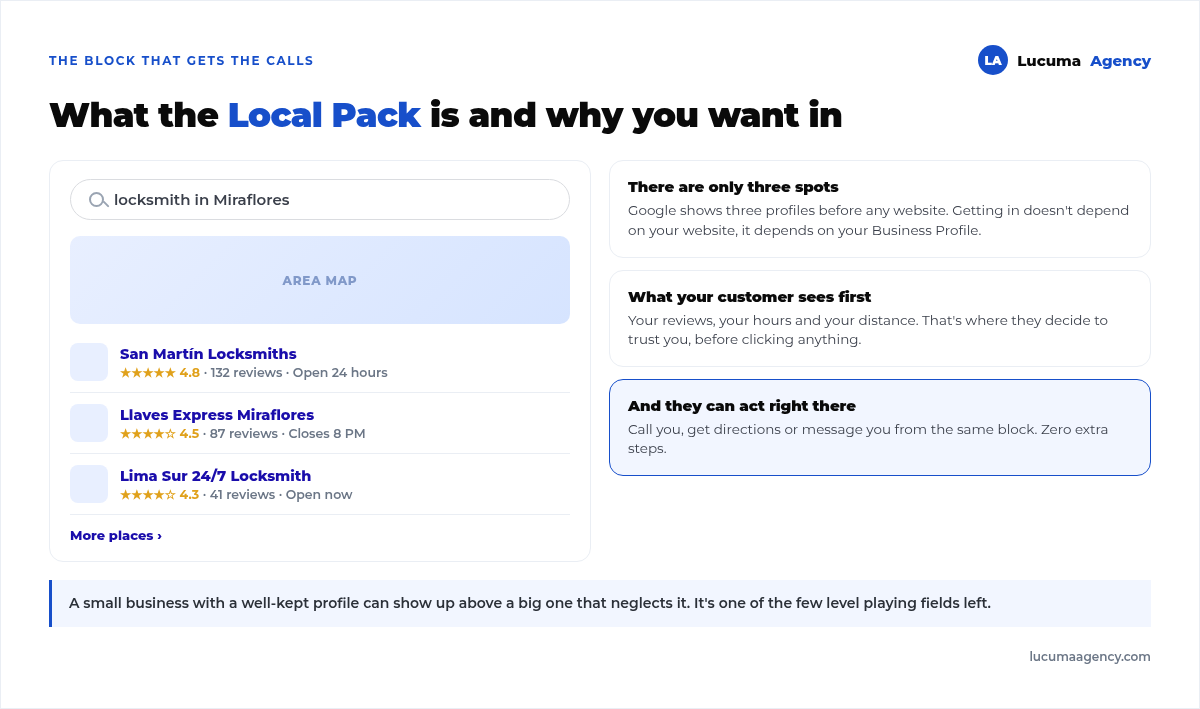
When someone searches “restaurante cerca de mí” (restaurant near me), “cerrajero en Lima” (locksmith in Lima) or “agencia de marketing en Perú” (marketing agency in Peru), Google doesn't show them a website first: it shows a map with three businesses and their reviews. That valuable block is called the Local Pack, and to show up there you need just one thing: a well-managed Google My Business profile.
All of this can be done in-house, and if you have the time, it's worth it. If you'd rather have someone keep it up every month, that's what we cover with our Google Business Profile & local SEO.
In this guide we explain, without jargon, what GMB is, how to create it step by step, why it matters so much, how it affects your local SEO, how to optimize it and, what almost nobody does, how to maintain it. Seriously close.
What is Google My Business (and why is it now called Google Business Profile)?
Google My Business (GMB) is the free listing Google gives your business so it shows up in Search and on Google Maps. It displays your key details: name, address, phone number, hours, website, photos, reviews and posts.
An important detail: in 2021 Google renamed the tool to Google Business Profile (Perfil de Empresa de Google in Spanish). Many people still call it “GMB” out of habit, so in this article we use both names, but they refer to the same thing.
In short: it's your business card inside Google, and it's 100% free.
Why it matters so much for your business
If your business serves customers in a specific area (a store, a clinic, a studio, a restaurant or even an agency), your Google profile is probably the digital asset that brings you the most customers for its cost: zero.
These are the key reasons:
You show up where people are already looking for you. 46% of all Google searches have local intent. People aren't just looking for information: they're looking to buy nearby.
It's the basis of the first impression. Before visiting your website, customers see your listing: your reviews, your photos and your hours. That's where they decide whether to trust you.
It drives direct actions. From your listing, customers can call you, get directions, visit your website or message you, without any extra steps.
It levels the playing field. A small business with a well-optimized profile can show up above a big one that has neglected its own.
In a nutshell: if you're not on Google My Business, for many potential customers your business simply doesn't exist.
How to create your Google My Business profile step by step
Creating your listing takes less time than you think. Follow these steps:
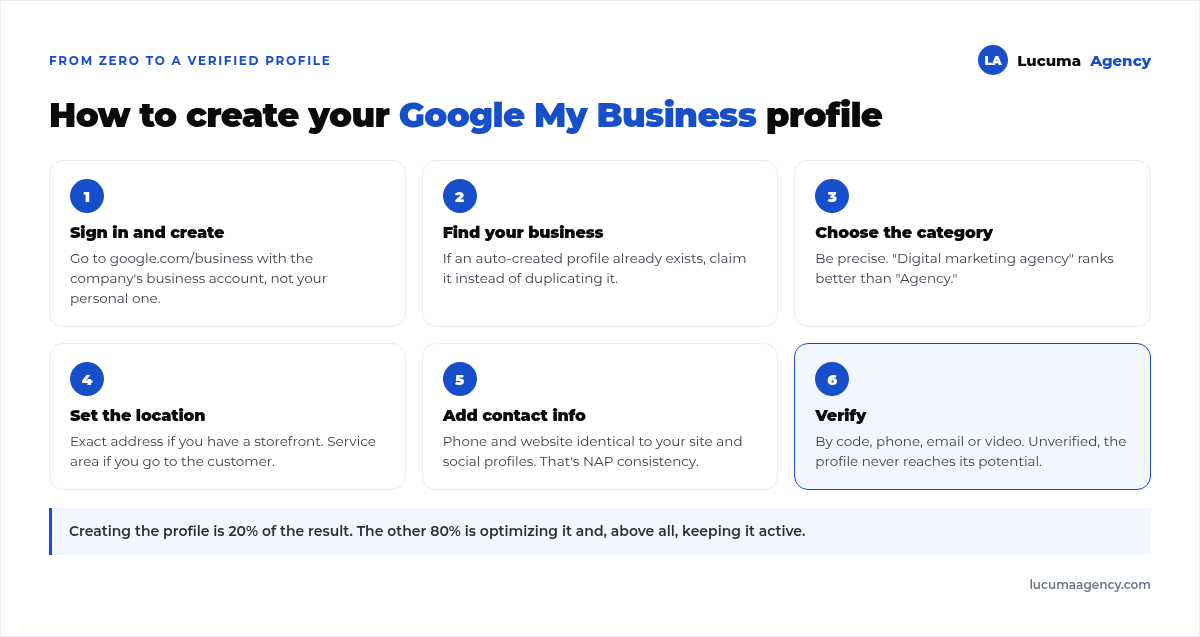
1. Go to google.com/business and sign in with your company's Google account (ideally a business account, not your personal one).
2. Search for your business. Type the name; if a listing was already created automatically, claim it. If not, create a new one.
3. Choose the primary category. Be specific: “Agencia de marketing digital” (digital marketing agency) is better than “Agencia” (agency). The category is one of the strongest ranking factors.
4. Add your location. If you serve customers at a physical location, enter the exact address. If you go to the customer or you're 100% remote, define your service area instead of an address.
5. Complete your contact details: phone number and website. They must match your website and social media exactly (this is called NAP consistency: Name, Address, Phone).
6. Verify your business. Google needs to confirm the business is real. Verification is usually by postcard, phone, email or video. Without verification, your listing doesn't reach its full potential.
Done: your profile is created. But creating it is just the beginning; the real results come from optimizing and maintaining it.
The impact of GMB on your local SEO
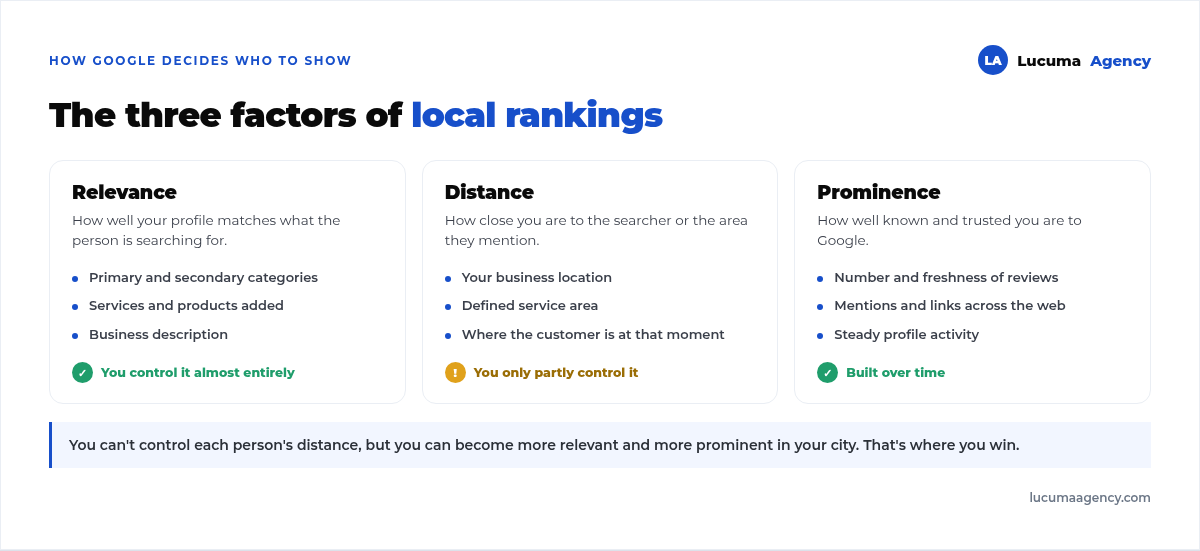
This is where many businesses underestimate Google My Business. Your profile is one of the core pieces of local SEO strategy, and Google decides who to show on the map based on three factors:
Relevance: how well your listing matches what the person is searching for. Your category, your services and your description weigh in here.
Distance: how close you are to the person searching. You don't fully control it, but defining your service area well helps.
Prominence: how well known and trusted you are. This includes your reviews, your activity and mentions of your business across the web.
What does this mean in practice? That an active, optimized profile ranks in the Local Pack (the three map results) and on Google Maps, which is exactly where searches with purchase intent happen. And best of all: the Local SEO from your listing complements your website's SEO. They don't compete, they reinforce each other. That's why it also pays to have a fast, optimized website to send that traffic to.
A business with fresh reviews, updated photos and consistent posts tells Google: “I'm active and trustworthy”. And Google rewards that signal.
How to optimize your Google My Business profile
Creating the listing is 20%. The other 80% of the results comes from optimization. These are the points that really move the needle, and we go through them one by one in how to optimize your Google profile step by step:
1. Complete 100% of your profile
Google favors complete listings. Fill in every field: description, secondary categories, services, products, attributes (for example “accepts cards” or “parking”) and links.
2. Choose your categories carefully
One precise primary category and several relevant secondary ones. Don't overdo it: each category should represent something you actually offer.
3. Get reviews (and reply to all of them)
Reviews are pure gold for local SEO and for trust. Ask your satisfied customers for reviews systematically and reply to every one, good and bad, politely and quickly. Google values engagement.
4. Upload real photos and videos
Listings with photos get many more direction requests and clicks. Upload photos of your location, your team, your products and your work. Refresh the images every so often.
5. Use posts
Google My Business lets you post updates, offers and events, as if it were a mini social network. Posting consistently keeps your listing alive and gives Google more reasons to show you. If you don't have time, lean on a service like content creation.
6. Make the most of questions and answers
Anyone can ask a question on your listing. Get ahead of it: create the frequently asked questions and their answers yourself to control the message.
7. Keep your NAP consistent
Your name, address and phone number must be identical on your listing, your website and your directories. Inconsistencies confuse Google and cost you rankings. On your website, those same details are marked up with schema; what to include and what to leave out is covered in structured data for local businesses.
Maintenance: the work almost nobody does
Here's the secret that separates the businesses that show up from the ones that don't: a Google My Business profile isn't something you create and forget; you maintain it.
Monthly maintenance includes:
Replying to reviews and questions promptly (ideally within 24 hours).
Posting updates every week or every two weeks.
Updating your hours on holidays and special dates so you don't lose customers.
Uploading new photos regularly.
Reviewing your information in case Google or a user suggests changes (sometimes incorrect details slip in).
Measure your stats: how many times you showed up and how many calls and visits you generated.
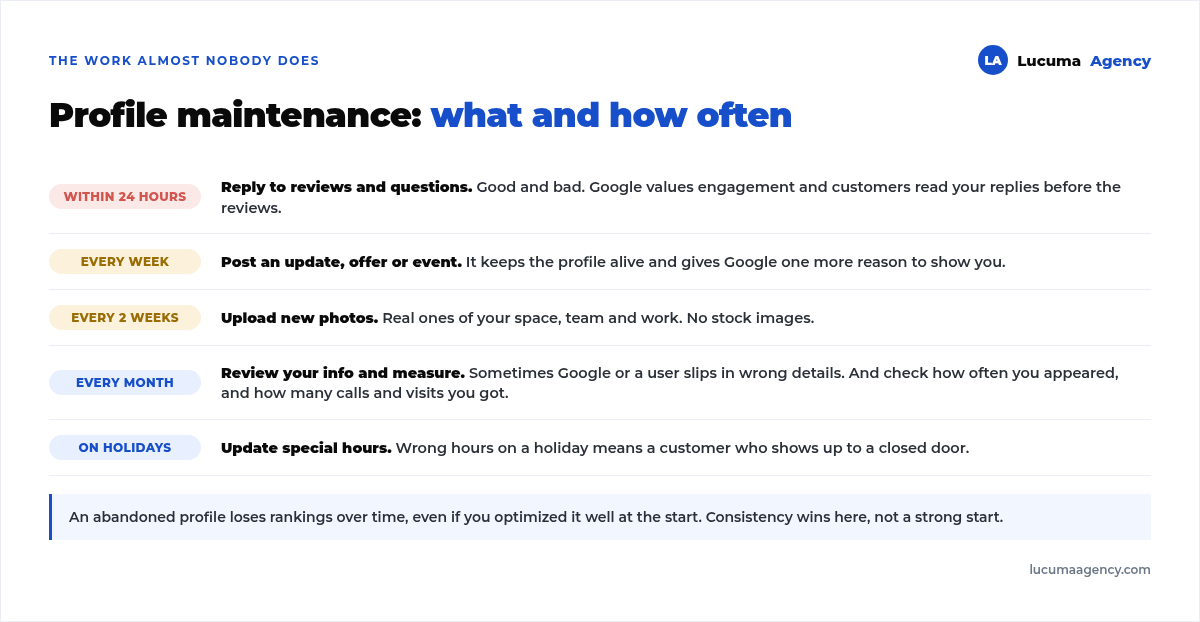
A neglected listing loses rankings over time, even if you optimized it well at the start. Consistency is what wins.
Common mistakes to avoid
Choosing a generic or wrong category.
Not verifying your profile.
Ignoring reviews (or worse, arguing with upset customers).
Using stock photos instead of real ones.
Having different details on your listing, website and social media.
Creating the listing and never touching it again.
GMB and advertising: the combination that speeds things up
Your Google profile is organic traffic: free but gradual. If you want results from day one while your listing gains strength, you can complement it with Google Ads to show up at the top when people search for you, and with Meta Ads to generate demand on Facebook and Instagram. Organic and paid don't compete: they add up.
Frequently asked questions about Google My Business
Is Google My Business free?
Yes, creating and managing your profile is completely free. You only invest time (or hire someone to do it for you).
How soon will I see results?
Verification can take a few days. Local ranking results show up gradually over the first few weeks and months, especially if you add reviews and post consistently.
Do I need a website to use GMB?
It's not required, but it's recommended. An optimized profile plus a fast website is the winning combination for local SEO.
Does it work if my business doesn't have a physical location?
Yes. If you serve customers at their location or work remotely, you define a service area instead of a visible address.
How often should I update my listing?
Ideally, at least one action per week (a post, replying to reviews or uploading a photo) and a general review once a month.
Conclusion: your Google listing is your best 24/7 salesperson
For most local businesses, Google My Business is the digital marketing investment with the best return: it costs zero soles and puts you in front of customers who are already searching for what you offer. But it only works if you set it up well, optimize it and, above all, maintain it.
If you don't have the time or want to do it strategically, at Lucuma Agency we optimize and manage your Google profile so you show up where people are looking for you and turn those searches into customers. Seriously close.
Want your business to show up on Google Maps? Book your free 30-minute consultation and we'll give you an honest assessment of your local presence.
Other posts you might like
At almost every real estate developer we work with, the lead takes the same absurd trip: it comes in through the form...
Switching servers is scary for a sensible reason: you rarely do it, and when it goes wrong, it goes wrong in public....
The question always comes the same way: “which payment gateway do you recommend?” And the useful answer doesn't start with a name, because the...
There's a moment, in quite a few projects, when the search for the right plugin becomes the problem. You tried three,...
Almost every online complaints book we audit complies on the outside and fails on the inside. They have the notice,...
The message came in like this: “the complaints book is throwing an error.” The Proba Inmobiliaria website, a page required by law,...
“Top 50 plugins” lists don't help you decide. They help you install fifty plugins. This is ours,...
Almost every business we ask has backups. Almost none has ever restored one. Those two sentences together are...
Almost every hosting conversation starts with price and ends up in the wrong place. The useful question is...
When a business wants to sell outside its country, the conversation almost always starts off wrong: with translation. And the...
Structured data is the piece of code that explains to Google, in a language that leaves no room for interpretation,...
The question comes up in almost every meeting: “if I use AI to write, will Google penalize me?” The short answer...