Google Maps for business: how to show up and attract customers
Someone is walking through San Borja with a limping dog and types “veterinaria cerca de mí” (vet near me). They don't compare websites or read a blog: they look at the map, see three businesses with their stars and hours, and tap “Directions” on one of them. The whole buying decision happens right there, in a few seconds and without leaving Google.
Showing up on the map and showing up in search results are two different jobs that reinforce each other. We work on both together in Google Business Profile & local SEO.
Show up in Google Maps is, for many businesses, the most direct way to win local customers. In this guide we explain how the map works, which levers move your position and why your competitor shows up and you don't.
It's part of our complete guide to Google My Business.
Why Google Maps is key for your business
Google Maps isn't just for getting somewhere: it's a business search engine. Millions of people use it every day to find where to shop, eat, get care or hire a service, almost always on their phone and ready to buy right away.
That's the difference from almost any other channel. On Maps you're not attracting someone who's researching: you're attracting someone who has already decided and is just choosing who. If your business doesn't show up there, you're handing those customers to whoever is two blocks away.
How you show up on Google Maps: your listing
Your presence on Maps is built entirely through your Google Business Profile listing. There's no separate “Maps SEO”: showing up on the map and having a well-optimized listing are the same thing. To be there, you need to:
Create and verify your listing. Without verification, Google doesn't trust that the business exists and the listing never reaches its potential.
Have accurate, complete information: address or service area, category, hours and phone number.
Optimize it and keep it active. We cover it point by point in how to optimize your Google profile step by step.
The Local Pack: the three on the map
When you run a local search, Google shows a block at the top called the Local Pack: a map with three featured businesses, their reviews, their hours and action buttons. Landing one of those three spots is the big goal, because they get most of the clicks.
Below it comes the full Maps list and then the web results. Ranking high across all three layers multiplies your chances, and for the bottom one you also need a well-built website, as we explain in Local SEO and city-based rankings.
What customers can do from the map
One of the reasons Maps converts so well is that customers can act without leaving the map, at the very moment they need you:
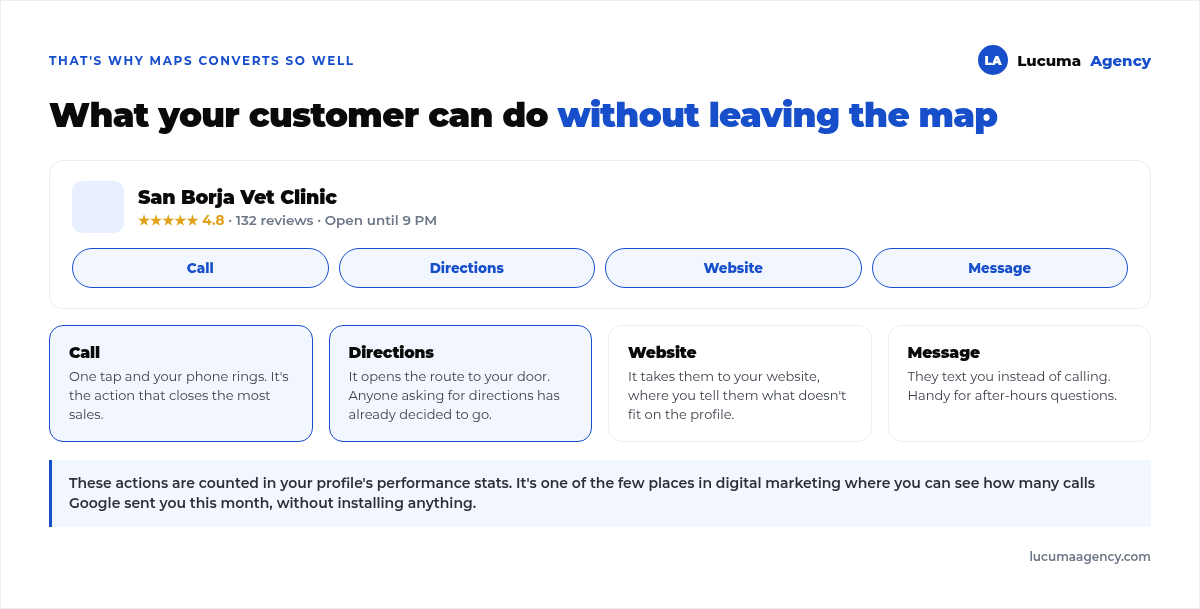
That's why a well-optimized listing is practically a salesperson working 24 hours a day. And it's measurable: those actions are counted in your profile's stats, so you can see how many calls Google brought you this month without installing anything.
How to rank higher on Google Maps
Google ranks results based on three factors: relevance (how well you match what people are searching for), distance (how close you are) and prominence (how well-known and trustworthy you are).
You don't control distance. You do control the other two, and you work on them with five concrete levers:
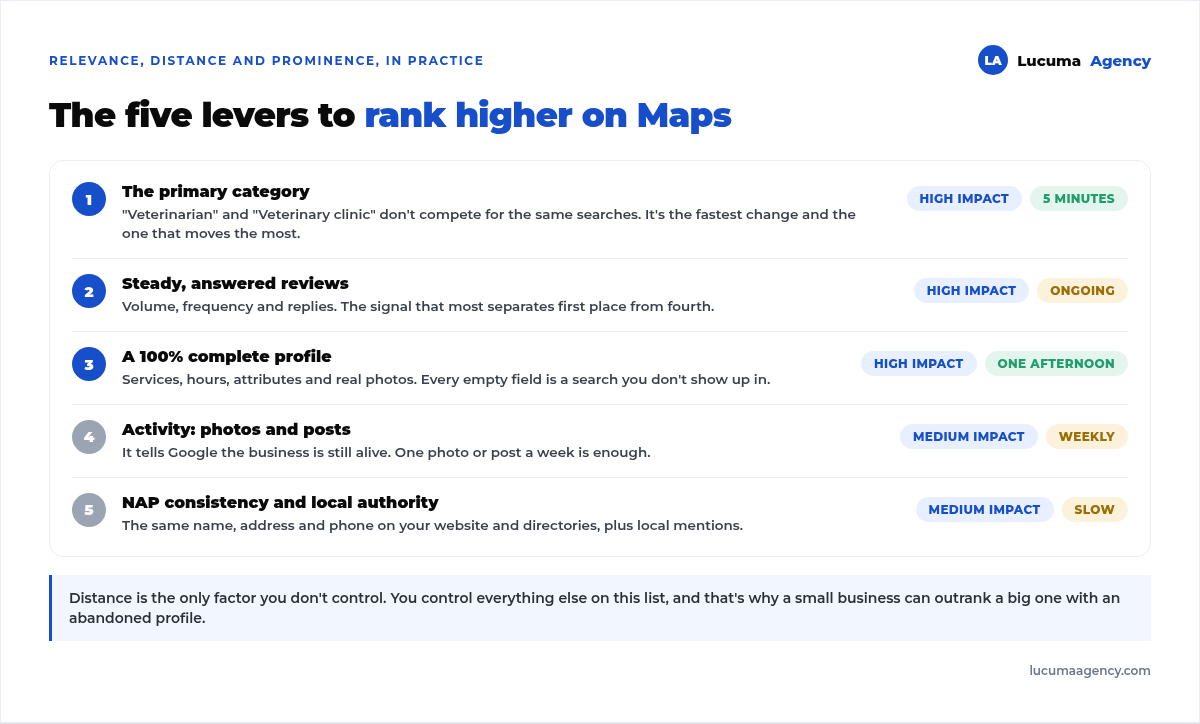
If you have to start with one, start with your primary category: it's the five-minute change that most often unblocks a listing. Being listed as “Store” when people search for “ferretería” (hardware store) leaves you out of that entire search, no matter how good you are.
And the one that sustains results the most over time is reviews: how many you have, how often they come in and whether you reply to them. We go deep on this in how to get Google reviews.
Mistakes that keep you off the map
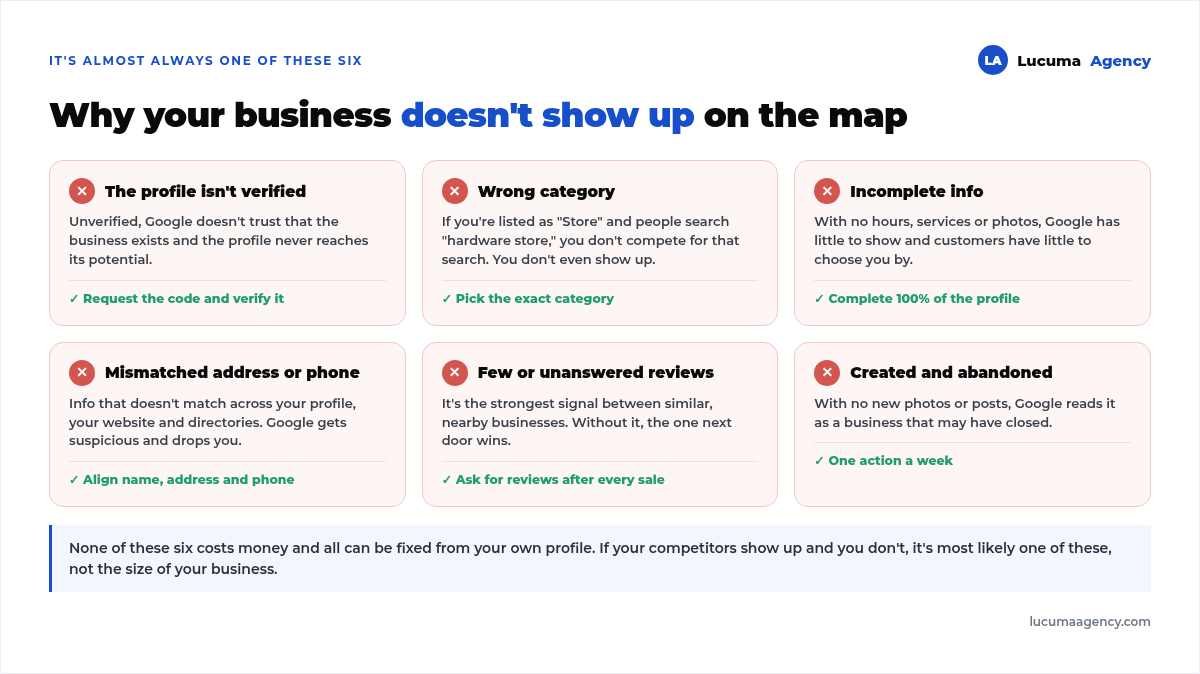
When a business doesn't show up, the cause is almost never a mystery. It's one of these six, and all of them can be fixed for free right from the profile:
Frequently asked questions about Google Maps for businesses
Is showing up on Google Maps free?
Yes. Creating, verifying and optimizing your listing to show up on Maps costs nothing. You only invest time, or hire someone to do it for you.
Do I need a physical location to show up on Maps?
Not always. If you serve customers at their homes or remotely, you set a service area instead of a visible address. You'll show up in searches for that area without revealing where you live.
Why does my competitor show up and I don't?
Usually because their listing is better optimized, has more reviews and more activity. It's one of the few things in digital marketing you can turn around without a budget, just with consistency.
Why do I show up on my phone but not from another neighborhood?
Because distance matters and Google personalizes results based on where the searcher is. Searching for yourself is no way to measure: your location and your history skew the result.
How long does it take for work on the listing to show?
Category and information changes are processed within days. The effect of reviews and activity builds gradually and takes hold over weeks or months of consistency.
Conclusion
Showing up on Google Maps means showing up right where your local customers make their decision, and it doesn't depend on luck or on the size of your business: it depends on having a verified, complete listing with reviews and steady activity.
It's probably the best investment a local business can make, not least because it costs no money. It costs remembering to do it.
In Lucuma Agency we put you on the map with a full Local SEO strategy. Want to show up on Google Maps? Book your free consultation.
Other posts you might like
At almost every real estate developer we work with, the lead takes the same absurd trip: it comes in through the form...
Switching servers is scary for a sensible reason: you rarely do it, and when it goes wrong, it goes wrong in public....
The question always comes the same way: “which payment gateway do you recommend?” And the useful answer doesn't start with a name, because the...
There's a moment, in quite a few projects, when the search for the right plugin becomes the problem. You tried three,...
Almost every online complaints book we audit complies on the outside and fails on the inside. They have the notice,...
The message came in like this: “the complaints book is throwing an error.” The Proba Inmobiliaria website, a page required by law,...
“Top 50 plugins” lists don't help you decide. They help you install fifty plugins. This is ours,...
Almost every business we ask has backups. Almost none has ever restored one. Those two sentences together are...
Almost every hosting conversation starts with price and ends up in the wrong place. The useful question is...
When a business wants to sell outside its country, the conversation almost always starts off wrong: with translation. And the...
Structured data is the piece of code that explains to Google, in a language that leaves no room for interpretation,...
The question comes up in almost every meeting: “if I use AI to write, will Google penalize me?” The short answer...