How to tell if your website is well built: a 15-point checklist
You paid for your website two years ago. It looks good, or so you think. Looking good and being well built are two different things; a website true to its design is built the way we explain in how to turn a JPG design into a pixel-perfect website, and even then you need to check everything below. But not a single inquiry comes in through it, and every time you need to change a price you have to message someone who answers when they can. The doubt keeps nagging you: is it badly built, or am I just not using it?
It's a fair question, and you don't need a tech person to answer it. In this guide you'll find five tests you can run in five minutes, the fifteen points any professional website should meet and, at the end, the criteria for the decision that really matters: whether to fix it or rebuild it.
Five tests you can run right now
Before any checklist, do this. It takes five minutes and none of it requires tech knowledge:
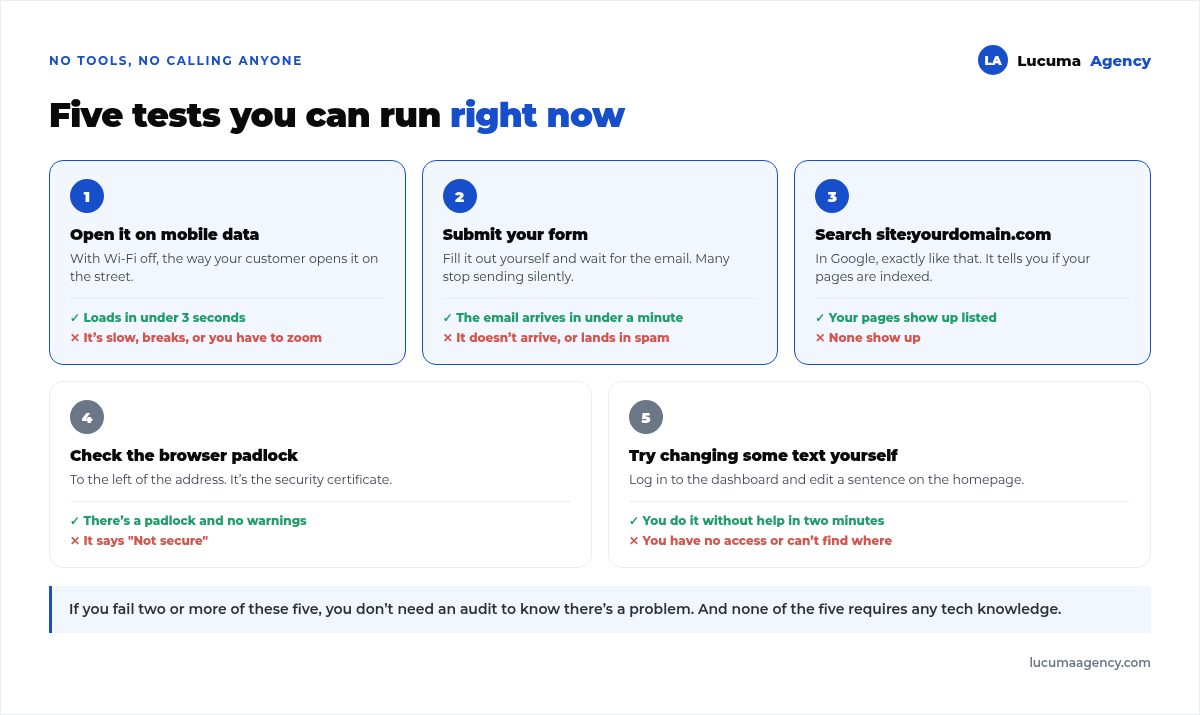
If you fail two or more, you already know there's a problem and you don't need to hire an audit to confirm it. And if you want the full version, with the thresholds we use, it's in how we audit a website before doing SEO.
Test number 2 is the one that brings the most surprises. Forms quietly stop sending, almost always after an update, and nobody notices until a customer complains they wrote in and never got a reply. It's worth repeating every so often even if everything else is fine.
The 15 points of a well-built website
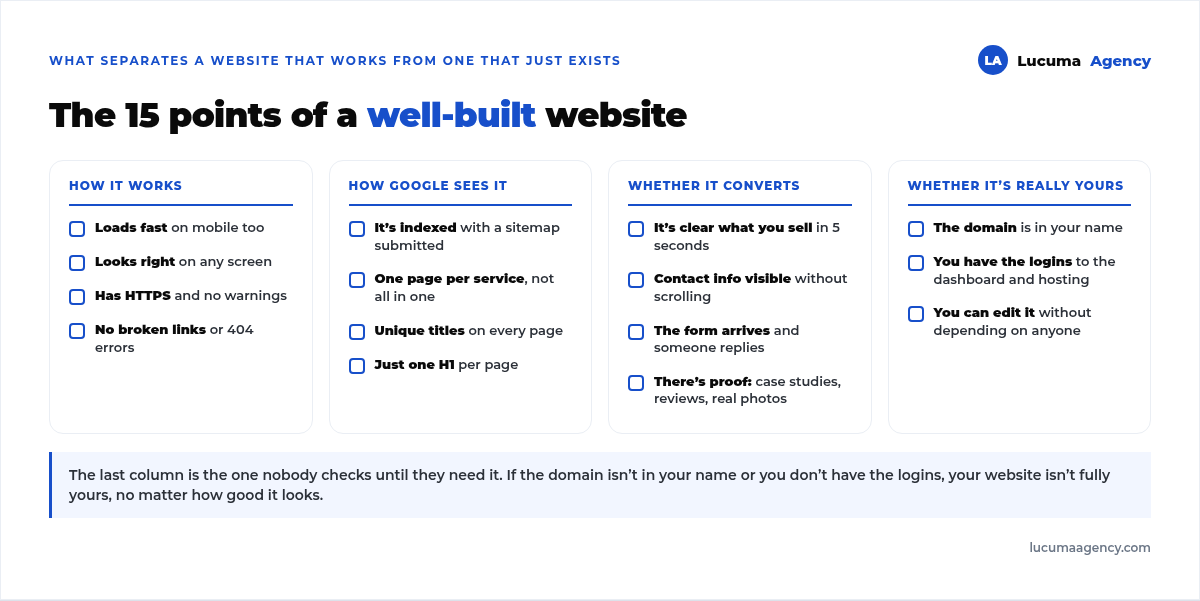
The quick tests catch the serious problems. The full checklist tells you how far you are from a website that actually works for you:
How it works
That loads fast on mobile too, looks good on any screen, has HTTPS and doesn't pile up broken links. It's the foundation, and it's what gets neglected most over time, even if it was fine on launch day.
How Google sees it
That it's indexed, that each service has its own page instead of everything crammed into one, and that each page has its own title and a single H1. If this fails, your website exists but it's invisible, and we cover it in depth in our guide on why your website doesn't show up on Google.
A very common mistake: a single “Services” page with all eight services you offer. Google doesn't know which one to rank it for and ends up ranking it for none. We explain it in On-page SEO.
Whether it converts
That what you sell is clear in five seconds, that contact info is visible without scrolling, that the form actually arrives, and that there's real proof: case studies, reviews, and your own photos, not stock images.
This block is what separates a pretty website from one that brings in customers. Many websites fail here, not on the technical side. And when every lead is worth a lot, as in real estate, the form arriving isn't enough: the lead has to land in the CRM with its source recorded, and that's the job of website integration with Sperant or another CRM.
Whether it's truly yours
That the domain is in your name, that you have access to the dashboard and the hosting, and that you can edit a piece of text without depending on anyone. And that there's a recent backup stored outside the hosting: the routine is in WordPress backups.
It's the column nobody checks until they need it, and the one that causes the most problems. If the domain is in the name of whoever built your website, your website isn't entirely yours: the day you want to switch providers, an awkward negotiation begins.
Signs it was built badly
Beyond the checklist, there are symptoms that almost always mean the same thing:
Every small change is billed separately. A professional website is delivered with training so you can edit text and photos yourself.
Nobody set up tracking. If you have no analytics or Search Console, it's not that you don't know how it's doing: it's that nobody left you a way to find out.
The website has someone else's name in the footer. A developer credit is fine; a template with the theme's branding still on it is something else.
It has never been updated. No maintenance, the website is a breakdown waiting to happen, and we cover it in WordPress security.
Fix it or rebuild it?
This is the decision that really costs money, and the default answer should be to fix it:
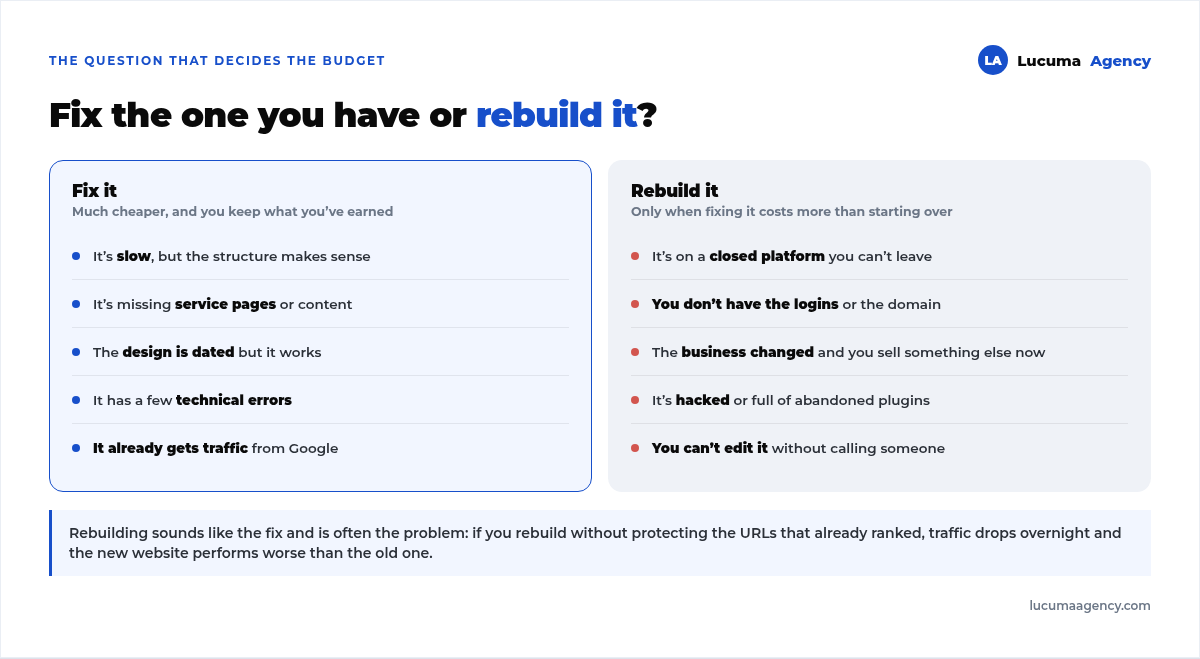
Rebuilding sounds like a clean solution, and often it's the problem. If you rebuild without keeping the URLs that were already ranking, traffic drops off a cliff and the new website performs worse than the old one for months. Before you decide, read how to migrate your website without losing rankings.
The rule of thumb: if your website already gets visits from Google, fix it. What you've already earned is worth more than a new design. And if you decide to rebuild it anyway, do it with a plan: how to redesigning your website without losing rankings.
Frequently asked questions
My website looks nice but doesn't sell. Is it badly built?
Not necessarily. Looking good and selling are two different things. Check the conversion block of the checklist: if what you offer isn't clear in five seconds and the contact info isn't visible, the problem is the message, not the design.
How much does it cost to fix a badly built website?
It depends on what's failing. Fixing speed, structure and tracking usually costs much less than rebuilding. If you also need to switch platforms or recover access, the math changes.
I don't have access to my website. What do I do?
Ask the person who built it, in writing, starting with the domain. If they won't hand it over, you can still recover the domain through the registrar where it's registered, but it's a slow process. That's why it's best to ask for access on delivery day, not two years later.
How often should I check all this?
The five quick tests, every two or three months. The full checklist, once a year or whenever you change services or prices.
You can run through this list yourself in an afternoon. If you'd rather have someone with judgment do it and come out with a prioritized work plan, that's a website & SEO audit.
Can I make these fixes myself?
Some, yes: writing better titles, making the contact info visible, adding case studies and reviews. And if you decide to hire someone for the rest, bring the list of what to ask for in a website quote. Others need technical hands, especially speed, indexing and structure.
Conclusion
Knowing whether your website is well built doesn't take an expensive audit: it takes five minutes and an honest checklist. Start with the five tests, move on to the fifteen points, and pay special attention to the last block: whether the website is truly yours.
And when it's time to decide, remember that rebuilding doesn't always mean improving. If your website already gets visits, fixing it is almost always cheaper and keeps what was so hard to earn.
In Lucuma Agency we review these fifteen points before proposing anything, and often the answer is that you don't need a new website. Want to know how yours is doing? Book your free consultation and we'll review it with you in 30 minutes.
Other posts you might like
At almost every real estate developer we work with, the lead takes the same absurd trip: it comes in through the form...
Switching servers is scary for a sensible reason: you rarely do it, and when it goes wrong, it goes wrong in public....
The question always comes the same way: “which payment gateway do you recommend?” And the useful answer doesn't start with a name, because the...
There's a moment, in quite a few projects, when the search for the right plugin becomes the problem. You tried three,...
Almost every online complaints book we audit complies on the outside and fails on the inside. They have the notice,...
The message came in like this: “the complaints book is throwing an error.” The Proba Inmobiliaria website, a page required by law,...
“Top 50 plugins” lists don't help you decide. They help you install fifty plugins. This is ours,...
Almost every business we ask has backups. Almost none has ever restored one. Those two sentences together are...
Almost every hosting conversation starts with price and ends up in the wrong place. The useful question is...
When a business wants to sell outside its country, the conversation almost always starts off wrong: with translation. And the...
Structured data is the piece of code that explains to Google, in a language that leaves no room for interpretation,...
The question comes up in almost every meeting: “if I use AI to write, will Google penalize me?” The short answer...